cancel
Showing results for 
Show  only  | Search instead for 
Did you mean: 
  • JMP will suspend normal business operations for our Winter Holiday beginning on Wednesday, December 24, 2025, at 5:00 p.m. ET (2:00 p.m. ET for JMP Accounts Receivable).
    Regular business hours will resume at 9:00 a.m. EST on Friday, January 2, 2026.
  • We’re retiring the File Exchange at the end of this year. The JMP Marketplace is now your destination for add-ins and extensions.
  • JMP 19 is here! Learn more about the new features.

JMP Wish List

We want to hear your ideas for improving JMP. Share them here.
Choose Language Hide Translation Bar

make columns more distinct (💚)

☐  cool new feature
☑ could help many users!

☐ removes a „bug“

☐ nice to have

☐ nobody needs it


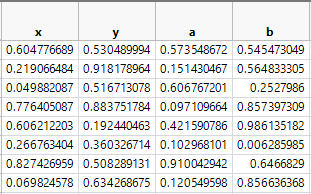
sometimes it's hard to find the right column again and again.


some suggestions to make it easier:


Holger_2-1656085062813.png


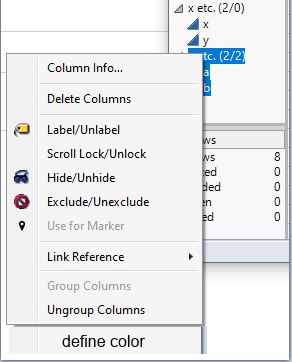
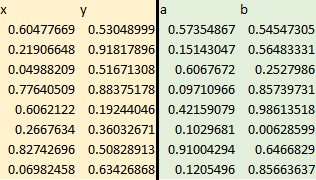
- define special colors for special columns (or groups):
Holger_3-1656085169377.png


- make the vertical line between groups thicker
 

Holger_1-1656085040528.png


more wishes submitted by  hogi_2-1702196401638.png

19 Comments
hogi
Level XIII

thanks a lot.

same for Filter Col Selectors and Col List Boxes?

hogi
Level XIII

Thank you - delivered with Jmp 18 :):)

hogi
Level XIII

Thanks to Jmp Development for making this feature available in Jmp 18  - really cool.
It got so easy now to pick the right column in platforms :)

In  @ 1:03h  @julian gives a short introduction on how to use the new feature:

hogi_0-1699027210818.png


Status changed to: Delivered
 
AW
Level II

Hello,

How is this new feature accessed in JMP 18? I see a reference to a video, but I don't see a link to it. If someone could provide a pointer to the video, that would be great.

Thanks in advance,

AW

hogi
Level XIII

right click - and change the color:

hogi_0-1731358879757.png


AW
Level II

Thank you @hogi !

Hector2713
New Member

Hello,

Is there a way to color the column headers using JSL?

I have looked through the functions but couldn’t find an answer.

I know there is the command to color the cells, but is there an equivalent command to change the header background color, like the right-click > Header Background Color option?

Column("TEST") << Color Cells("Light Blue")


Thank you!

hogi
Level XIII

good question.

col << Set Header Background Color( "Red" );
col << Set Header Text Color( "Magenta" );

surprisingly, the setting is not saved via Copy Column and not saved via Save Table Script.