cancel
Showing results for 
Show  only  | Search instead for 
Did you mean: 
  • Sign-in to the JMP Community will be unavailable intermittently Dec. 6-7 due to a system update. Thank you for your understanding!
  • We’re retiring the File Exchange at the end of this year. The JMP Marketplace is now your destination for add-ins and extensions.
  • JMP 19 is here! Learn more about the new features.

JMP Wish List

We want to hear your ideas for improving JMP. Share them here.
Choose Language Hide Translation Bar

Show and hide the column number of a data table

What inspired this wish list request? 

Sometimes it is important to know the number of a column in a data table for scripting.

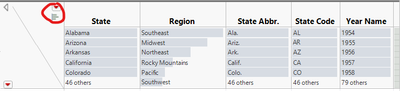
Currently, only values of a column can be shown and hidden in the header graphs (see figure below).
Silver22_0-1691411310995.png


What is the improvement you would like to see? 

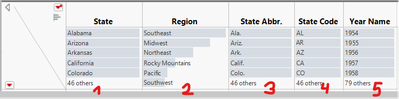
I would like to see also the number of the column in the data table, see picture below.
Silver22_1-1691411437734.png


Why is this idea important? 

Scripts might need the column number of a data table due to changeable header names.


@martindemel 

2 Comments
martindemel
Staff

@Silver22 any suggestion how the column numbering should be handled if you exclude/hide columns in the data table? I guess still the actual number though it might display as 1 2 5 6 ..., where columns 3 and 4 have been hidden/excluded, correct.

Silver22
Level III

Yes, that is correct. If the columns are hidden or excluded, then 1 2 5 6 is displayed and the user recognizes that columns are present.