cancel
Showing results for 
Show  only  | Search instead for 
Did you mean: 
  • DownloadSemiconductor Toolkit: Tools to create wafer maps, add wafer geometry to graphics, explore die defects & compare wafers.
  • Discovery Summit 2026: Early User Edition - September 23-24.Register. It's free.
  • Use JMP Clinical with CDISC-compliant data. Review studies, ID safety and efficacy signals & communicate findings with interactive graphics. Register to see how. Aug. 27, 2 pm US ET.

JMP Wish List

We want to hear your ideas for improving JMP. Share them here.
Choose Language Hide Translation Bar

Preview specified rows in column formula editor

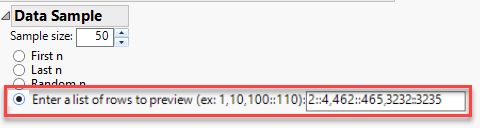
In addition to First n, Last n, and Random n rows, let the user enter a list or matrix of rows to preview in the column formula dialog.  This would be helpful when trying to write a formula that needs to work for conditions in different parts of the table.  Right now, for example, I would like to see the preview for rows 2, 462, and 3232 as each represent different conditions in the table, so I would really like to enter something like this:
 

ih_1-1634242977618.pngih_1-1634242977618.png


1 Comment
hogi
Level XIII

good idea.

The editor for the Column Property "Event Handler" provides a light version of what is requested here for Formula Editor:

hogi_0-1729759510423.png