cancel
Showing results for 
Show  only  | Search instead for 
Did you mean: 
  • Learn how to build custom Python data connectors and further customize JMP’s Data Connector Framework with the Python Data Connector Demo, available now in the JMP Marketplace!
  • See how to create experiments to support product design and ID useful product features. Register for June 12 webinar, 2pm US Eastern Time.

JMP Wish List

We want to hear your ideas for improving JMP. Share them here.
Choose Language Hide Translation Bar

Graph Builder HeatMap Tick Labels -- change "Automatic" setting

Whenever I create a heat-map in Graph Builder with categorical data, I end up with odd gridlines that don't make sense:
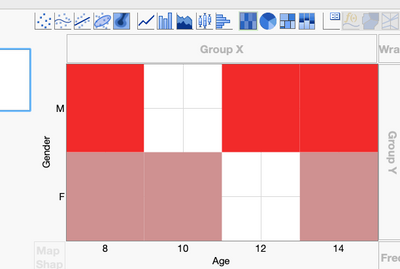
 

BHarris_0-1689693915209.png


The axes "Show Tick Labels" option is usually set to "Automatic".  I'd like to suggest that "Automatic" set the tick labels to "Short Divider" (or "Interval Tray") for heat-maps with categorical data.


Folks on my team have complained about this verbally before so I'm not the only one.


Thanks for considering this!

2 Comments
hogi
Level XIII

Or: change the logic behind "automatic" for categorical data :)
-> i.e. don't use the default short/long mark.


long dividers look also nice ...


cool that there are so many options :)

hogi
Level XIII

hm, strange that we don't get more supporters here.

A setting in the preferences would be awesome.

It would save me at least 10 minutes a day.

And a lot of frustration - because with every tiny change the setting flips back to the bad one : (