JMP Security Notice: CVE-2026-109618 and CVE-2026-109619
JMP promptly initiated a review of its products, services, and relevant infrastructure for exposure to CVE-2026-109618 and CVE-2026-109619.
Our assessment of JMP products has not identified exposure to these vulnerabilities. Where remediation was required within supporting environments, appropriate security updates and controls have been applied and validated.
We have identified no evidence of successful exploitation or unauthorized access to JMP systems or customer information associated with these vulnerabilities.
JMP continues to monitor the issue and relevant vendor guidance. No action is required by JMP customers at this time.
Don’t miss your chance to experience Discovery Summit Europe at our best available rate! Early bird registration through 31 Oct.
Graph Builder Toolbar streamlines interactive graphing. Creates shortcuts on Report and GraphBuilder Helpers toolbars. Download and install the extension.
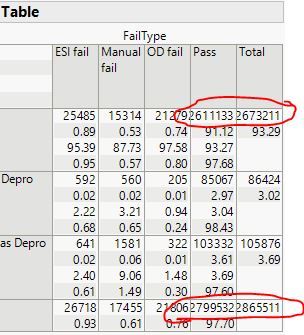
When I do a contingency analysis, the numbers in the table are too big for the column and they end up overlapping. There is no way to adjust the size of the columns or the text formatting so that this doesn't happen.
I can confirm that this particular wish has been granted in the JMP 17 timeframe. JMP 17 will be available in fall 2022. To change the format of values in the Contingency Table, press Ctrl+Shift when you right-click the value in the table and select Format.