JMP Live uses HTTPS/TLS and relies on a certificate in two main places:
1) JMP Live web and pool servers
JMP Live web and pool can be the same server.
They are used here to secure traffic between browsers and JMP Live.
Requirements:
-
A valid SSL/TLS certificate issued for the JMP Live hostname
(e.g. yourserver.dev.jmp.com)
-
The certificate should be in PEM format and can be opened in Notepad to ensure proper formatting.
The three parts used for JMP Live are:
-
Server certificate used in JMP Live web installation
-----BEGIN CERTIFICATE-----
(server cert)
-----END CERTIFICATE-----
-
Private key used in JMP Live web installation
-----BEGIN PRIVATE KEY-----
(private key)
-----END PRIVATE KEY-----
- Root CA / CA Chain used in JMP Live web and pool installation
-----BEGIN CERTIFICATE-----
(intermediate CA)
-----END CERTIFICATE-----
-----BEGIN CERTIFICATE-----
(root CA)
-----END CERTIFICATE-----
Notes of importance:
- Certificates for JMP Live web and pool must be in PEM format
- Ensure there are no carriage returns above or below the certificates
- Remove any Attributes above or below the certificates
- These certificates must be trusted by client machines
2) SSL Certificate for Keycloak installation:
JMP Live authentication requires Keycloak, which also needs its own certificate.
Requirements:
- Certificate required for installation. These can also be opened in Notepad to ensure proper formatting:
-
Private key used in JMP Live web installation
-----BEGIN PRIVATE KEY-----
(private key)
-----END PRIVATE KEY-----
-
Keycloak Certificate
-----BEGIN CERTIFICATE-----
(server certificate)
-----END CERTIFICATE-----
-----BEGIN CERTIFICATE-----
(intermediate CA)
-----END CERTIFICATE-----
-----BEGIN CERTIFICATE-----
(root ca)
-----END CERTIFICATE-----
Notes of importance:
- The certificate for Keycloak should be .cert format
- Ensure there are no carriage returns above or below the certificates
- Remove any Attributes above or below the certificates
- These certificates must be trusted by client machines
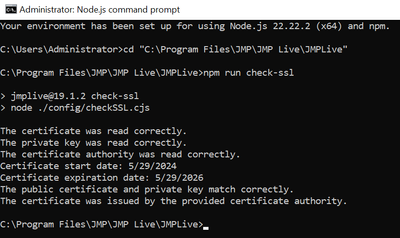
To test the validity of your JMP Live certificate, run the following:
- Start menu > Node.js command prompt (Run as Admin)
- cd to C:\Program Files\JMP\JMP Live\JMPLive
- npm run check-ssl
Please note, JMP Statistical Discovery cannot generate the certificate required for JMP Live.
The certificate is organization-specific and must come from third-party vendors such as DigiCert, Symantec, or Network Solutions, or from an internal enterprise certificate authority (CA).
For a more detailed explanation of SSL Certificates needed for JMP Live, please refer to this blog post.