- JMP will suspend normal business operations for our Winter Holiday beginning on Wednesday, Dec. 24, 2025, at 5:00 p.m. ET (2:00 p.m. ET for JMP Accounts Receivable).
Regular business hours will resume at 9:00 a.m. EST on Friday, Jan. 2, 2026. - We’re retiring the File Exchange at the end of this year. The JMP Marketplace is now your destination for add-ins and extensions.
- Subscribe to RSS Feed
- Mark Topic as New
- Mark Topic as Read
- Float this Topic for Current User
- Bookmark
- Subscribe
- Mute
- Printer Friendly Page
Discussions
Solve problems, and share tips and tricks with other JMP users.- JMP User Community
- :
- Discussions
- :
- xPath coding help


- Mark as New
- Bookmark
- Subscribe
- Mute
- Subscribe to RSS Feed
- Get Direct Link
- Report Inappropriate Content
xPath coding help
I am attempting to learn/use xPath in retrieving elements from the JMP Display Output. For my learning, I have a very simple Bivariate output, and I am attempting to retrieve the Prediction formula, directly from the display output.
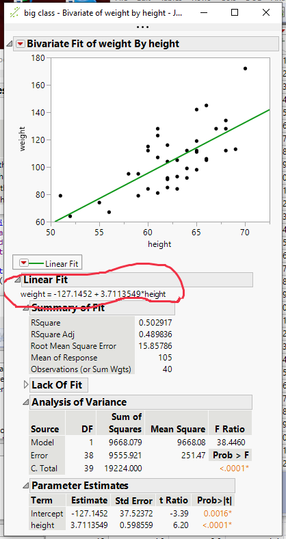
The JSL
names default to here(1);
dt = Open("$Sample_Data/big class.jmp");

ow = Bivariate(
	Y( :weight ),
	X( :height ),
	Fit Line( {Line Color( "Medium Dark Green" )} )
);
The Issue:
I can easily retrieve the formula using the Display Tree call of
zap = report(ow)["Linear Fit"][TextBox(1)] << get text;I can also access it by retrieving the text from the 4th TextBox from an xPath retrieval
zip = (report(ow) << XPath("//TextEditBox"))[4] << get text ;But since the value of 4 for the subscript, may change if additional fits are added etc. I would like to use xPath to retrieve the 1st textbox after an outlinebox that has the value of "Linear Fit"
Do any of you xPath experts have a solution.
Accepted Solutions


- Mark as New
- Bookmark
- Subscribe
- Mute
- Subscribe to RSS Feed
- Get Direct Link
- Report Inappropriate Content
Re: xPath coding help
rpt=ow<<report;
actText=(rpt << xpath("//OutlineBox[text()='Linear Fit']//TextEditBox"))[1]<<get text;

- Mark as New
- Bookmark
- Subscribe
- Mute
- Subscribe to RSS Feed
- Get Direct Link
- Report Inappropriate Content
Re: xPath coding help
You should be able to do it all with XPath. The first example gives you all the texts. The second example tries to use an XPath function, but I can't get the syntax to work, though.
Names Default to Here( 1 );

dt = Open( "$SAMPLE_DATA/Big Class.jmp" );

biv = dt << Bivariate( Y( :weight ), X( :height ), Fit Line( 1 ) );

biv rep = biv << Report;

// get all texts in a list
biv rep << XPath( "//TextEditBox/text()" );

// get specific text
target = "=";
biv rep << XPath( "//TextEditBox/[contains(text(),target)]/text()" );- Mark as New
- Bookmark
- Subscribe
- Mute
- Subscribe to RSS Feed
- Get Direct Link
- Report Inappropriate Content
Re: xPath coding help
Aha! This syntax works!
biv rep << XPath( "//TextEditBox[contains(text(),\!"=\!")]/text()" );- Mark as New
- Bookmark
- Subscribe
- Mute
- Subscribe to RSS Feed
- Get Direct Link
- Report Inappropriate Content
Re: xPath coding help
Super......
I am still thinking there must be a way to return the value from a TextEditBox after detecting a specific OutlineBox, i.e.return the first text box after a specified Outline Box
- Mark as New
- Bookmark
- Subscribe
- Mute
- Subscribe to RSS Feed
- Get Direct Link
- Report Inappropriate Content
Re: xPath coding help
rpt=ow<<report;
actText=(rpt << xpath("//OutlineBox[text()='Linear Fit']//TextEditBox"))[1]<<get text;
- Mark as New
- Bookmark
- Subscribe
- Mute
- Subscribe to RSS Feed
- Get Direct Link
- Report Inappropriate Content
Re: xPath coding help

- Mark as New
- Bookmark
- Subscribe
- Mute
- Subscribe to RSS Feed
- Get Direct Link
- Report Inappropriate Content
Re: xPath coding help
Here are some other xpath expressions that I've found helpful for navigating the tree structure.
// Note: the * in these examples can also be replaced by the class of
// the element you are looking for e.g. TableBox, OutlineBox

rpt = report(ow);

// Gets immediate children of the Outlinebox (ItsTableBox)
rpt << xpath("//OutlineBox[text()='Summary of Fit']/*");

// Gets all descendants of the Outlinebox (TableBox AND all of its ColBoxes)
rpt << xpath("//OutlineBox[text()='Summary of Fit']//*");

// Gets following elements at the same level of the tree
//(Lack of Fit, Analysis of Variances, Parameter Estimates OutlineBoxes)
rpt << xpath("//OutlineBox[text()='Summary of Fit']/following-sibling::*")

// Gets preceding elements at the same level of the tree (TextEditBox with formula)
rpt << xpath("//OutlineBox[text()='Summary of Fit']/preceding-sibling::*")

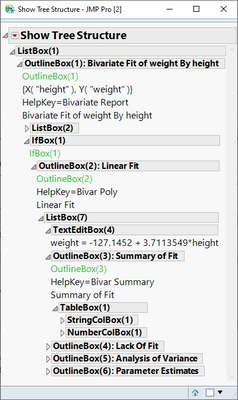
// Gets ancestors of the box (ListBox, OutlineBox["Linear Fit"], IfBox, OutlineBox["Bivariate Fit..."])
rpt << xpath("//OutlineBox[text()='Summary of Fit']/ancestor::*")
This is the tree structure being navigated in the examples.
This poster has even more examples https://community.jmp.com/t5/Discovery-Summit-2015/JMP-Discovery-2015-Mining-JMP-Reports-v10-pdf/ta-...
- Mark as New
- Bookmark
- Subscribe
- Mute
- Subscribe to RSS Feed
- Get Direct Link
- Report Inappropriate Content
Re: xPath coding help
You CAN approach it that way, Jim, but that way subverts the point of XPath language. It is supposed to do all the work for you.
Recommended Articles
- © 2025 JMP Statistical Discovery LLC. All Rights Reserved.
- Terms of Use
- Privacy Statement
- Contact Us