cancel
Showing results for 
Show  only  | Search instead for 
Did you mean: 
  • Sign-in to the JMP Community will be unavailable intermittently Dec. 6-7 due to a system update. Thank you for your understanding!
  • We’re retiring the File Exchange at the end of this year. The JMP Marketplace is now your destination for add-ins and extensions.
  • JMP 19 is here! Learn more about the new features.

Discussions

Solve problems, and share tips and tricks with other JMP users.
Choose Language Hide Translation Bar
vishwasanj
Level V

tabulate function wrap text

Hi all,


Is there a way to wrap text/ Fixed width in Tabulate data table. Now I have so many parameters that table becomes long that it's shrinking the size of the graphs(which is of fixed width)?


Thank you so much.


1 REPLY 1
txnelson
Super User

Re: tabulate function wrap text

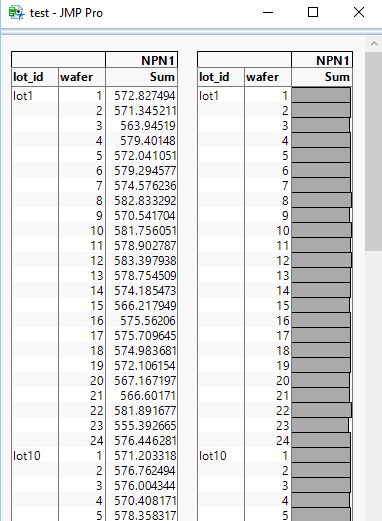
There is not a build in selection to wrap or display the charts on the horizontal.  However, as you know, the components of JMP platform's output can be manipulated.  Below is the manipulated output display, and the script that creates the new output
tabulate.PNG

Names Default To Here( 1 );
dt = Open( "$SAMPLE_DATA\semiconductor capability.jmp" );
tab = dt << Tabulate(
	invisible,
	Show Chart( 1 ),
	Show Control Panel( 0 ),
	Add Table(
		Column Table( Analysis Columns( :NPN1 ) ),
		Row Table( Grouping Columns( :lot_id, :wafer ) )
	)
);

nw = New Window( "test",
	H List Box( Report( tab )[tabulatebox( 1 )], Report( tab )[tabulatebox( 2 )] )
);
Jim

Recommended Articles