- JMP will suspend normal business operations for our Winter Holiday beginning on Wednesday, Dec. 24, 2025, at 5:00 p.m. ET (2:00 p.m. ET for JMP Accounts Receivable).
Regular business hours will resume at 9:00 a.m. EST on Friday, Jan. 2, 2026. - We’re retiring the File Exchange at the end of this year. The JMP Marketplace is now your destination for add-ins and extensions.
- Subscribe to RSS Feed
- Mark Topic as New
- Mark Topic as Read
- Float this Topic for Current User
- Bookmark
- Subscribe
- Mute
- Printer Friendly Page
Discussions
Solve problems, and share tips and tricks with other JMP users.- JMP User Community
- :
- Discussions
- :
- stop all evaluations?

- Mark as New
- Bookmark
- Subscribe
- Mute
- Subscribe to RSS Feed
- Get Direct Link
- Report Inappropriate Content
stop all evaluations?
Is there a keyboard shortcut to stop all running Column Formula Evaluations?
Accepted Solutions


- Mark as New
- Bookmark
- Subscribe
- Mute
- Subscribe to RSS Feed
- Get Direct Link
- Report Inappropriate Content
Re: stop all evaluations?
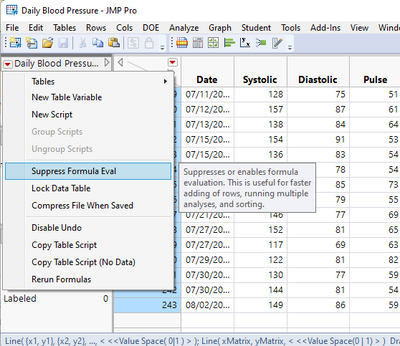
To turn off formula evaluation for all formulas, click the red triangle next to the data table name and select Suppress Formula Eval. To re-evaluate formulas, click the red triangle next to the data table name and select Rerun Formulas. You can also click the Apply button in the Formula Editor for each column that contains a pending formula.
- Mark as New
- Bookmark
- Subscribe
- Mute
- Subscribe to RSS Feed
- Get Direct Link
- Report Inappropriate Content
Re: stop all evaluations?
To turn off formula evaluation for all formulas, click the red triangle next to the data table name and select Suppress Formula Eval. To re-evaluate formulas, click the red triangle next to the data table name and select Rerun Formulas. You can also click the Apply button in the Formula Editor for each column that contains a pending formula.
- Mark as New
- Bookmark
- Subscribe
- Mute
- Subscribe to RSS Feed
- Get Direct Link
- Report Inappropriate Content
Re: stop all evaluations?
The application case:
an erroneous column formula which prevents me from doing anything in JMP till the evaluation is stopped:
dt = new table("test");
new column("infinite loop", Formula(for(i=1,i>0,i++, print(i))));- Mark as New
- Bookmark
- Subscribe
- Mute
- Subscribe to RSS Feed
- Get Direct Link
- Report Inappropriate Content
Re: stop all evaluations?
triggered by Turn off "Suppress Eval" on all columns ...
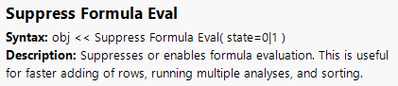
maybe could help - it's universal enough that one just has to find a way to call it despite the non-responding JMP.
here it works:
dt = new table("test");
new column("test", Formula(for(i=1,i>0,i++, print(i))));
Suppress Formula Eval(1)
... but I tried to generate a command in the main menu and assigned a Keyboard shortcut.
Here, JMP is already too busy to react on my input : (
Any idea?
Recommended Articles
- © 2025 JMP Statistical Discovery LLC. All Rights Reserved.
- Terms of Use
- Privacy Statement
- Contact Us