Turn on suggestions
Auto-suggest helps you quickly narrow down your search results by suggesting possible matches as you type.
- Don’t miss your chance to experience Discovery Summit Europe at our best available rate! Early bird registration through 31 Oct.
- Graph Builder Toolbar streamlines interactive graphing. Creates shortcuts on Report and GraphBuilder Helpers toolbars. Download and install the extension.
- JMP will suspend normal business operations for our Rest and Recharge Day on Friday, October 2, 2026.
Regular business hours will resume on Monday, October 5, 2026.
Options
- Subscribe to RSS Feed
- Mark Topic as New
- Mark Topic as Read
- Float this Topic for Current User
- Bookmark
- Subscribe
- Mute
- Printer Friendly Page
Discussions
Solve problems, and share tips and tricks with other JMP users.- User Community
- :
- Discussions
- :
- reading data from peak - y and x data

Level I
- Mark as New
- Bookmark
- Subscribe
- Mute
- Subscribe to RSS Feed
- Get Direct Link
- Report Inappropriate Content
reading data from peak - y and x data
Mar 31, 2025 06:26 AM
(1738 views)
Hi,
I am having JMP 18 and I am looking for a way to read the max peak - I´d like to have the max y and equivalent x value.
1 ACCEPTED SOLUTION
Accepted Solutions


Super User
Solution
- Mark as New
- Bookmark
- Subscribe
- Mute
- Subscribe to RSS Feed
- Get Direct Link
- Report Inappropriate Content
Re: reading data from peak - y and x data
It requires just a simple modification to the JSL I originally provided.
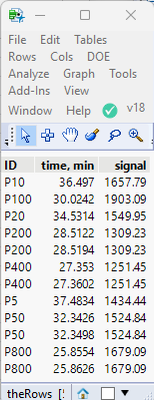
names default to here(1);
dt = current data table();

// Find all of the peaks
theRows = (dt << get rows where(col max(:signal, :ID)==:signal));

// Display results
New window("Peak Maximums",
	table box(
		string col box("ID", :ID[theRows]),
		number col box("time, min",:"time, min"n[theRows]),
		number col box("signal", :signal[theRows])
	)
);

// Select the rows in the data table
dt << clear select;
dt << select rows(theRows);
Jim
3 REPLIES 3
Super User
- Mark as New
- Bookmark
- Subscribe
- Mute
- Subscribe to RSS Feed
- Get Direct Link
- Report Inappropriate Content
Re: reading data from peak - y and x data
Here is a simple script that will write the values to the log
names default to here(1);
dt = current data table();

theRow = (dt << get rows where(col max(:signal)==:signal))[1];
show(:"time, min"n[theRow],:signal[theRow]);
Jim
Level I
- Mark as New
- Bookmark
- Subscribe
- Mute
- Subscribe to RSS Feed
- Get Direct Link
- Report Inappropriate Content
Re: reading data from peak - y and x data
hi, thanks for the great input.
Is there away that it does the data picking for all IDs?
Super User
Solution
- Mark as New
- Bookmark
- Subscribe
- Mute
- Subscribe to RSS Feed
- Get Direct Link
- Report Inappropriate Content
Re: reading data from peak - y and x data
It requires just a simple modification to the JSL I originally provided.
names default to here(1);
dt = current data table();

// Find all of the peaks
theRows = (dt << get rows where(col max(:signal, :ID)==:signal));

// Display results
New window("Peak Maximums",
	table box(
		string col box("ID", :ID[theRows]),
		number col box("time, min",:"time, min"n[theRows]),
		number col box("signal", :signal[theRows])
	)
);

// Select the rows in the data table
dt << clear select;
dt << select rows(theRows);
Jim
Recommended Articles
- © 2026 JMP Statistical Discovery LLC. All Rights Reserved.
- Terms of Use
- Privacy Statement
- Contact Us