Turn on suggestions
Auto-suggest helps you quickly narrow down your search results by suggesting possible matches as you type.
- JMP Statement Regarding Critical PHP Remote Code Execution Vulnerabilities (CVE-2026-109618, CVE-2026-109619)
- Don’t miss your chance to experience Discovery Summit Europe at our best available rate! Early bird registration through 31 Oct.
- Graph Builder Toolbar streamlines interactive graphing. Creates shortcuts on Report and GraphBuilder Helpers toolbars. Download and install the extension.
Options
- Subscribe to RSS Feed
- Mark Topic as New
- Mark Topic as Read
- Float this Topic for Current User
- Bookmark
- Subscribe
- Mute
- Printer Friendly Page
Discussions
Solve problems, and share tips and tricks with other JMP users.- User Community
- :
- Discussions
- :
- Re: nearest neighbors wafer map

Level I
- Mark as New
- Bookmark
- Subscribe
- Mute
- Subscribe to RSS Feed
- Get Direct Link
- Report Inappropriate Content
nearest neighbors wafer map
Created:
Sep 1, 2022 03:39 AM
| Last Modified: Jun 10, 2023 4:53 PM
(2924 views)
Hi
Is this possible to filter a specific defect (in defect column) and 8 nearest neighbor and subset the data from main table?
Thanks
1 ACCEPTED SOLUTION
Accepted Solutions


Super User
Solution
- Mark as New
- Bookmark
- Subscribe
- Mute
- Subscribe to RSS Feed
- Get Direct Link
- Report Inappropriate Content
Re: nearest neighbors wafer map
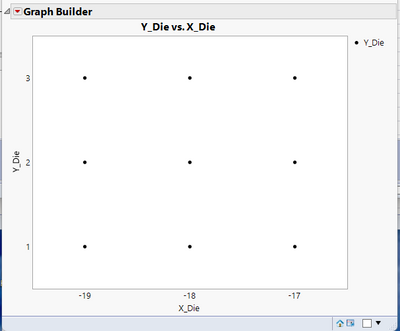
Here is an example using the Wafer Stacked data table from the JMP Sample tables that selects the nearest neighbor die
names default to here(1);
dtMain =
// Open Data Table: Wafer Stacked.jmp
// → Data Table( "Wafer Stacked" )
Open( "$SAMPLE_DATA/Wafer Stacked.jmp" );
dtMain << set name("Main");
dtMain:X_Die << modeling type(Ordinal);
dtMain:Y_Die << modeling type(Ordinal);

// For illustration, use only Wafer 1 data
dtMain << select where( :Wafer == 1 & :Lot =="1" );
dtMain << invert row selection;
dtMain << delete rows;

// Create a separate data table that only has the die with defects in them
dtMain << select where( :Defects > 0 );
dtDefects = dtMain << subset( selected rows( 1 ), selected columns( 0 ),
output table( "Defects" ) );

// Remove the defects column from the main table
dtMain << delete columns( :Defects );

// Create a table with the nearest neighbor data from the main table, based upon one of the
// defect die that has a defect in the defect table.
// For illustration we will pick the die in the Defect table in row
DefectRow = 1;

dtMain << select where( dtMain:X_Die >= dtDefects:X_Die[DefectRow] - 1 &
dtMain:X_Die <= dtDefects:X_Die[DefectRow] + 1
 &
dtMain:Y_Die >= dtDefects:Y_Die[DefectRow] - 1 & dtMain:Y_Die <= dtDefects:Y_Die[DefectRow] + 1
);

dtNear = dtMain << subset( selected rows( 1 ), selected columns( 0 ),
output table( "Nearest" ) );

// Display the selected die
dtNear << Graph Builder(
	Size( 512, 448 ),
	Show Control Panel( 0 ),
	Variables( X( :X_Die ), Y( :Y_Die ) ),
	Elements( Points( X, Y, Legend( 5 ) ) )
);
Jim
3 REPLIES 3

Super User
- Mark as New
- Bookmark
- Subscribe
- Mute
- Subscribe to RSS Feed
- Get Direct Link
- Report Inappropriate Content
Re: nearest neighbors wafer map
I suggest checking out Semiconductor Toolkit addin. Hierarchical clustering might also work. There is also always option to do some scripting which can do basically "anything" (KDTable() might be a good start,Near neighbors mean calculation).
-Jarmo
Super User
Solution
- Mark as New
- Bookmark
- Subscribe
- Mute
- Subscribe to RSS Feed
- Get Direct Link
- Report Inappropriate Content
Re: nearest neighbors wafer map
Here is an example using the Wafer Stacked data table from the JMP Sample tables that selects the nearest neighbor die
names default to here(1);
dtMain =
// Open Data Table: Wafer Stacked.jmp
// → Data Table( "Wafer Stacked" )
Open( "$SAMPLE_DATA/Wafer Stacked.jmp" );
dtMain << set name("Main");
dtMain:X_Die << modeling type(Ordinal);
dtMain:Y_Die << modeling type(Ordinal);

// For illustration, use only Wafer 1 data
dtMain << select where( :Wafer == 1 & :Lot =="1" );
dtMain << invert row selection;
dtMain << delete rows;

// Create a separate data table that only has the die with defects in them
dtMain << select where( :Defects > 0 );
dtDefects = dtMain << subset( selected rows( 1 ), selected columns( 0 ),
output table( "Defects" ) );

// Remove the defects column from the main table
dtMain << delete columns( :Defects );

// Create a table with the nearest neighbor data from the main table, based upon one of the
// defect die that has a defect in the defect table.
// For illustration we will pick the die in the Defect table in row
DefectRow = 1;

dtMain << select where( dtMain:X_Die >= dtDefects:X_Die[DefectRow] - 1 &
dtMain:X_Die <= dtDefects:X_Die[DefectRow] + 1
 &
dtMain:Y_Die >= dtDefects:Y_Die[DefectRow] - 1 & dtMain:Y_Die <= dtDefects:Y_Die[DefectRow] + 1
);

dtNear = dtMain << subset( selected rows( 1 ), selected columns( 0 ),
output table( "Nearest" ) );

// Display the selected die
dtNear << Graph Builder(
	Size( 512, 448 ),
	Show Control Panel( 0 ),
	Variables( X( :X_Die ), Y( :Y_Die ) ),
	Elements( Points( X, Y, Legend( 5 ) ) )
);
Jim
Level I
- Mark as New
- Bookmark
- Subscribe
- Mute
- Subscribe to RSS Feed
- Get Direct Link
- Report Inappropriate Content
Re: nearest neighbors wafer map
Thank you very much
Recommended Articles
- © 2026 JMP Statistical Discovery LLC. All Rights Reserved.
- Terms of Use
- Privacy Statement
- Contact Us