- Don’t miss your chance to experience Discovery Summit Europe at our best available rate! Early bird registration through 31 Oct.
- Graph Builder Toolbar streamlines interactive graphing. Creates shortcuts on Report and GraphBuilder Helpers toolbars. Download and install the extension.
- Subscribe to RSS Feed
- Mark Topic as New
- Mark Topic as Read
- Float this Topic for Current User
- Bookmark
- Subscribe
- Mute
- Printer Friendly Page
Discussions
Solve problems, and share tips and tricks with other JMP users.- User Community
- :
- Discussions
- :
- keyboard shortcut to rerun last dialog box used

- Mark as New
- Bookmark
- Subscribe
- Mute
- Subscribe to RSS Feed
- Get Direct Link
- Report Inappropriate Content
keyboard shortcut to rerun last dialog box used
Hello,
Is there a keyboard shortcut to return to the dialog box you used most recently. Basically I am trying to find a quick and easy way to rerun your most recent analysis if you want to modify the settings and try it again.
Thanks
Accepted Solutions


- Mark as New
- Bookmark
- Subscribe
- Mute
- Subscribe to RSS Feed
- Get Direct Link
- Report Inappropriate Content
Re: keyboard shortcut to rerun last dialog box used
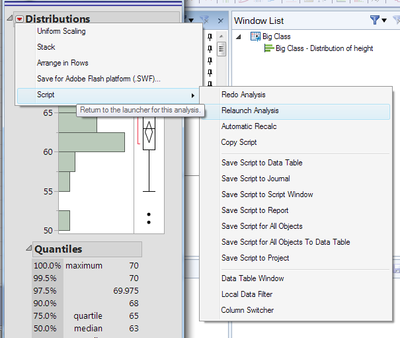
I don't think there is a keyboard shortcut, but you can use the red triangle menu on the platform to bring up the launcher, already filled in. Redo launches the platform without a dialog, useful if the data has changed. Relaunch is what you want for changing launch settings. You can then compare the results and close the one you don't want to keep.
- Mark as New
- Bookmark
- Subscribe
- Mute
- Subscribe to RSS Feed
- Get Direct Link
- Report Inappropriate Content
Re: keyboard shortcut to rerun last dialog box used
I don't think there is a keyboard shortcut, but you can use the red triangle menu on the platform to bring up the launcher, already filled in. Redo launches the platform without a dialog, useful if the data has changed. Relaunch is what you want for changing launch settings. You can then compare the results and close the one you don't want to keep.
Recommended Articles
- © 2026 JMP Statistical Discovery LLC. All Rights Reserved.
- Terms of Use
- Privacy Statement
- Contact Us