cancel
Showing results for 
Show  only  | Search instead for 
Did you mean: 
  • DownloadSemiconductor Toolkit: Tools to create wafer maps, add wafer geometry to graphics, explore die defects & compare wafers.
  • Discovery Summit 2026: Early User Edition - September 23-24.Register. It's free.
  • Use JMP Clinical with CDISC-compliant data. Review studies, ID safety and efficacy signals & communicate findings with interactive graphics. Register to see how. Aug. 27, 2 pm US ET.

Discussions

Solve problems, and share tips and tricks with other JMP users.
Choose Language Hide Translation Bar
Elby
Level II

jmp cannot open a .jmp file

Please let me know if there are any known issues like this and/or any solutions or evaluations to help determine the issue and "fix" the file.


There is a .jmp file I have been using since ≈2016.  Last Thursday I worked on the file without issue (that I was aware of).  This morning I could not open the file.  The message I get is shown below along with the SW and some system info.  The file is in a network folder.  There are other .jmp files that can be opened.  There are over 15k rows of data and may columns of data.  There are also many columns for evaluation that I created to help sort and process the data so I am really hoping to recover the file.  Do to the content, I am not adding the file.
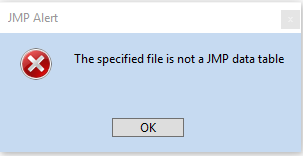
 

2019-09-03 jmp file error.PNG2019-09-03 jmp file error.PNG

SW - JMP® 12.1.0 (64-bit)
Microsoft Windows 10 Pro 64-bit 

Windows - Version 10.0.17134 Build 17134

Laptop - System Model Precision 7530

Processor - Intel(R) Core(TM) i7-8750H CPU @ 2.20GHz, 2208 Mhz, 6 Core(s), 12 Logical Processor(s)


1 REPLY 1
cwillden
Super User (Alumni)

Re: jmp cannot open a .jmp file

Yikes.  Sounds like the file got corrupted?  I would call JMP Tech Support and see what can be done to recover the information from the file. 

-- Cameron Willden

Recommended Articles