- Don’t miss your chance to experience Discovery Summit Europe at our best available rate! Early bird registration through 31 Oct.
- Graph Builder Toolbar streamlines interactive graphing. Creates shortcuts on Report and GraphBuilder Helpers toolbars. Download and install the extension.
- JMP will suspend normal business operations for our Rest and Recharge Day on Friday, October 2, 2026.
Regular business hours will resume on Monday, October 5, 2026.
- Subscribe to RSS Feed
- Mark Topic as New
- Mark Topic as Read
- Float this Topic for Current User
- Bookmark
- Subscribe
- Mute
- Printer Friendly Page
Discussions
Solve problems, and share tips and tricks with other JMP users.- User Community
- :
- Discussions
- :
- issues running jmp2pandas.py

- Mark as New
- Bookmark
- Subscribe
- Mute
- Subscribe to RSS Feed
- Get Direct Link
- Report Inappropriate Content
issues running jmp2pandas.py
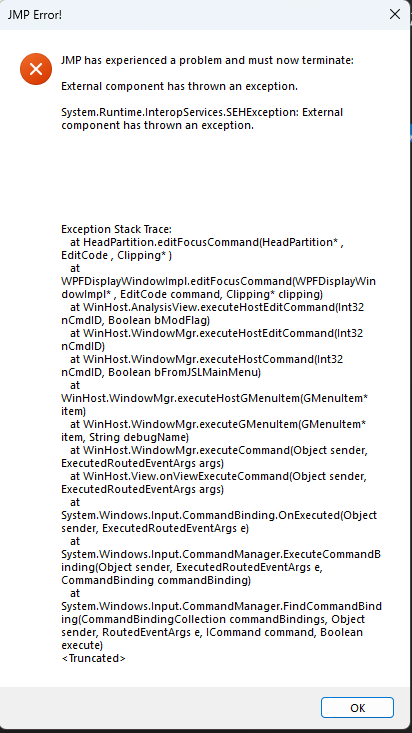
I am getting a termination error every time I run jmp2pandas. The table is formed, but then the termination error appears (see attached image).
import jmp2pandas
import pandas as pd

data = {
    "Name": ["Alice", "Bob", "Charlie"],
    "Age": [25, 30, 35],
    "City": ["New York", "London", "Paris"]
}

df = pd.DataFrame(data)

jmp2pandas.df2dt(df,dt_title='Example df to dt')
Accepted Solutions


- Mark as New
- Bookmark
- Subscribe
- Mute
- Subscribe to RSS Feed
- Get Direct Link
- Report Inappropriate Content
Re: issues running jmp2pandas.py
I would suggest using more modern methods to go from dataframe to datatable as you have JMP19 (jmp.from_dataframe)
import jmp

import jmputils

try:
    # pandas depends on numpy will install numpy if needed
    if not jmputils.is_installed('pandas'):
        jmputils.jpip('install', 'pandas', echo=False)
except Exception as e:
    print(f'Install failed with exception: {e}')

import pandas as pd
import numpy as np

pandas_df = pd.DataFrame(
    {
        "A": 1.0,
        "B": pd.Timestamp("20130102"),
        "C": pd.Series(1, index=list(range(4)), dtype="float32"),
        "D": np.array([3] * 4, dtype="int32"),
        "E": pd.Categorical(["test", "train", "test", "train"]),
        "F": "foo",
    }
)
print(pandas_df)

dt = jmp.from_dataframe(pandas_df)
print(dt)
See Scripting Index

Going further with Python in JMP 19

- Mark as New
- Bookmark
- Subscribe
- Mute
- Subscribe to RSS Feed
- Get Direct Link
- Report Inappropriate Content
Re: issues running jmp2pandas.py
AI in the loop?
- Mark as New
- Bookmark
- Subscribe
- Mute
- Subscribe to RSS Feed
- Get Direct Link
- Report Inappropriate Content
Re: issues running jmp2pandas.py
Are you asking if AI is being used? or if AI is causing the error?
- Mark as New
- Bookmark
- Subscribe
- Mute
- Subscribe to RSS Feed
- Get Direct Link
- Report Inappropriate Content
Re: issues running jmp2pandas.py
Which JMP version are you using?
- Mark as New
- Bookmark
- Subscribe
- Mute
- Subscribe to RSS Feed
- Get Direct Link
- Report Inappropriate Content
Re: issues running jmp2pandas.py
JMP 19.0.0
- Mark as New
- Bookmark
- Subscribe
- Mute
- Subscribe to RSS Feed
- Get Direct Link
- Report Inappropriate Content
Re: issues running jmp2pandas.py
I would suggest using more modern methods to go from dataframe to datatable as you have JMP19 (jmp.from_dataframe)
import jmp

import jmputils

try:
    # pandas depends on numpy will install numpy if needed
    if not jmputils.is_installed('pandas'):
        jmputils.jpip('install', 'pandas', echo=False)
except Exception as e:
    print(f'Install failed with exception: {e}')

import pandas as pd
import numpy as np

pandas_df = pd.DataFrame(
    {
        "A": 1.0,
        "B": pd.Timestamp("20130102"),
        "C": pd.Series(1, index=list(range(4)), dtype="float32"),
        "D": np.array([3] * 4, dtype="int32"),
        "E": pd.Categorical(["test", "train", "test", "train"]),
        "F": "foo",
    }
)
print(pandas_df)

dt = jmp.from_dataframe(pandas_df)
print(dt)
See Scripting Index
Going further with Python in JMP 19


- Mark as New
- Bookmark
- Subscribe
- Mute
- Subscribe to RSS Feed
- Get Direct Link
- Report Inappropriate Content
Re: issues running jmp2pandas.py
Agreed!
I guess @mhw_novonesis was using this reference: Creating a Pandas DataFrame from a JMP Data Table, but now there is the new function (as of JMP 19): jmp.from_dataframe()
Recommended Articles
- © 2026 JMP Statistical Discovery LLC. All Rights Reserved.
- Terms of Use
- Privacy Statement
- Contact Us