cancel
Showing results for 
Show  only  | Search instead for 
Did you mean: 
  • Don’t miss your chance to experience Discovery Summit Europe at our best available rate! Early bird registration through 31 Oct.
  • Graph Builder Toolbar streamlines interactive graphing. Creates shortcuts on Report and GraphBuilder Helpers toolbars. Download and install the extension.
  • JMP will suspend normal business operations for our Rest and Recharge Day on Friday, October 2, 2026.
    Regular business hours will resume on Monday, October 5, 2026.

Discussions

Solve problems, and share tips and tricks with other JMP users.
Choose Language Hide Translation Bar

how to 'embed' a table to the top-left section of main table?

I'm not sure if this is a thing. I have another small table that is just some extra context keys that I'd like to 'link' or 'embed' to the main, large datatable....the area in the top-left where the green triangle buttons are.


Is this possible? Can I save the small table to the main large table?

1 REPLY 1
jthi
Super User

Re: how to 'embed' a table to the top-left section of main table?

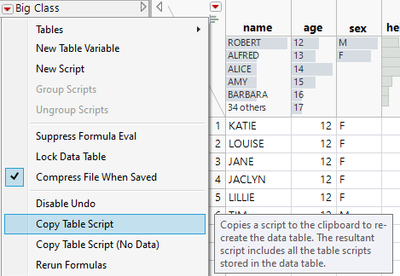
You could save it there as a table script https://www.jmp.com/support/help/en/17.2/#page/jmp/table-scripts.shtml. In your small table go to red triangle and copy table script

jthi_0-1711123276688.png

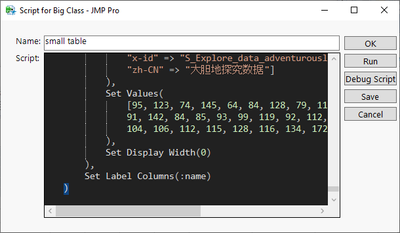
then on your larger table go to same red triangle and select New Script, paste the copied script to Script part and give the script a name and save it

jthi_1-1711123320753.png

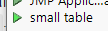
You can then "open" your small table by pressing green triangle (it is re-created every time you press the green triangle button).

jthi_2-1711123368361.png


-Jarmo

Recommended Articles