Turn on suggestions
Auto-suggest helps you quickly narrow down your search results by suggesting possible matches as you type.
- Don’t miss your chance to experience Discovery Summit Europe at our best available rate! Early bird registration through 31 Oct.
- Graph Builder Toolbar streamlines interactive graphing. Creates shortcuts on Report and GraphBuilder Helpers toolbars. Download and install the extension.
Options
- Subscribe to RSS Feed
- Mark Topic as New
- Mark Topic as Read
- Float this Topic for Current User
- Bookmark
- Subscribe
- Mute
- Printer Friendly Page
Discussions
Solve problems, and share tips and tricks with other JMP users.- User Community
- :
- Discussions
- :
- Re: how can i export or save the smoothing in a table.

Level I
- Mark as New
- Bookmark
- Subscribe
- Mute
- Subscribe to RSS Feed
- Get Direct Link
- Report Inappropriate Content
how can i export or save the smoothing in a table.
Created:
Nov 8, 2021 07:34 AM
| Last Modified: Jun 11, 2023 4:19 AM
(4019 views)
Hey people,
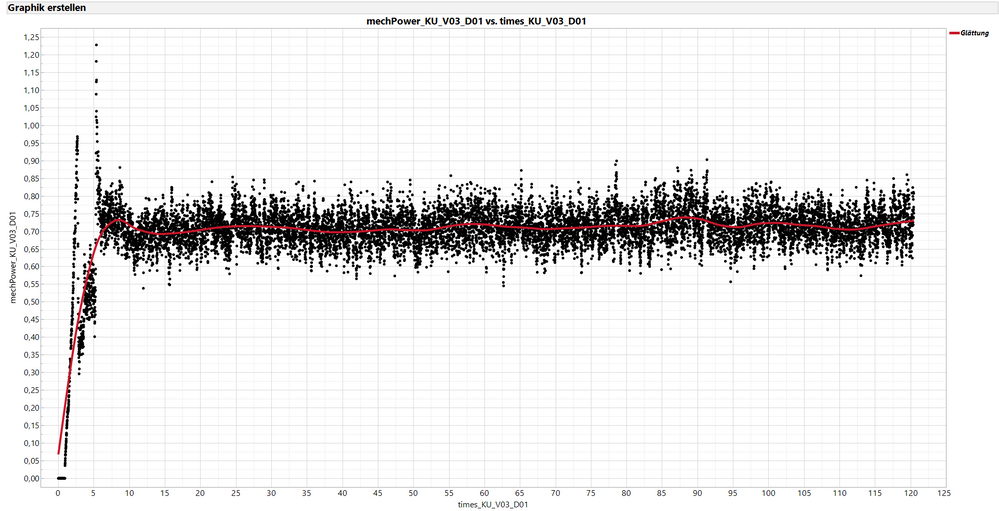
I have a plot of 12000 values here and can show the smoothing in the graph, but I would like to export this smoothing as a table (values) so that I can later calculate the integral.
how can i export or save the smoothing in a table.
thanks
3 REPLIES 3


Super User
- Mark as New
- Bookmark
- Subscribe
- Mute
- Subscribe to RSS Feed
- Get Direct Link
- Report Inappropriate Content
Re: how can i export or save the smoothing in a table.
Hi,
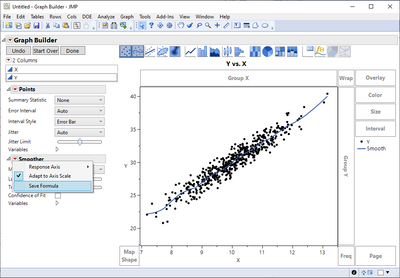
In the GrapBuilder window, look for the "Smoother" item (mid to lower left), click on the red triangle and select "Save Formula".
Best,
TS
Thierry R. Sornasse

Super User
- Mark as New
- Bookmark
- Subscribe
- Mute
- Subscribe to RSS Feed
- Get Direct Link
- Report Inappropriate Content
Re: how can i export or save the smoothing in a table.
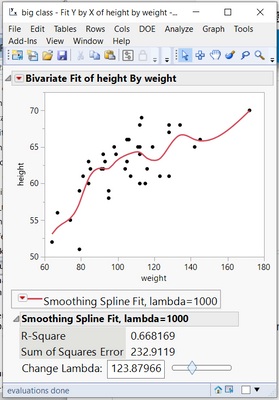
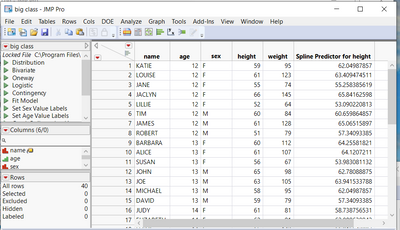
If you use Fit Y by X, and perform a Fit Flexible(Spline), you can set your smoothing function and then Save the Predicteds.
Jim

Level X
- Mark as New
- Bookmark
- Subscribe
- Mute
- Subscribe to RSS Feed
- Get Direct Link
- Report Inappropriate Content
Re: how can i export or save the smoothing in a table.
Picking up on "So that I can later calculate the integral . . ." you could do this in JSL using this kind of approach:
ames Default To Here( 1 );

// Example data
dt = Open("$SAMPLE_DATA/Big Class.jmp");

// Graph Builder with Smoother
gb = dt << Graph Builder(
					Variables( X( :weight ), Y( :height ) ),
					Elements( Points( X, Y, Legend( 6 ) ), Smoother( X, Y, Legend( 7 ) ))
					);

// Save the Smoother formula! (see https://community.jmp.com/t5/Discussions/JSL-to-save-smoother-formula-from-Graph-Builder/m-p/417262#M66636)
gbb = Report(gb)[GraphBuilderBox(1)];
gbb << updateElement(1, 1, 2, {Save Formula});

// Get the saved formula from the table
form = Column(dt, "Smoother(height)") << getFormula;

// Make the independant variable 'x'
SubstituteInto(form, Expr(:weight), Expr(x));

// Integrate it between 80 and 140
area = Integrate( form, x, 80, 140 );
Print(area);

// Print area estimated 'by eye'
Print("Area estimate: "||Char(62.5 * (140 - 80)));
Recommended Articles
- © 2026 JMP Statistical Discovery LLC. All Rights Reserved.
- Terms of Use
- Privacy Statement
- Contact Us