Turn on suggestions
Auto-suggest helps you quickly narrow down your search results by suggesting possible matches as you type.
- JMP Statement Regarding Critical PHP Remote Code Execution Vulnerabilities (CVE-2026-109618, CVE-2026-109619)
- Don’t miss your chance to experience Discovery Summit Europe at our best available rate! Early bird registration through 31 Oct.
- Graph Builder Toolbar streamlines interactive graphing. Creates shortcuts on Report and GraphBuilder Helpers toolbars. Download and install the extension.
Options
- Subscribe to RSS Feed
- Mark Topic as New
- Mark Topic as Read
- Float this Topic for Current User
- Bookmark
- Subscribe
- Mute
- Printer Friendly Page
Discussions
Solve problems, and share tips and tricks with other JMP users.- User Community
- :
- Discussions
- :
- Re: formule

Level VI
- Mark as New
- Bookmark
- Subscribe
- Mute
- Subscribe to RSS Feed
- Get Direct Link
- Report Inappropriate Content
formule
Jul 18, 2023 07:10 AM
(1972 views)
Bonjour à tous,
Je vous pose une simple question, j’aimerais établir la requête suivante à l’aide des formules dans JMP si possible :
Mettre dans la colonne « erreur » la valeur 1 une ligne après qu’une cellule dans la colonne « bilan » soit non-nulle.
Voici la base de données :
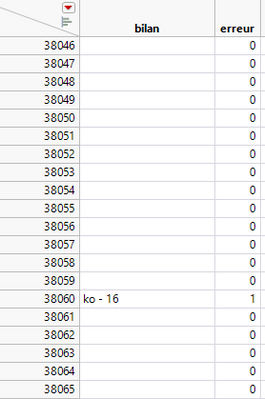
Il faudrait qu’à la ligne 38 061 la valeur dans la colonne « bilan » soit 1 et pas la ligne 38 060.
Merci pour vos réponses !
2 ACCEPTED SOLUTIONS
Accepted Solutions


Super User
Solution
- Mark as New
- Bookmark
- Subscribe
- Mute
- Subscribe to RSS Feed
- Get Direct Link
- Report Inappropriate Content
Re: formule
Using Lag() (and possibly check for first row) should be enough here.
Names Default To Here(1);

dt = New Table("Untitled 5",
	Add Rows(3),
	Compress File When Saved(1),
	New Column("Column 1", Character, "Nominal", Set Values({"", "aaa", ""}))
);

dt << New Column("Col", Numeric, Nominal, Formula(
	Row() != 1 & !IsMissing(Lag(:Column 1, 1))
));
-Jarmo

Super User
Solution
- Mark as New
- Bookmark
- Subscribe
- Mute
- Subscribe to RSS Feed
- Get Direct Link
- Report Inappropriate Content
Re: formule
Jarmo's formula works fine, but it can be simplified to
If( Is Missing( Lag( :Bilan ) ) == 0,
	1,
	0
)
which will increase the runtime efficiency
Jim
2 REPLIES 2
Super User
Solution
- Mark as New
- Bookmark
- Subscribe
- Mute
- Subscribe to RSS Feed
- Get Direct Link
- Report Inappropriate Content
Re: formule
Using Lag() (and possibly check for first row) should be enough here.
Names Default To Here(1);

dt = New Table("Untitled 5",
	Add Rows(3),
	Compress File When Saved(1),
	New Column("Column 1", Character, "Nominal", Set Values({"", "aaa", ""}))
);

dt << New Column("Col", Numeric, Nominal, Formula(
	Row() != 1 & !IsMissing(Lag(:Column 1, 1))
));
-Jarmo
Super User
Solution
- Mark as New
- Bookmark
- Subscribe
- Mute
- Subscribe to RSS Feed
- Get Direct Link
- Report Inappropriate Content
Re: formule
Jarmo's formula works fine, but it can be simplified to
If( Is Missing( Lag( :Bilan ) ) == 0,
	1,
	0
)
which will increase the runtime efficiency
Jim
Recommended Articles
- © 2026 JMP Statistical Discovery LLC. All Rights Reserved.
- Terms of Use
- Privacy Statement
- Contact Us