- Image to Table JMP extension imports single or batch images as data tables. Useful to extract curves from pictures or convert image data to curve data to use in analyses like Functional Data Explorer. Download and install the extension.
- Subscribe to RSS Feed
- Mark Topic as New
- Mark Topic as Read
- Float this Topic for Current User
- Bookmark
- Subscribe
- Mute
- Printer Friendly Page
Discussions
Solve problems, and share tips and tricks with other JMP users.- User Community
- :
- Discussions
- :
- error: row number (-1) is not valid.

- Mark as New
- Bookmark
- Subscribe
- Mute
- Subscribe to RSS Feed
- Get Direct Link
- Report Inappropriate Content
error: row number (-1) is not valid.
Hi,
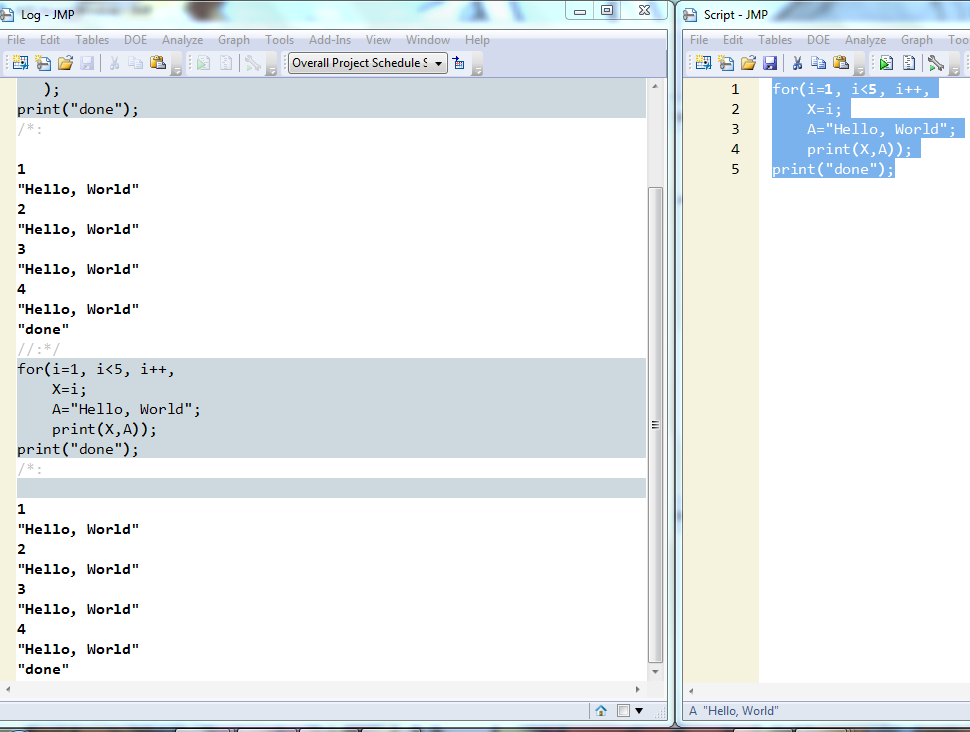
I am following the very first example on "hello world' in JMP scripting basic and has encountered error.
script:
for(i=1, i<5, i++,
X=i;
A="Hello, World";
print(X,A));
print("done");
error:
Cannot set value for the column 'X' because the row number (-1) is not valid.
Can anyone enlighten what is wrong with the script?
Accepted Solutions

- Mark as New
- Bookmark
- Subscribe
- Mute
- Subscribe to RSS Feed
- Get Direct Link
- Report Inappropriate Content
Re: error: row number (-1) is not valid.


- Mark as New
- Bookmark
- Subscribe
- Mute
- Subscribe to RSS Feed
- Get Direct Link
- Report Inappropriate Content
Re: error: row number (-1) is not valid.
The issue is one of scoping. JMP is finding your variable 'X: in a data table.....I assume. And because of that, it is wanting to have a subscript for the X variable. To make this work and point to the memory variable "X" you need to force the proper reference to it by placing "::" in front of the variable.
For( i = 1, i < 5, i++,
	::X = i;
	A = "Hello, World";
	Print( ::X, A );
);
Print( "done" );- Mark as New
- Bookmark
- Subscribe
- Mute
- Subscribe to RSS Feed
- Get Direct Link
- Report Inappropriate Content
Re: error: row number (-1) is not valid.
Uday
- Mark as New
- Bookmark
- Subscribe
- Mute
- Subscribe to RSS Feed
- Get Direct Link
- Report Inappropriate Content
Re: error: row number (-1) is not valid.
Uday
- Mark as New
- Bookmark
- Subscribe
- Mute
- Subscribe to RSS Feed
- Get Direct Link
- Report Inappropriate Content
Re: error: row number (-1) is not valid.
The issue is one of scoping. JMP is finding your variable 'X: in a data table.....I assume. And because of that, it is wanting to have a subscript for the X variable. To make this work and point to the memory variable "X" you need to force the proper reference to it by placing "::" in front of the variable.
For( i = 1, i < 5, i++,
	::X = i;
	A = "Hello, World";
	Print( ::X, A );
);
Print( "done" );Recommended Articles
- © 2026 JMP Statistical Discovery LLC. All Rights Reserved.
- Terms of Use
- Privacy Statement
- Contact Us