- JMP Statement Regarding Critical PHP Remote Code Execution Vulnerabilities (CVE-2026-109618, CVE-2026-109619)
- Don’t miss your chance to experience Discovery Summit Europe at our best available rate! Early bird registration through 31 Oct.
- Graph Builder Toolbar streamlines interactive graphing. Creates shortcuts on Report and GraphBuilder Helpers toolbars. Download and install the extension.
- Subscribe to RSS Feed
- Mark Topic as New
- Mark Topic as Read
- Float this Topic for Current User
- Bookmark
- Subscribe
- Mute
- Printer Friendly Page
Discussions
Solve problems, and share tips and tricks with other JMP users.- User Community
- :
- Discussions
- :
- error: row number (-1) is not valid.

- Mark as New
- Bookmark
- Subscribe
- Mute
- Subscribe to RSS Feed
- Get Direct Link
- Report Inappropriate Content
error: row number (-1) is not valid.
Hi,
I am following the very first example on "hello world' in JMP scripting basic and has encountered error.
script:
for(i=1, i<5, i++,
X=i;
A="Hello, World";
print(X,A));
print("done");
error:
Cannot set value for the column 'X' because the row number (-1) is not valid.
Can anyone enlighten what is wrong with the script?
Accepted Solutions

- Mark as New
- Bookmark
- Subscribe
- Mute
- Subscribe to RSS Feed
- Get Direct Link
- Report Inappropriate Content
Re: error: row number (-1) is not valid.
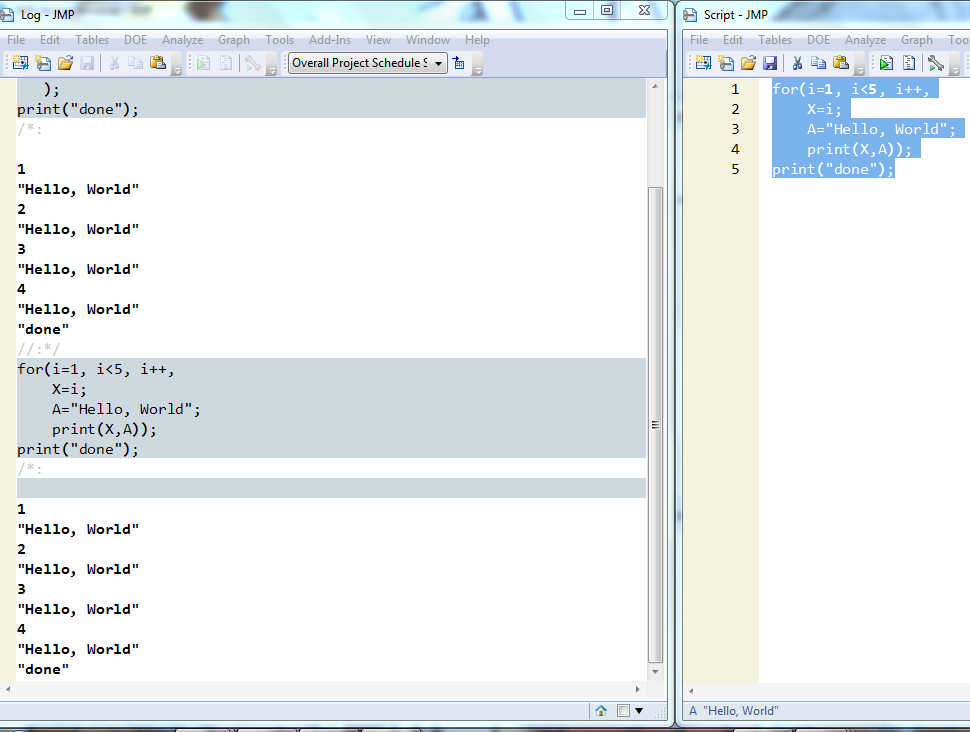


- Mark as New
- Bookmark
- Subscribe
- Mute
- Subscribe to RSS Feed
- Get Direct Link
- Report Inappropriate Content
Re: error: row number (-1) is not valid.
The issue is one of scoping. JMP is finding your variable 'X: in a data table.....I assume. And because of that, it is wanting to have a subscript for the X variable. To make this work and point to the memory variable "X" you need to force the proper reference to it by placing "::" in front of the variable.
For( i = 1, i < 5, i++,
	::X = i;
	A = "Hello, World";
	Print( ::X, A );
);
Print( "done" );- Mark as New
- Bookmark
- Subscribe
- Mute
- Subscribe to RSS Feed
- Get Direct Link
- Report Inappropriate Content
Re: error: row number (-1) is not valid.
Uday
- Mark as New
- Bookmark
- Subscribe
- Mute
- Subscribe to RSS Feed
- Get Direct Link
- Report Inappropriate Content
Re: error: row number (-1) is not valid.
Uday
- Mark as New
- Bookmark
- Subscribe
- Mute
- Subscribe to RSS Feed
- Get Direct Link
- Report Inappropriate Content
Re: error: row number (-1) is not valid.
The issue is one of scoping. JMP is finding your variable 'X: in a data table.....I assume. And because of that, it is wanting to have a subscript for the X variable. To make this work and point to the memory variable "X" you need to force the proper reference to it by placing "::" in front of the variable.
For( i = 1, i < 5, i++,
	::X = i;
	A = "Hello, World";
	Print( ::X, A );
);
Print( "done" );Recommended Articles
- © 2026 JMP Statistical Discovery LLC. All Rights Reserved.
- Terms of Use
- Privacy Statement
- Contact Us