- Don’t miss your chance to experience Discovery Summit Europe at our best available rate! Early bird registration through 31 Oct.
- Graph Builder Toolbar streamlines interactive graphing. Creates shortcuts on Report and GraphBuilder Helpers toolbars. Download and install the extension.
- Subscribe to RSS Feed
- Mark Topic as New
- Mark Topic as Read
- Float this Topic for Current User
- Bookmark
- Subscribe
- Mute
- Printer Friendly Page
Discussions
Solve problems, and share tips and tricks with other JMP users.- User Community
- :
- Discussions
- :
- can i move the 5 number summary away from the top of my graphs?

- Mark as New
- Bookmark
- Subscribe
- Mute
- Subscribe to RSS Feed
- Get Direct Link
- Report Inappropriate Content
can i move the 5 number summary away from the top of my graphs?
hello,
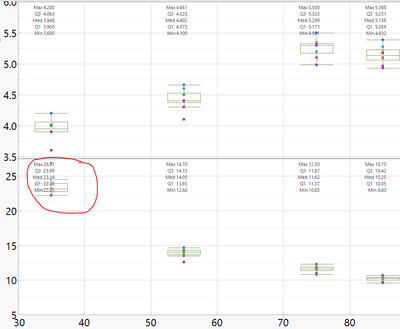
i am making graphs with box plots and i want to display the 5 number summary on the graph. the problem is that the 5 number summary always displays at the top of the graph, and it sometimes obscures the box plots,
is there a way to change the location of the 5 number summary so it doesn't interfere with the graph???


- Mark as New
- Bookmark
- Subscribe
- Mute
- Subscribe to RSS Feed
- Get Direct Link
- Report Inappropriate Content
Re: can i move the 5 number summary away from the top of my graphs?
Hi @LogitPorcupine1 ,
The fastest way of doing so would be to modify the scale of the Y axis to make room for both.
otherwise, someone else may have a fundamental solution.
- Mark as New
- Bookmark
- Subscribe
- Mute
- Subscribe to RSS Feed
- Get Direct Link
- Report Inappropriate Content
Re: can i move the 5 number summary away from the top of my graphs?
thanks you,
but yeah, i was hoping for a way where i didn't have to expand the y-scale
- Mark as New
- Bookmark
- Subscribe
- Mute
- Subscribe to RSS Feed
- Get Direct Link
- Report Inappropriate Content
Re: can i move the 5 number summary away from the top of my graphs?
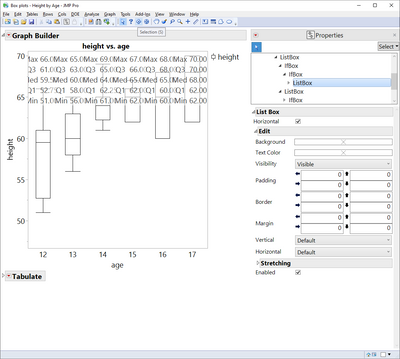
if there is no way to access the 5 numbers in the graph and modify them i think it would be better to run somthing like this:
Open( "$SAMPLE_DATA/Big Class.jmp" );
New Window( "Box plots - Height by Age",
	V List Box(
		Graph Builder(
			Size( 567, 640 ),
			Show Control Panel( 0 ),
			Fit to Window( "Off" ),
			Variables( X( :age ), Y( :height ) ),
			Elements( Box Plot( X, Y, Legend( 4 ) ) )
		),
		Tabulate(
			Show Control Panel( 0 ),
			Add Table(
				Column Table( Grouping Columns( :age ), Analysis Columns( :height ) ),
				Row Table( Statistics( Max, Quantiles( 75 ), Median, Quantiles( 25 ), Min ) )
			)
		)
	)
);
you can modify it to fit your needs and save it as an add in for future use.
I didnt manage to access the 5 numbers from the properties if anyone knows how this may be the key to the solution

- Mark as New
- Bookmark
- Subscribe
- Mute
- Subscribe to RSS Feed
- Get Direct Link
- Report Inappropriate Content
Re: can i move the 5 number summary away from the top of my graphs?
In the past I have added 5 separate Caption Box elements to the graph, each listing one component of the 5 number summary. Those Caption Box elements give you a bit more control on where you want the information displayed. Always a good idea to make an addition to the JMP Wish List if there is functionality you are interested in. Thanks!
Recommended Articles
- © 2026 JMP Statistical Discovery LLC. All Rights Reserved.
- Terms of Use
- Privacy Statement
- Contact Us