cancel
Showing results for 
Show  only  | Search instead for 
Did you mean: 
  • Instantly extract effect sizes, F-ratios, and FDR-adjusted p-values from your models with the Calculate Effects Sizes extension, available now in the JMP Marketplace!
  • New to JMP? Join us Sept. 23-24 for the Early User Edition of Discovery Summit, tailor-made for new users. Register now for free!
  • See how to use the JMP Marketplace – Free tools to expand JMP capabilities. Register. July 10, 2 pm US Eastern Time.

Discussions

Solve problems, and share tips and tricks with other JMP users.
Choose Language Hide Translation Bar
Xuhaidan
Level I

add data value

How to add all data value in graph? example time series graph.

1 REPLY 1
gzmorgan0
Super User (Alumni)

Re: add data value

Is ths what you want (see picture below)? If yes, bring the table to the front

  • Select  the column used for your Y axis variable (in the example below Acid), by selecting it in the Column tabel panl or on the column header.
  • then Main Menu> Columns > select Label
  • Main Menu > Rows > Select > click on Select all rows
  • then Main Menu > Rows > click on Label. Each row in the table will now have a little tag icon showinh that is a label and each value is shown.

If this is not what you want, you need to provide more details.  
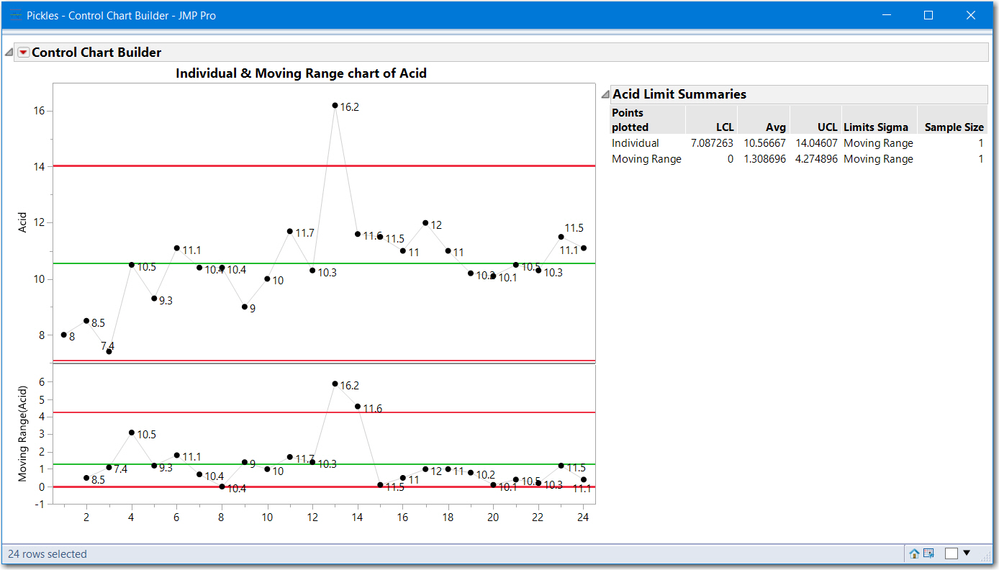
image.png

Recommended Articles

