- Don’t miss your chance to experience Discovery Summit Europe at our best available rate! Early bird registration through 31 Oct.
- Graph Builder Toolbar streamlines interactive graphing. Creates shortcuts on Report and GraphBuilder Helpers toolbars. Download and install the extension.
- Subscribe to RSS Feed
- Mark Topic as New
- Mark Topic as Read
- Float this Topic for Current User
- Bookmark
- Subscribe
- Mute
- Printer Friendly Page
Discussions
Solve problems, and share tips and tricks with other JMP users.- User Community
- :
- Discussions
- :
- Why can't I have duplicate values in List Box?

- Mark as New
- Bookmark
- Subscribe
- Mute
- Subscribe to RSS Feed
- Get Direct Link
- Report Inappropriate Content
Why can't I have duplicate values in List Box?
If I run this:
lb = List Box({"qwerqwerr", "qwerqwerr"});

nwTest = New Window("Test ListBox Duplicate values", lb);
I will get a List Box with only one line. Why?
List Box accepts lists, lists can have duplicate values, why can't Lis Box have duplicate values?
If I pass a list with duplicate values to List Box, what's shown in the List Box is not the list that was passed with now additional warnings or errors.
IS it by design? Why? Any workarounds?
- Mark as New
- Bookmark
- Subscribe
- Mute
- Subscribe to RSS Feed
- Get Direct Link
- Report Inappropriate Content
Re: Why can't I have duplicate values in List Box?
You named two different String Col Boxes in two different windows the same name. So the second assignment overwrites the first one.
Funny behavior => no matter buttons in which window I press, the second window updates.


- Mark as New
- Bookmark
- Subscribe
- Mute
- Subscribe to RSS Feed
- Get Direct Link
- Report Inappropriate Content
Re: Why can't I have duplicate values in List Box?
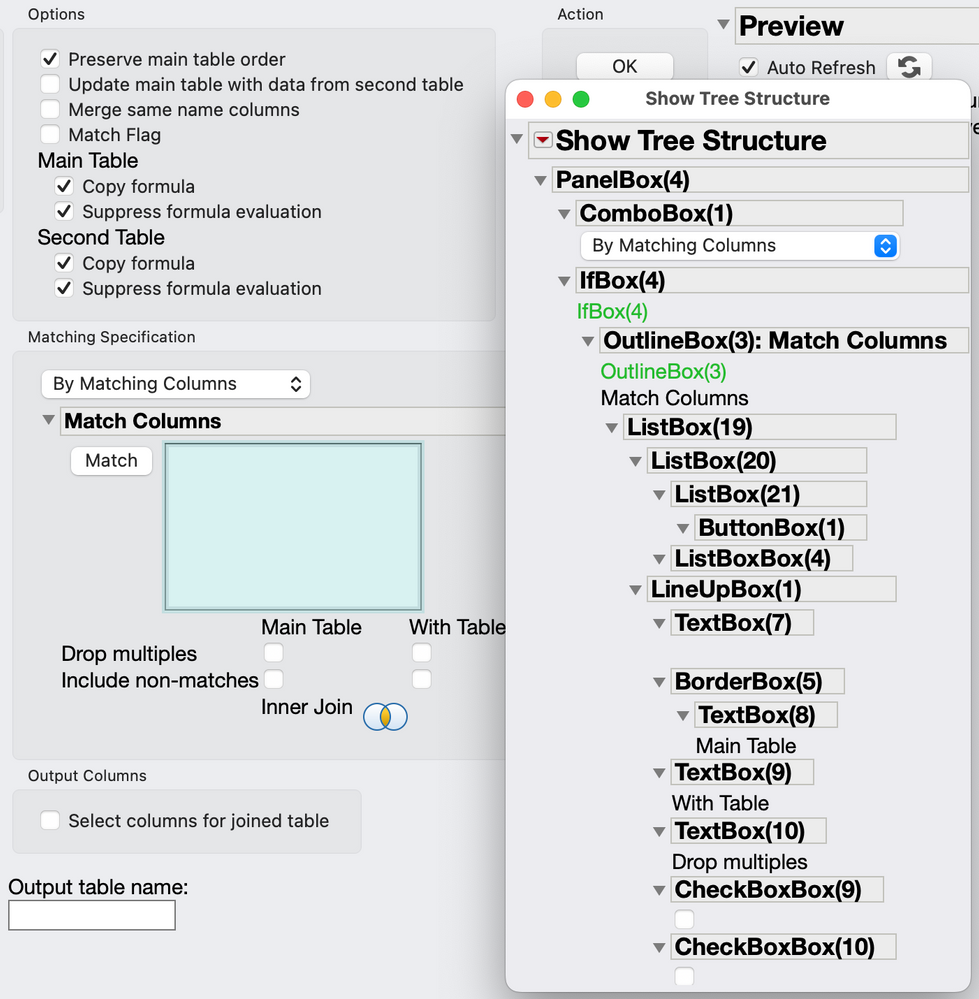
That 'control' is a composite object starting with an outline box. You can investigate the structure (display tree) by right-clicking the outline box and select Edit > Show Tree Structure. The list is presented in a List Box, the same object you started with.
- « Previous
-
- 1
- 2
- Next »
Recommended Articles
- © 2026 JMP Statistical Discovery LLC. All Rights Reserved.
- Terms of Use
- Privacy Statement
- Contact Us