cancel
Showing results for 
Show  only  | Search instead for 
Did you mean: 
  • JMP will suspend normal business operations for our Winter Holiday beginning on Wednesday, Dec. 24, 2025, at 5:00 p.m. ET (2:00 p.m. ET for JMP Accounts Receivable).
    Regular business hours will resume at 9:00 a.m. EST on Friday, Jan. 2, 2026.
  • We’re retiring the File Exchange at the end of this year. The JMP Marketplace is now your destination for add-ins and extensions.

Discussions

Solve problems, and share tips and tricks with other JMP users.
Choose Language Hide Translation Bar
Technician
Level I

Variability Chart Platform Factor Re-Insert Positions (Not Swapping)

Hello JMP Community,


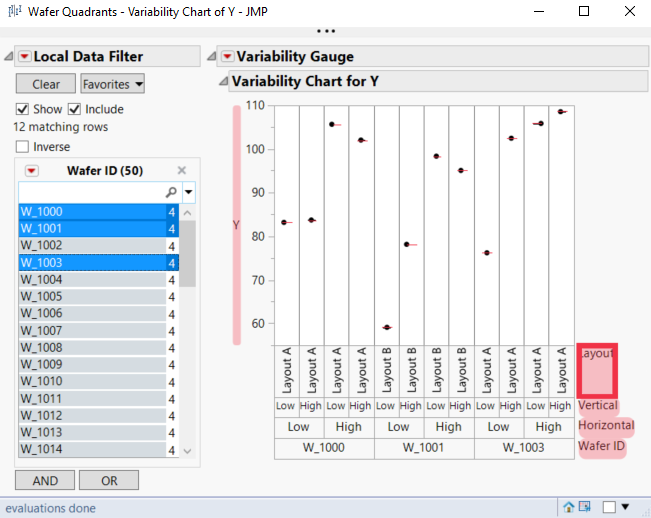
I understand dragging between any two factors swaps the location pairs in the Variability Chart platform. Is there a way to drag to specifically re-insert the factors instead? For example, can I drag "Layout" between "Horizontal" and "Wafer ID" in the attached screenshot instead of performing multiple drags to have the intended result? I am aware I can do this reordering with "Relaunch Analysis".


I am asking because my real data has more than 10 factors. It would be much easier to reorder directly on the platform. Let me know if this should be a feature request, with which perhaps using Ctrl+Drag or Alt+Drag might be a helpful combination.


Thanks,

Technician

0 REPLIES 0

Recommended Articles