- JMP will suspend normal business operations for our Winter Holiday beginning on Wednesday, Dec. 24, 2025, at 5:00 p.m. ET (2:00 p.m. ET for JMP Accounts Receivable).
Regular business hours will resume at 9:00 a.m. EST on Friday, Jan. 2, 2026. - We’re retiring the File Exchange at the end of this year. The JMP Marketplace is now your destination for add-ins and extensions.
- Subscribe to RSS Feed
- Mark Topic as New
- Mark Topic as Read
- Float this Topic for Current User
- Bookmark
- Subscribe
- Mute
- Printer Friendly Page
Discussions
Solve problems, and share tips and tricks with other JMP users.- JMP User Community
- :
- Discussions
- :
- Using Char to compare numeric and character values

- Mark as New
- Bookmark
- Subscribe
- Mute
- Subscribe to RSS Feed
- Get Direct Link
- Report Inappropriate Content
Using Char to compare numeric and character values
Hi,
Is it possible to compare numeric and character values?
I want to compare two columns (identical or different values). One column has a numeric date and one has a character date and as I need to compare only parts of it I want to use substring. The below script runs, but it doesn´t get me the correct result as all appears to be different (which is not the case). Am I using Char wrong?
If( Substr( Char( :Name( "Date/Time of Specimen Collection" ) ), 1, 10 ) == Substr( :Name( "Start Date/Time of Visit" ), 1, 10 ),
"identical",
"different"
)
I know I can change the format of "Date/Time of Specimen Collection" but I prefer not to as it will complicate other parts of my script.
Thanks in advance
Accepted Solutions


- Mark as New
- Bookmark
- Subscribe
- Mute
- Subscribe to RSS Feed
- Get Direct Link
- Report Inappropriate Content
Re: Using Char to compare numeric and character values
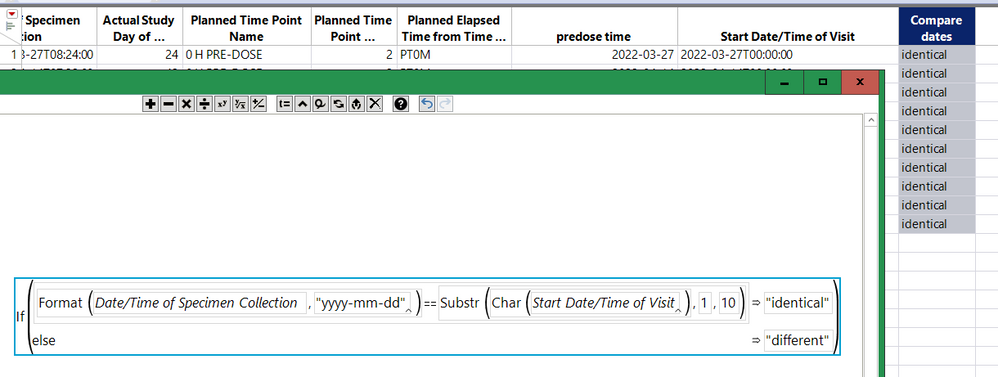
Or even this:
- Mark as New
- Bookmark
- Subscribe
- Mute
- Subscribe to RSS Feed
- Get Direct Link
- Report Inappropriate Content
Re: Using Char to compare numeric and character values
Thanks a lot - I´ll give that a shot :)
- Mark as New
- Bookmark
- Subscribe
- Mute
- Subscribe to RSS Feed
- Get Direct Link
- Report Inappropriate Content
Re: Using Char to compare numeric and character values
To understand what's happening, make a temporary column with
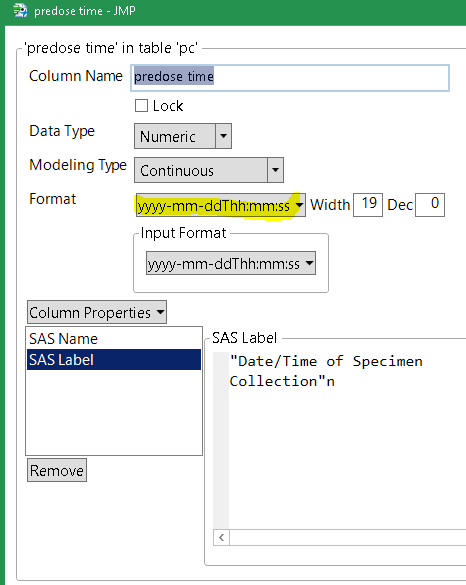
Char( :Name( "Date/Time of Specimen Collection" ) )as the formula. You'll probably need to use the format(...) function (instead of char(...)) to specify the exact date-time format you need to get all the values and separator characters correct. You can see the available format names when you use the column properties dialog and look at the format...date section.
- Mark as New
- Bookmark
- Subscribe
- Mute
- Subscribe to RSS Feed
- Get Direct Link
- Report Inappropriate Content
Re: Using Char to compare numeric and character values
I see your point. I cannot seem to get it right using format though.
Is there anyway of doing this without creating extra columns?
- Mark as New
- Bookmark
- Subscribe
- Mute
- Subscribe to RSS Feed
- Get Direct Link
- Report Inappropriate Content
Re: Using Char to compare numeric and character values
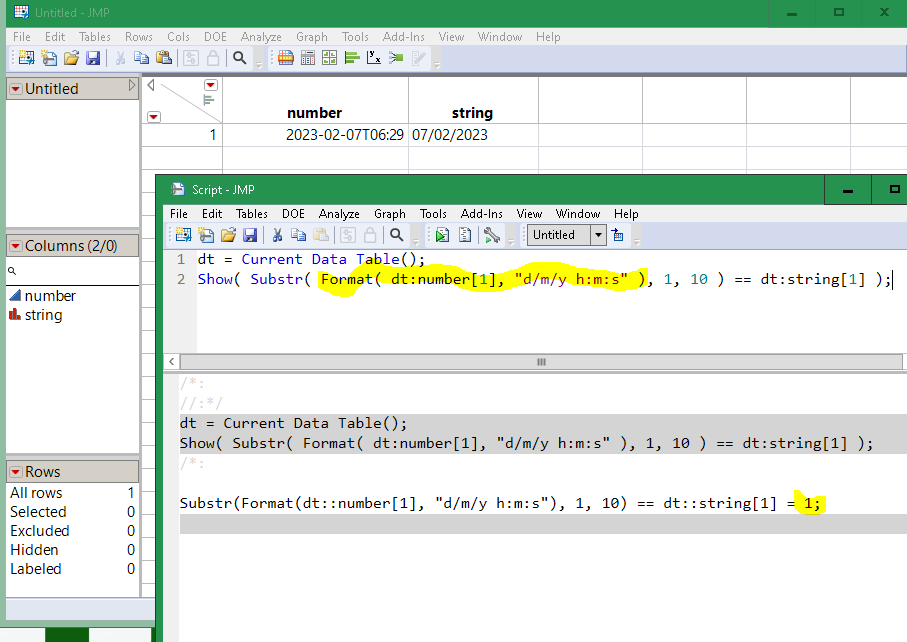
Yes. What is the format of the character date?
- Mark as New
- Bookmark
- Subscribe
- Mute
- Subscribe to RSS Feed
- Get Direct Link
- Report Inappropriate Content
Re: Using Char to compare numeric and character values
In the attached table snip I´m trying to compare the date part of "Date/Time of Specimen Collection" column (numeric, yyy-mm-ddThh:mm:ss) with the "Start Date/Time of Visit" column (character, nominal)
Is there a function that allows jmp to see the numerical values as character (formatted as a date of course) so that I can use substring for the date part of it?
- Mark as New
- Bookmark
- Subscribe
- Mute
- Subscribe to RSS Feed
- Get Direct Link
- Report Inappropriate Content
Re: Using Char to compare numeric and character values
- Mark as New
- Bookmark
- Subscribe
- Mute
- Subscribe to RSS Feed
- Get Direct Link
- Report Inappropriate Content
Re: Using Char to compare numeric and character values
You might need this format:
- Mark as New
- Bookmark
- Subscribe
- Mute
- Subscribe to RSS Feed
- Get Direct Link
- Report Inappropriate Content
Re: Using Char to compare numeric and character values
Or even this:
- Mark as New
- Bookmark
- Subscribe
- Mute
- Subscribe to RSS Feed
- Get Direct Link
- Report Inappropriate Content
Re: Using Char to compare numeric and character values
Thanks a lot - I´ll give that a shot :)
Recommended Articles
- © 2026 JMP Statistical Discovery LLC. All Rights Reserved.
- Terms of Use
- Privacy Statement
- Contact Us