- JMP Statement Regarding Critical PHP Remote Code Execution Vulnerabilities (CVE-2026-109618, CVE-2026-109619)
- Don’t miss your chance to experience Discovery Summit Europe at our best available rate! Early bird registration through 31 Oct.
- Graph Builder Toolbar streamlines interactive graphing. Creates shortcuts on Report and GraphBuilder Helpers toolbars. Download and install the extension.
- Subscribe to RSS Feed
- Mark Topic as New
- Mark Topic as Read
- Float this Topic for Current User
- Bookmark
- Subscribe
- Mute
- Printer Friendly Page
Discussions
Solve problems, and share tips and tricks with other JMP users.- User Community
- :
- Discussions
- :
- Re: Unable to Restore Row Height After Accidental Resize in Data Table

- Mark as New
- Bookmark
- Subscribe
- Mute
- Subscribe to RSS Feed
- Get Direct Link
- Report Inappropriate Content
Unable to Restore Row Height After Accidental Resize in Data Table
I encountered an issue while working with a data table in JMP 18.2.1.
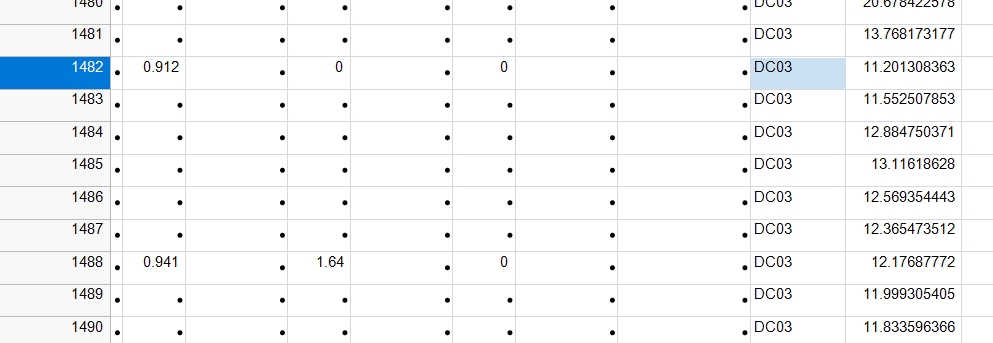
While trying to select rows, I accidentally dragged the mouse in a way that resized the row height instead of selecting. As a result, the row height became excessively large, making the table difficult to view.
The problem is that there appears to be no way to restore the row height to its original size using the mouse. Attempting to manually resize it back does not return it to the default height, and it is very difficult to achieve a consistent or clean layout again.
This behavior is quite inconvenient, especially since it is easy to trigger accidentally due to the narrow boundary between selection and resizing. It would be helpful if one of the following improvements could be implemented:
→ A simple way to reset row height to default
→ An option to lock row height to prevent accidental resizing
→ More distinct interaction between selection and resizing
Thank you for your consideration.
Accepted Solutions


 Community Manager
- Mark as New
- Bookmark
- Subscribe
- Mute
- Subscribe to RSS Feed
- Get Direct Link
- Report Inappropriate Content
Re: Unable to Restore Row Height After Accidental Resize in Data Table
Hi @H_TJ ,
I hear you on this frustration! In JMP 19 we introduced an easy way to reset the row height to default: double click the border between the rows in the left-hand area of the table (where the row numbers are). Also in JMP 19, resizing can only be done in that same left-hand area, which we hoped would limit accidental resizing when trying to select rows/cells.
In JMP 18 and earlier, resetting the row heights to default can be done via jsl (which I know is not ideal):
Current Data Table() << Set Cell Height(0)I hope this helps!
-Jules



- Mark as New
- Bookmark
- Subscribe
- Mute
- Subscribe to RSS Feed
- Get Direct Link
- Report Inappropriate Content
Re: Unable to Restore Row Height After Accidental Resize in Data Table
It would be helpful if one of the following improvements could be implemented: -> JMP Wish List

- Mark as New
- Bookmark
- Subscribe
- Mute
- Subscribe to RSS Feed
- Get Direct Link
- Report Inappropriate Content
Re: Unable to Restore Row Height After Accidental Resize in Data Table
The way I've found to do this is to set the height to zero. It sets it to the default height instead.
dt << Set Cell Height( 0 );- Mark as New
- Bookmark
- Subscribe
- Mute
- Subscribe to RSS Feed
- Get Direct Link
- Report Inappropriate Content
Re: Unable to Restore Row Height After Accidental Resize in Data Table
Hi @H_TJ ,
I hear you on this frustration! In JMP 19 we introduced an easy way to reset the row height to default: double click the border between the rows in the left-hand area of the table (where the row numbers are). Also in JMP 19, resizing can only be done in that same left-hand area, which we hoped would limit accidental resizing when trying to select rows/cells.
In JMP 18 and earlier, resetting the row heights to default can be done via jsl (which I know is not ideal):
Current Data Table() << Set Cell Height(0)I hope this helps!
-Jules
- Mark as New
- Bookmark
- Subscribe
- Mute
- Subscribe to RSS Feed
- Get Direct Link
- Report Inappropriate Content
Re: Unable to Restore Row Height After Accidental Resize in Data Table
Thank you for the tips.
I updated JMP and it works well.
Recommended Articles
- © 2026 JMP Statistical Discovery LLC. All Rights Reserved.
- Terms of Use
- Privacy Statement
- Contact Us