Turn on suggestions
Auto-suggest helps you quickly narrow down your search results by suggesting possible matches as you type.
- Don’t miss your chance to experience Discovery Summit Europe at our best available rate! Early bird registration through 31 Oct.
- Graph Builder Toolbar streamlines interactive graphing. Creates shortcuts on Report and GraphBuilder Helpers toolbars. Download and install the extension.
Options
- Subscribe to RSS Feed
- Mark Topic as New
- Mark Topic as Read
- Float this Topic for Current User
- Bookmark
- Subscribe
- Mute
- Printer Friendly Page
Discussions
Solve problems, and share tips and tricks with other JMP users.- User Community
- :
- Discussions
- :
- The Ever-Expanding Buttons (controlling button box width)


Super User
- Mark as New
- Bookmark
- Subscribe
- Mute
- Subscribe to RSS Feed
- Get Direct Link
- Report Inappropriate Content
The Ever-Expanding Buttons (controlling button box width)
Nov 1, 2017 03:23 PM
(4358 views)
Hello all,
I have a weird problem in JMP 12.2. When I run the code below, successive switching between the tabs using the button on the first tab yields button boxes that grow in width.
nw = new window("Test",
	tbb = tab box(
		"First",
		vlistbox(
			text box("Not much here"),
			button box("Go to Second", tbb << set selected(2)),
		),
		"Second",
		tb = tablebox(
			scb = string col box("AAA", {"Hello", "World", "Fubar", "Festival"}),
			cb = col box("Actions",
				b1 = button box(""),
				t2 = text box(""),
				t3 = text box(""),
				b4 = button box(""),
			),
		),
	),
);

tb << set underline headings(1) << set column borders(1) << set row borders(1) << set shade alternate rows(1);

b1 << set icon("ControlC");
b4 << set icon("WinFilePrintPreview");
Here's what it looks like:
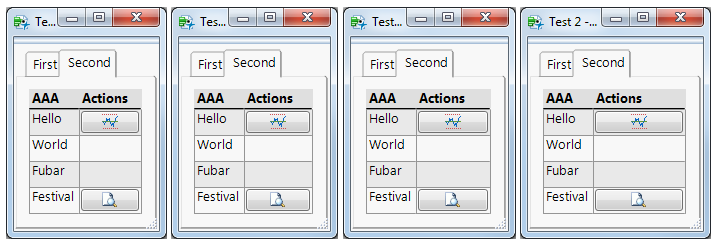
To see the effect, run the code and click on the "Go to Second" button. This will switch to the "Second" tab. Now click on the "First" tab and click the "Go to Second" button again. Keep doing this and you'll see what I'm talking about.
Is there a way to force a button to be a particular width? I tried putting a button inside a border box and setting the width of the border box, but that didn't work. BTW this behavior is not evident in JMP 13.2.
2 REPLIES 2
Super User
- Mark as New
- Bookmark
- Subscribe
- Mute
- Subscribe to RSS Feed
- Get Direct Link
- Report Inappropriate Content
Re: The Ever-Expanding Buttons (controlling button box width)
Found a fix:
b1 << set max size(30, 50);
b4 << set max size(30, 50);
This seems to do the trick.

Super User
- Mark as New
- Bookmark
- Subscribe
- Mute
- Subscribe to RSS Feed
- Get Direct Link
- Report Inappropriate Content
Re: The Ever-Expanding Buttons (controlling button box width)
Looks like this issue was fixed in JMP 13.
Craige
Recommended Articles
- © 2026 JMP Statistical Discovery LLC. All Rights Reserved.
- Terms of Use
- Privacy Statement
- Contact Us