- Don’t miss your chance to experience Discovery Summit Europe at our best available rate! Early bird registration through 31 Oct.
- Graph Builder Toolbar streamlines interactive graphing. Creates shortcuts on Report and GraphBuilder Helpers toolbars. Download and install the extension.
- Subscribe to RSS Feed
- Mark Topic as New
- Mark Topic as Read
- Float this Topic for Current User
- Bookmark
- Subscribe
- Mute
- Printer Friendly Page
Discussions
Solve problems, and share tips and tricks with other JMP users.- User Community
- :
- Discussions
- :
- Re: Tabulate in script not creating table seen in control panel

- Mark as New
- Bookmark
- Subscribe
- Mute
- Subscribe to RSS Feed
- Get Direct Link
- Report Inappropriate Content
Tabulate in script not creating table seen in control panel
I am trying to tabulate a table and use a filter simultaneously to create a table that pulls out 6 rows of data that I can then join to another data table. The table that I see in my control panel is correct but when the script runs and creates the data table I am getting different data. Below is the code I use and 2 screen shots. Why is the table created different than the table seen in the control panel?
(Data Table("SILZone")<<Tabulate(
Add Table(
Column Table(
Analysis Columns( :Name( "Sum(BOTTLESOUT)" ) ),
Statistics( Mean, Sum )
),
Row Table( Grouping Columns(:DATE, :SHOP, :LOOP ) )
),
Local Data Filter(
Location( {208, 121} ),
Add Filter(
columns( :ZONENAME, :LOOP ),
Where( :ZONENAME == "Gob Cuts" ),
Where( :LOOP == 0 ),
Display( :ZONENAME, Size( 284, 259 ), List Display )
),
Mode( Select( 0 ), Show( 1 ), Include( 1 ) )
));
<< Make Into Data Table;
=current data table();
<<set name("GobCuts");
From the tabulate control panel. This is the table I want:
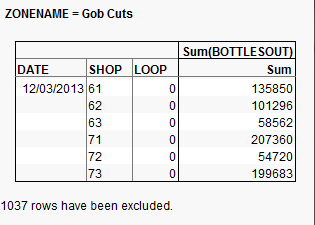
This is what I get when I run the script:
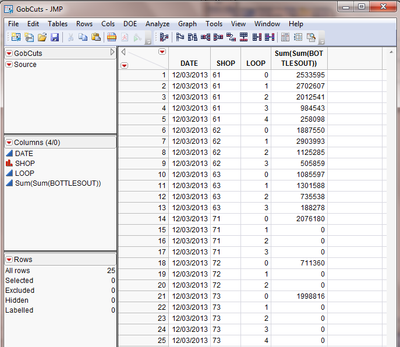
Accepted Solutions


- Mark as New
- Bookmark
- Subscribe
- Mute
- Subscribe to RSS Feed
- Get Direct Link
- Report Inappropriate Content
Re: Tabulate in script not creating table seen in control panel
Try using get rows instead of a local data filter. Here's some code:
dt = Data Table("SILZone");
current data table(dt);
selected_mtx = dt << get rows where(:ZONENAME == "Gob Cuts" & :LOOP == 0 );
if (nrows(selected_mtx) > 0,
dt << select rows(selected_mtx) << invert row selection << exclude << clear select;
dt_tab = dt << Tabulate(
Add Table(
Column Table( Analysis Columns( :Name( "Sum(BOTTLESOUT)" ) ),
Statistics( Mean, Sum )
),
Row Table( Grouping Columns(:DATE, :SHOP, :LOOP ) )
), invisible
);
dt2 = dt_tab << Make Into Data Table;
dt_tab << close window;
dt2 << set name("GobCuts");
dt << clear row states;
);
- Mark as New
- Bookmark
- Subscribe
- Mute
- Subscribe to RSS Feed
- Get Direct Link
- Report Inappropriate Content
Re: Tabulate in script not creating table seen in control panel
Try using get rows instead of a local data filter. Here's some code:
dt = Data Table("SILZone");
current data table(dt);
selected_mtx = dt << get rows where(:ZONENAME == "Gob Cuts" & :LOOP == 0 );
if (nrows(selected_mtx) > 0,
dt << select rows(selected_mtx) << invert row selection << exclude << clear select;
dt_tab = dt << Tabulate(
Add Table(
Column Table( Analysis Columns( :Name( "Sum(BOTTLESOUT)" ) ),
Statistics( Mean, Sum )
),
Row Table( Grouping Columns(:DATE, :SHOP, :LOOP ) )
), invisible
);
dt2 = dt_tab << Make Into Data Table;
dt_tab << close window;
dt2 << set name("GobCuts");
dt << clear row states;
);
- Mark as New
- Bookmark
- Subscribe
- Mute
- Subscribe to RSS Feed
- Get Direct Link
- Report Inappropriate Content
Re: Tabulate in script not creating table seen in control panel
Thank you! That works perfectly. I had been playing around with get rows and couldn't get it to work. I appreciate your help!
Recommended Articles
- © 2026 JMP Statistical Discovery LLC. All Rights Reserved.
- Terms of Use
- Privacy Statement
- Contact Us