Turn on suggestions
Auto-suggest helps you quickly narrow down your search results by suggesting possible matches as you type.
- JMP will suspend normal business operations for our Winter Holiday beginning on Wednesday, Dec. 24, 2025, at 5:00 p.m. ET (2:00 p.m. ET for JMP Accounts Receivable).
Regular business hours will resume at 9:00 a.m. EST on Friday, Jan. 2, 2026. - We’re retiring the File Exchange at the end of this year. The JMP Marketplace is now your destination for add-ins and extensions.
Options
- Subscribe to RSS Feed
- Mark Topic as New
- Mark Topic as Read
- Float this Topic for Current User
- Bookmark
- Subscribe
- Mute
- Printer Friendly Page
Discussions
Solve problems, and share tips and tricks with other JMP users.- JMP User Community
- :
- Discussions
- :
- Strange behaviour of script generated formula column; no data until I copy+paste...

Level IV
- Mark as New
- Bookmark
- Subscribe
- Mute
- Subscribe to RSS Feed
- Get Direct Link
- Report Inappropriate Content
Strange behaviour of script generated formula column; no data until I copy+paste the column in the same datatable
Created:
Nov 24, 2022 03:45 AM
| Last Modified: Jun 9, 2023 9:03 AM
(2391 views)
I have a script that loads data from excel and then generates a new formula column. The column appears empty however, even though my formula preview shows values. Once I copy/paste the column into the same datatable suddenly the values appear. What's going on here?
Easiest demo is through the gif below. I also added the script and excel sheet.
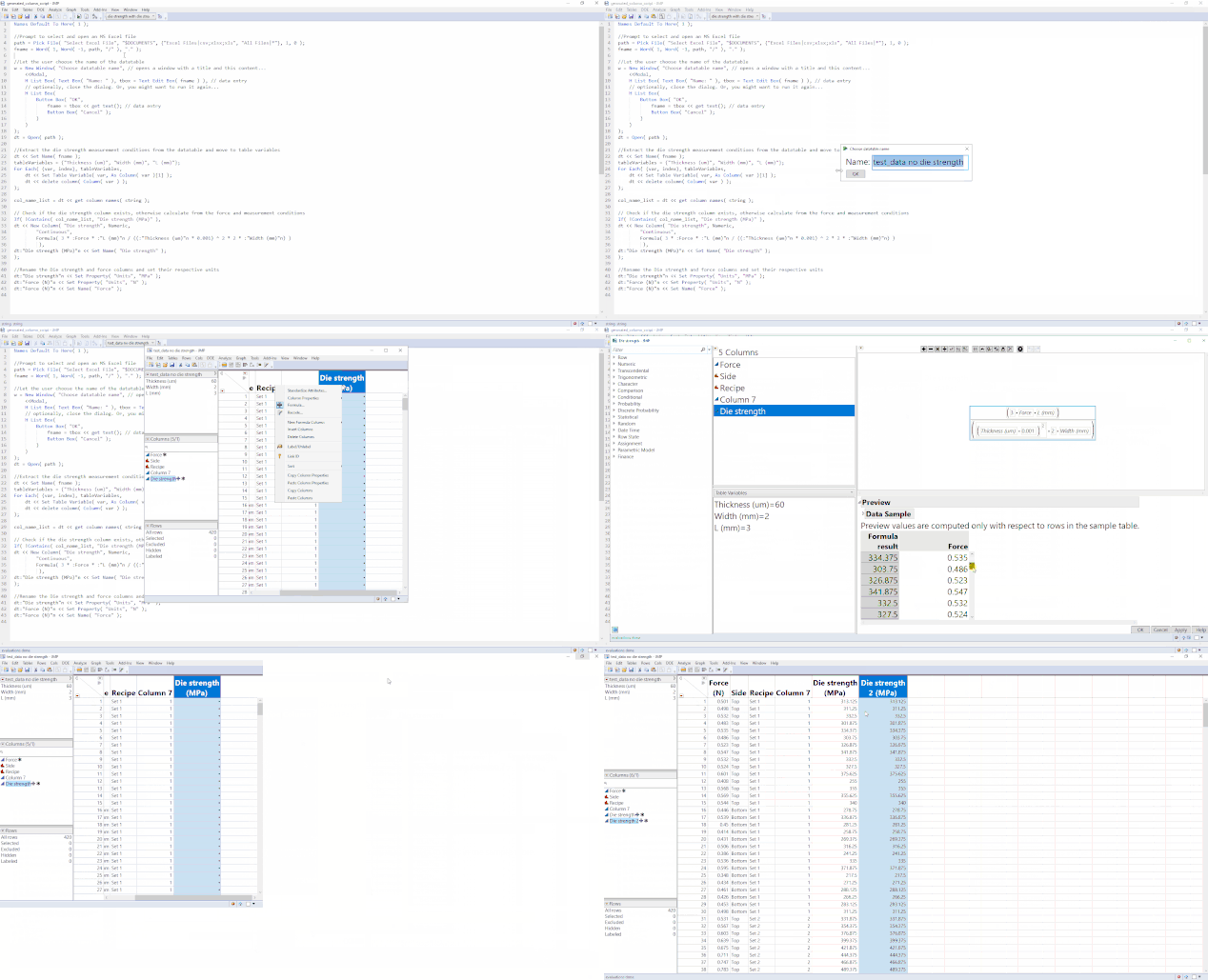
Names Default To Here( 1 );

//Prompt to select and open an MS Excel file
path = Pick File( "Select Excel File", "$DOCUMENTS", {"Excel Files|csv;xlsx;xls", "All Files|*"}, 1, 0 );
fname = Word( 1, Word( -1, path, "/" ), "." );

//Let the user choose the name of the datatable
w = New Window( "Choose datatable name", // opens a window with a title and this content...
	<<Modal,
	H List Box( Text Box( "Name: " ), tbox = Text Edit Box( fname ) ), // data entry
	// optionally, close the dialog. Or, you might want to run it again...
	H List Box(
		Button Box( "OK",
			fname = tbox << get text(); // data entry
			Button Box( "Cancel" );
		)
	)
);
dt = Open( path );

//Extract the die strength measurement conditions from the datatable and move to table variables
dt << Set Name( fname );
tableVariables = {"Thickness (um)", "Width (mm)", "L (mm)"};
For Each( {var, index}, tableVariables,
	dt << Set Table Variable( var, As Column( var )[1] );
	dt << delete column( Column( var ) );
);

col_name_list = dt << get column names( string );

// Check if the die strength column exists, otherwise calculate from the force and measurement conditions
If( !Contains( col_name_list, "Die strength (MPa)" ),
dt << New Column( "Die strength", Numeric,
		"Continuous",
		Formula( 3 * :Force * :"L (mm)"n / ((:"Thickness (um)"n * 0.001) ^ 2 * 2 * :"Width (mm)"n) )
		 ),
dt:"Die strength (MPa)"n << Set Name( "Die strength" );
);

//Rename the Die strength and force columns and set their respective units
dt:"Die strength"n << Set Property( "Units", "MPa" );
dt:"Force (N)"n << Set Property( "Units", "N" );
dt:"Force (N)"n << Set Name( "Force" );
1 ACCEPTED SOLUTION
Accepted Solutions


Super User
Solution
- Mark as New
- Bookmark
- Subscribe
- Mute
- Subscribe to RSS Feed
- Get Direct Link
- Report Inappropriate Content
Re: Strange behaviour of script generated formula column; no data until I copy+paste the column in the same datatable
It seems like your force column's name is wrong in the formula until you rename it.
Column Die strength Formula Interrupted
Name Unresolved: Force at row 1 in access or evaluation of 'Force' , :Force/*###*/
Formula evaluation errors have been ignored
-Jarmo
2 REPLIES 2
Super User
Solution
- Mark as New
- Bookmark
- Subscribe
- Mute
- Subscribe to RSS Feed
- Get Direct Link
- Report Inappropriate Content
Re: Strange behaviour of script generated formula column; no data until I copy+paste the column in the same datatable
It seems like your force column's name is wrong in the formula until you rename it.
Column Die strength Formula Interrupted
Name Unresolved: Force at row 1 in access or evaluation of 'Force' , :Force/*###*/
Formula evaluation errors have been ignored
-Jarmo
Level IV
- Mark as New
- Bookmark
- Subscribe
- Mute
- Subscribe to RSS Feed
- Get Direct Link
- Report Inappropriate Content
Re: Strange behaviour of script generated formula column; no data until I copy+paste the column in the same datatable
Created:
Nov 24, 2022 10:06 AM
| Last Modified: Nov 24, 2022 7:10 AM
(2371 views)
| Posted in reply to message from jthi 11-24-2022
Edit: Ok I see now, I'm changing the variable name later in the script. So the Force column name reference is not correct at the time of creating the column.
Recommended Articles
- © 2026 JMP Statistical Discovery LLC. All Rights Reserved.
- Terms of Use
- Privacy Statement
- Contact Us