Turn on suggestions
Auto-suggest helps you quickly narrow down your search results by suggesting possible matches as you type.
- Don’t miss your chance to experience Discovery Summit Europe at our best available rate! Early bird registration through 31 Oct.
- Graph Builder Toolbar streamlines interactive graphing. Creates shortcuts on Report and GraphBuilder Helpers toolbars. Download and install the extension.
Options
- Subscribe to RSS Feed
- Mark Topic as New
- Mark Topic as Read
- Float this Topic for Current User
- Bookmark
- Subscribe
- Mute
- Printer Friendly Page
Discussions
Solve problems, and share tips and tricks with other JMP users.- User Community
- :
- Discussions
- :
- Re: Several charts in Graph Builder with independent axis

Level V
- Mark as New
- Bookmark
- Subscribe
- Mute
- Subscribe to RSS Feed
- Get Direct Link
- Report Inappropriate Content
Several charts in Graph Builder with independent axis
Apr 4, 2017 10:49 AM
(12444 views)
Hello,
I would like to do a "By" action in Graph Builder like in all other platforms.
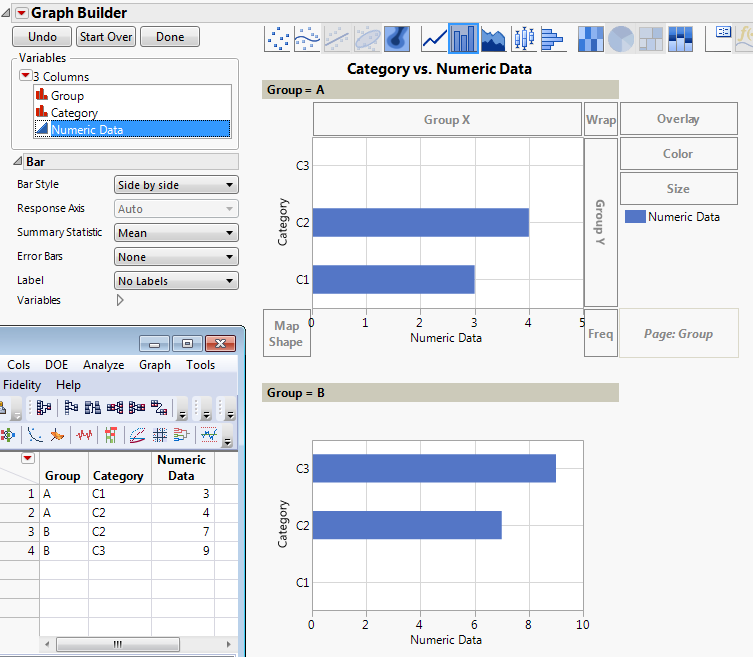
What I see is only "Page" option but it makes all X Axis the same.
See attached a screenshot.
In this example I would like each chart will have its own categories without categories with no data.
Please help.
Thank you.
2 ACCEPTED SOLUTIONS
Accepted Solutions


Super User
Solution
- Mark as New
- Bookmark
- Subscribe
- Mute
- Subscribe to RSS Feed
- Get Direct Link
- Report Inappropriate Content
Re: Several charts in Graph Builder with independent axis
All you have to do is to add the By clause into the JSL code
Names Default To Here( 1 );
dt = Open( "$SAMPLE_DATA\semiconductor capability.jmp" );
Graph Builder(
	Variables( X( :PNP1 ), Y( :NPN1 ) ),
	Elements( Points( X, Y, Legend( 3 ) ), Smoother( X, Y, Legend( 4 ) ) ),
	by( :site )
);
Jim


Staff
Solution
- Mark as New
- Bookmark
- Subscribe
- Mute
- Subscribe to RSS Feed
- Get Direct Link
- Report Inappropriate Content
Re: Several charts in Graph Builder with independent axis
Hi Tom,
When you first open graph builder, there should be a button called Dialog. Use this button to get a dialog interface to Graph Builder which will have the By option you are looking for.
Chris Kirchberg
When you first open graph builder, there should be a button called Dialog. Use this button to get a dialog interface to Graph Builder which will have the By option you are looking for.
Chris Kirchberg
Chris Kirchberg, M.S.2
Data Scientist, Life Sciences - Global Technical Enablement
JMP Statistical Discovery, LLC. - Denver, CO
Tel: +1-919-531-9927 ▪ Mobile: +1-303-378-7419 ▪ E-mail: [email protected]
www.jmp.com
Data Scientist, Life Sciences - Global Technical Enablement
JMP Statistical Discovery, LLC. - Denver, CO
Tel: +1-919-531-9927 ▪ Mobile: +1-303-378-7419 ▪ E-mail: [email protected]
www.jmp.com
3 REPLIES 3
Super User
Solution
- Mark as New
- Bookmark
- Subscribe
- Mute
- Subscribe to RSS Feed
- Get Direct Link
- Report Inappropriate Content
Re: Several charts in Graph Builder with independent axis
All you have to do is to add the By clause into the JSL code
Names Default To Here( 1 );
dt = Open( "$SAMPLE_DATA\semiconductor capability.jmp" );
Graph Builder(
	Variables( X( :PNP1 ), Y( :NPN1 ) ),
	Elements( Points( X, Y, Legend( 3 ) ), Smoother( X, Y, Legend( 4 ) ) ),
	by( :site )
);
Jim
Staff
Solution
- Mark as New
- Bookmark
- Subscribe
- Mute
- Subscribe to RSS Feed
- Get Direct Link
- Report Inappropriate Content
Re: Several charts in Graph Builder with independent axis
Hi Tom,
When you first open graph builder, there should be a button called Dialog. Use this button to get a dialog interface to Graph Builder which will have the By option you are looking for.
Chris Kirchberg
When you first open graph builder, there should be a button called Dialog. Use this button to get a dialog interface to Graph Builder which will have the By option you are looking for.
Chris Kirchberg
Chris Kirchberg, M.S.2
Data Scientist, Life Sciences - Global Technical Enablement
JMP Statistical Discovery, LLC. - Denver, CO
Tel: +1-919-531-9927 ▪ Mobile: +1-303-378-7419 ▪ E-mail: [email protected]
www.jmp.com
Data Scientist, Life Sciences - Global Technical Enablement
JMP Statistical Discovery, LLC. - Denver, CO
Tel: +1-919-531-9927 ▪ Mobile: +1-303-378-7419 ▪ E-mail: [email protected]
www.jmp.com
Level V
- Mark as New
- Bookmark
- Subscribe
- Mute
- Subscribe to RSS Feed
- Get Direct Link
- Report Inappropriate Content
Re: Several charts in Graph Builder with independent axis
Thank you!
Recommended Articles
- © 2026 JMP Statistical Discovery LLC. All Rights Reserved.
- Terms of Use
- Privacy Statement
- Contact Us