- Don’t miss your chance to experience Discovery Summit Europe at our best available rate! Early bird registration through 31 Oct.
- Graph Builder Toolbar streamlines interactive graphing. Creates shortcuts on Report and GraphBuilder Helpers toolbars. Download and install the extension.
- Subscribe to RSS Feed
- Mark Topic as New
- Mark Topic as Read
- Float this Topic for Current User
- Bookmark
- Subscribe
- Mute
- Printer Friendly Page
Discussions
Solve problems, and share tips and tricks with other JMP users.- User Community
- :
- Discussions
- :
- Re: Setting limits of a factor based on a categorical variable

- Mark as New
- Bookmark
- Subscribe
- Mute
- Subscribe to RSS Feed
- Get Direct Link
- Report Inappropriate Content
Setting limits of a factor based on a categorical variable
Dear JMP!
We have recently purchased JMP Pro, and I want to utilize Bayesian optimalization.
I would like to generate a starting set of points with a DoE with Fast Flexible Filling Design for the optimalization.
I have 2 responses and 5 factors, 1 of them is categorical (Dtype), 4 is continuous.
Based on the level of Dtype, I would like to set the limit of the factor D to different values (e.g. for P and A betweeen 5-10, for L 5-20).
How can I achieve this?
I have attached a screenshot from my JMP Pro.
Thanks in advance for your time and answer.


- Mark as New
- Bookmark
- Subscribe
- Mute
- Subscribe to RSS Feed
- Get Direct Link
- Report Inappropriate Content
Re: Setting limits of a factor based on a categorical variable
Welcome in the Community !
When creating your Space Filling design to generate your candidate set, you can very simply achieve your goal by using Disallowed Combinations Filter or Disallowed Combinations Script.
Select "Use Disallowed Combinations Filter", and select factor Dtype = P and the range for factor D from 10 to 20, OR factor Dtype = A and the range for D from 10 to 20. These are the factors ranges/combination you don't want in your design based on your informations, you should have this screen :
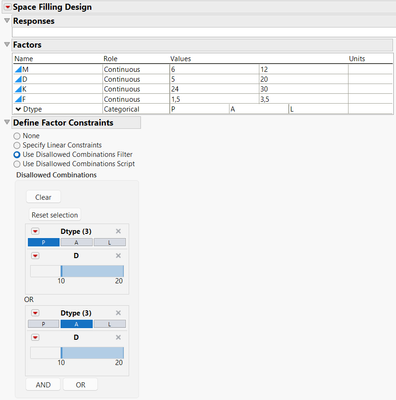
If you are more familiar with JMP script, you can use the option "Use Disallowed Combinations Script" and this script:
Dtype == "P" & D >= 10 | Dtype == "A" & D >= 10And you'll get the same results.
Specify the number of points you want for your candidate set, generate the datatable, and you can finally check that the constraints are well enforced and respected:

I would recommend reading the excellent blog Demystifying Factor Constraints by @Jed_Campbell, it will explain the different ways to enforce constraints when creating designs/candidate sets.
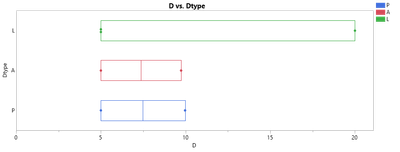
EDIT: As you want to create starting points for Bayesian Optimization, you could maybe use a D-Optimal Custom Design and enforce the constraint mentioned before, to be sure that the range for each factor can be explored with a minimum of runs. With only 6 runs and Fast Flexible Filling design, I had some situations where the ranges of D for every Dtype was not fully explored :

With a Custom design approach (and only using main effects in the model), you'll need a minimum of 7 runs, but the repartition of the runs ensure you will explore the entire range for any Dtype level :

Hope this answer will solve your problem,
"It is not unusual for a well-designed experiment to analyze itself" (Box, Hunter and Hunter)
Recommended Articles
- © 2026 JMP Statistical Discovery LLC. All Rights Reserved.
- Terms of Use
- Privacy Statement
- Contact Us