Turn on suggestions
Auto-suggest helps you quickly narrow down your search results by suggesting possible matches as you type.
- Don’t miss your chance to experience Discovery Summit Europe at our best available rate! Early bird registration through 31 Oct.
- Graph Builder Toolbar streamlines interactive graphing. Creates shortcuts on Report and GraphBuilder Helpers toolbars. Download and install the extension.
Options
- Subscribe to RSS Feed
- Mark Topic as New
- Mark Topic as Read
- Float this Topic for Current User
- Bookmark
- Subscribe
- Mute
- Printer Friendly Page
Discussions
Solve problems, and share tips and tricks with other JMP users.- User Community
- :
- Discussions
- :
- Setting Default Selected Item in a Combo Box

Level IV
- Mark as New
- Bookmark
- Subscribe
- Mute
- Subscribe to RSS Feed
- Get Direct Link
- Report Inappropriate Content
Setting Default Selected Item in a Combo Box
Feb 20, 2025 05:57 AM
(1427 views)
When using a combo box, how can I set it to display the currently selected item by default? For example, if the default is the first item, which is "1", what should I do to have the combo box show "7" as the currently selected item by default, as shown in the image below?

a = {"1", "2", "3", "4", "5", "6", "7", "8", "9", "0"};
New Window( "Test",

	testCB = Combo Box( a, )
);
2 REPLIES 2


Staff
- Mark as New
- Bookmark
- Subscribe
- Mute
- Subscribe to RSS Feed
- Get Direct Link
- Report Inappropriate Content
Re: Setting Default Selected Item in a Combo Box
Hi @BabyDoragon ,
You can use the 'set' function to place it into the position on the list (this has to be the numbered order for the combo box list)
a = {"1", "2", "3", "4", "5", "6", "7", "8", "9", "0"};
New Window( "Test",

	testCB = Combo Box( a, )
);

testcb<<set (1); //set to first position
“All models are wrong, but some are useful”


Super User
- Mark as New
- Bookmark
- Subscribe
- Mute
- Subscribe to RSS Feed
- Get Direct Link
- Report Inappropriate Content
Re: Setting Default Selected Item in a Combo Box
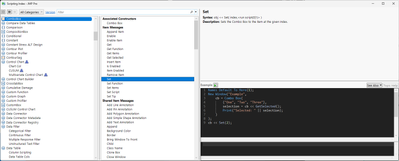
Extending a little on bens solution
Names Default To Here(1);

options = {"1", "2", "3", "4", "5", "6", "7", "8", "9", "0"};
initial_option = "7";

nw = New Window( "Test",
	combob = Combo Box(options, << Set(Contains(options, initial_option)))
);
Scripting Index is usually good place to start
-Jarmo
Recommended Articles
- © 2026 JMP Statistical Discovery LLC. All Rights Reserved.
- Terms of Use
- Privacy Statement
- Contact Us