- Don’t miss your chance to experience Discovery Summit Europe at our best available rate! Early bird registration through 31 Oct.
- Graph Builder Toolbar streamlines interactive graphing. Creates shortcuts on Report and GraphBuilder Helpers toolbars. Download and install the extension.
- Subscribe to RSS Feed
- Mark Topic as New
- Mark Topic as Read
- Float this Topic for Current User
- Bookmark
- Subscribe
- Mute
- Printer Friendly Page
Discussions
Solve problems, and share tips and tricks with other JMP users.- User Community
- :
- Discussions
- :
- Re: Set Property for Missing Data

- Mark as New
- Bookmark
- Subscribe
- Mute
- Subscribe to RSS Feed
- Get Direct Link
- Report Inappropriate Content
Set Property for Missing Data
Quite certain this is a simple fix for those in the "know" however, i have been struggling to figure it out. I have a pass_fail column when i am doing my limits and need to figure out how to assign "Fail" to missing data.I use the same table to plot distributions so assigning a random number to the missing data could cause problems.
Thanks in Advance
Column( dt_split, N Cols( dt_split ) ) << Set Property( "Value Labels", {1 = "Pass", 0 = "Fail", -999 = "Fail" } );
	colList = dt_split << Get Column Names( numeric, string );

	foundCols = "";

	i = 2;

	For( i = 1, i <= N Items( colList ), i++,

		Spec = Column( dt_split, colList[i] ) << Get Property( "Spec Limits" );

		If( Is Empty( Spec ) == 0,

			dt_split << New Column( (Column( dt_split, colList[i] ) << Get Name) || " Pass_Fail" );

			If( Is Missing( Try( Spec["LSL"], . ) ) == 0,

				dt_split << Select Where( As Column( dt_split, colList[i] ) < Spec["LSL"] );

				Try( Column( dt_split, N Cols( dt_split ) )[dt_split << get selected rows] = 0 );
			);

			If( Is Missing( Try( Spec["USL"], . ) ) == 0,

				dt_split << Select Where( As Column( dt_split, colList[i] ) > Spec["USL"], Current Selection( "Extend" ) );

				Try( Column( dt_split, N Cols( dt_split ) )[dt_split << Get Selected Rows] = 0 );
			);

			Wait( 0.5 );

			dt_split << Invert Row Selection;

			Wait( 0.5 );

			ColNotes = Eval( test ) || "_" || "PassFail";

			Try( Column( dt_split, N Cols( dt_split ) )[dt_split << Get Selected Rows] = 1 );

			Column( dt_split, N Cols( dt_split ) ) << Set Property( "Value Labels", {1 = "Pass", 0 = "Fail", -999 = "Fail" } );

			Column( dt_split, N Cols( dt_split ) ) << Set Property( "Value Ordering", {1, 0} );

			Column( dt_split, N Cols( dt_split ) ) << Set Property( "Description", "PASS_FAIL" );

			Column( dt_split, N Cols( dt_split ) ) << Set Property( "Notes", ColNotes );

			If( foundCols == "",
				foundCols = ":Name(\!"" || (Column( dt_split, colList[i] ) << Get Name) || " Pass_Fail\!")",
				foundCols = foundCols || ", " || ":Name(\!"" || (Column( dt_split, colList[i] ) << Get Name) || " Pass_Fail\!")"
			);

		);
		dt_split << Clear Select;
	);
col << Set Property( "Value Labels", {1 = "Pass", 0 = "Fail", 999 = "Fail"} );


- Mark as New
- Bookmark
- Subscribe
- Mute
- Subscribe to RSS Feed
- Get Direct Link
- Report Inappropriate Content
Re: Set Property for Missing Data
If you are trying use Value Labels for missing values . you should be able to use that directly in the Set Property:
col << Set Property( "Value Labels", {. = "Fail", 1 = "Pass", 0 = "Fail", 999 = "Fail"} );Edit:
Also if those 999 are already missing data with "random number"? you could also use Missing Value Codes column property to hide them from analysis:
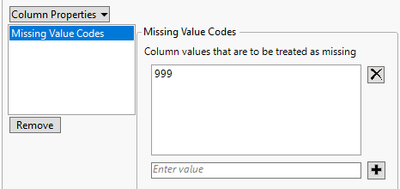
Set Property("Missing Value Codes", {999})- Mark as New
- Bookmark
- Subscribe
- Mute
- Subscribe to RSS Feed
- Get Direct Link
- Report Inappropriate Content
Re: Set Property for Missing Data
I did try the ". = "Fail" but it didn't work for me the first time. Is placement in the { } important? I will give it a try again here real soon. BUT, I like the missing value codes property. I will also try that real soon.
Thanks
Recommended Articles
- © 2026 JMP Statistical Discovery LLC. All Rights Reserved.
- Terms of Use
- Privacy Statement
- Contact Us