Turn on suggestions
Auto-suggest helps you quickly narrow down your search results by suggesting possible matches as you type.
- Don’t miss your chance to experience Discovery Summit Europe at our best available rate! Early bird registration through 31 Oct.
- Graph Builder Toolbar streamlines interactive graphing. Creates shortcuts on Report and GraphBuilder Helpers toolbars. Download and install the extension.
Options
- Subscribe to RSS Feed
- Mark Topic as New
- Mark Topic as Read
- Float this Topic for Current User
- Bookmark
- Subscribe
- Mute
- Printer Friendly Page
Discussions
Solve problems, and share tips and tricks with other JMP users.- User Community
- :
- Discussions
- :
- Script

Level VI
- Mark as New
- Bookmark
- Subscribe
- Mute
- Subscribe to RSS Feed
- Get Direct Link
- Report Inappropriate Content
Script
Jul 17, 2023 10:07 AM
(1797 views)
Bonjour à tous,
Voici ma base de données :
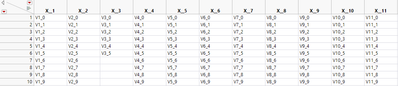
J’aimerais pouvoir supprimer toutes les colonnes (de la 4ème à la dernière colonne).
J’utilise le script suivant mais cela ne fonctionne pas correctement.
dt22 = current data table();

max = N cols(dt22);

For (i=4 , i <= max , i++,
	dt22 << delete columns(i);
);
Merci pour vos réponses !
1 ACCEPTED SOLUTION
Accepted Solutions


Super User
Solution
- Mark as New
- Bookmark
- Subscribe
- Mute
- Subscribe to RSS Feed
- Get Direct Link
- Report Inappropriate Content
Re: Script
Easiest is most likely to use list of columns to remove with Delete Columns
Names Default To Here(1);

dt = Open("$SAMPLE_DATA/Semiconductor Capability.jmp");

col_names = dt << Get Column Names("String");
Remove From(col_names, 1, 4);
wait(2); // for demo purposes
dt << Delete Columns(col_names);
If you want to use For loop, loop from the end to avoid issues with indices changing.
-Jarmo
1 REPLY 1
Super User
Solution
- Mark as New
- Bookmark
- Subscribe
- Mute
- Subscribe to RSS Feed
- Get Direct Link
- Report Inappropriate Content
Re: Script
Easiest is most likely to use list of columns to remove with Delete Columns
Names Default To Here(1);

dt = Open("$SAMPLE_DATA/Semiconductor Capability.jmp");

col_names = dt << Get Column Names("String");
Remove From(col_names, 1, 4);
wait(2); // for demo purposes
dt << Delete Columns(col_names);
If you want to use For loop, loop from the end to avoid issues with indices changing.
-Jarmo
Recommended Articles
- © 2026 JMP Statistical Discovery LLC. All Rights Reserved.
- Terms of Use
- Privacy Statement
- Contact Us