- JMP Statement Regarding Critical PHP Remote Code Execution Vulnerabilities (CVE-2026-109618, CVE-2026-109619)
- Don’t miss your chance to experience Discovery Summit Europe at our best available rate! Early bird registration through 31 Oct.
- Graph Builder Toolbar streamlines interactive graphing. Creates shortcuts on Report and GraphBuilder Helpers toolbars. Download and install the extension.
- Subscribe to RSS Feed
- Mark Topic as New
- Mark Topic as Read
- Float this Topic for Current User
- Bookmark
- Subscribe
- Mute
- Printer Friendly Page
Discussions
Solve problems, and share tips and tricks with other JMP users.- User Community
- :
- Discussions
- :
- Script editor - turn off quote completion?

- Mark as New
- Bookmark
- Subscribe
- Mute
- Subscribe to RSS Feed
- Get Direct Link
- Report Inappropriate Content
Script editor - turn off quote completion?
In JMP Pro 15.2.0, whenever I type a quote character - " - JMP inserts another. But the cursor is left at the end of the line.
After I type a quote, this is what i have (with | being the cursor position):
""|
I then have to backspace once so I can start typing the text for the string literal.
Of course, when I go to close the string literal, it happens again:
""|
I have to backspace once again to get rid of the extra ".
Maddening!


- Mark as New
- Bookmark
- Subscribe
- Mute
- Subscribe to RSS Feed
- Get Direct Link
- Report Inappropriate Content
Re: Script editor - turn off quote completion?
Go to
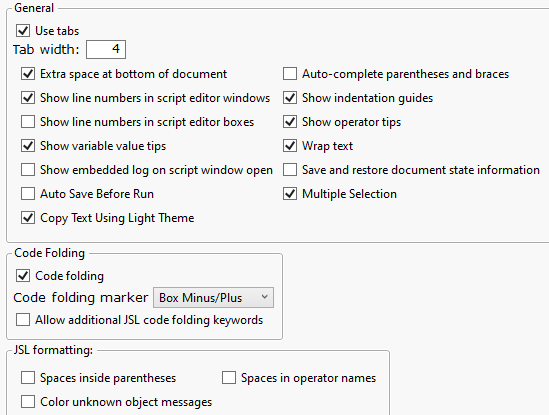
File=>Preferences=>Script Editor
and unselect the Auto Complete
- Mark as New
- Bookmark
- Subscribe
- Mute
- Subscribe to RSS Feed
- Get Direct Link
- Report Inappropriate Content
Re: Script editor - turn off quote completion?
Alas, there is no "Auto Complete" in 15.2, it is "Auto-complete parentheses and braces"
However, I don't think it's JMP -- it's this keyboard I was given.
It other applications -- including this website:
Type " once, and it doesn't appear. So you type " again, and you get "".
Typing " followed by a space, and you get "
Now the JMP JSL editor appears more hypersensitive to whatever the keyboard is doing, as just typing " once will result two "" immediately.
I tried reducing the repeat delay and repeat rate in Windows for the keyboard -- no joy.
Recommended Articles
- © 2026 JMP Statistical Discovery LLC. All Rights Reserved.
- Terms of Use
- Privacy Statement
- Contact Us