- JMP Statement Regarding Critical PHP Remote Code Execution Vulnerabilities (CVE-2026-109618, CVE-2026-109619)
- Don’t miss your chance to experience Discovery Summit Europe at our best available rate! Early bird registration through 31 Oct.
- Graph Builder Toolbar streamlines interactive graphing. Creates shortcuts on Report and GraphBuilder Helpers toolbars. Download and install the extension.
- Subscribe to RSS Feed
- Mark Topic as New
- Mark Topic as Read
- Float this Topic for Current User
- Bookmark
- Subscribe
- Mute
- Printer Friendly Page
Discussions
Solve problems, and share tips and tricks with other JMP users.- User Community
- :
- Discussions
- :
- Saving files to created folder
- Mark as New
- Bookmark
- Subscribe
- Mute
- Subscribe to RSS Feed
- Get Direct Link
- Report Inappropriate Content
Saving files to created folder
Hi!
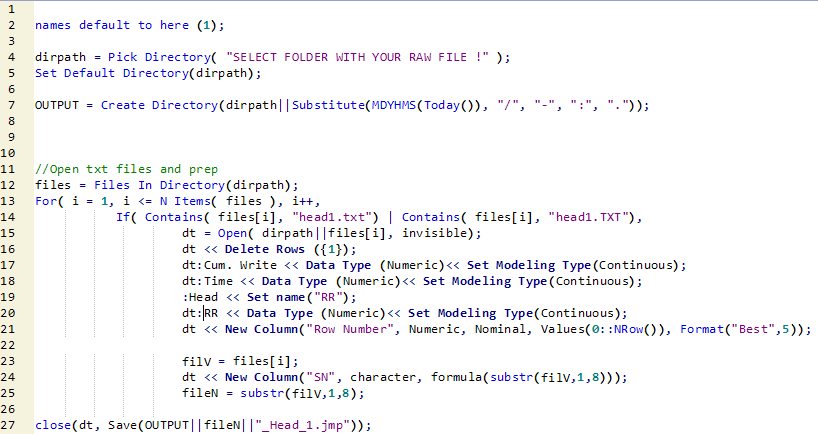
Would like to save a table to a folder created with jsl (Line #7). I have created a variable for it so that I can use it when indicating the directory I want to save my table(Line #27). However, after running the script, the variable("output") does not return the dir path but just the value "1". Thus, I could not save to my intended directory.
Am I missing someting here? Would appreciate any help.
Accepted Solutions
- Mark as New
- Bookmark
- Subscribe
- Mute
- Subscribe to RSS Feed
- Get Direct Link
- Report Inappropriate Content
Re: Saving files to created folder
Thanks much, Jim! Have added a slash to your suggestion and it worked. Appreciate the help.
OUTPUT = (dirpath||substitute(MDYHMs(Today()), "/", "-", ":", ".")||"/");


- Mark as New
- Bookmark
- Subscribe
- Mute
- Subscribe to RSS Feed
- Get Direct Link
- Report Inappropriate Content
Re: Saving files to created folder
Your variable "output" returns the success or failure of the "Create Directory" function, 1 or 0. If you want it to have the directory path as it value, use the following after creating the directory:
OUTPUT = dirpath""substitute(MDYHMS(Today()), "/", "-", ":", "."));
- Mark as New
- Bookmark
- Subscribe
- Mute
- Subscribe to RSS Feed
- Get Direct Link
- Report Inappropriate Content
Re: Saving files to created folder
Thanks much, Jim! Have added a slash to your suggestion and it worked. Appreciate the help.
OUTPUT = (dirpath||substitute(MDYHMs(Today()), "/", "-", ":", ".")||"/");
- Mark as New
- Bookmark
- Subscribe
- Mute
- Subscribe to RSS Feed
- Get Direct Link
- Report Inappropriate Content
Re: Saving files to created folder
oops, my typo....sorry
Recommended Articles
- © 2026 JMP Statistical Discovery LLC. All Rights Reserved.
- Terms of Use
- Privacy Statement
- Contact Us