- Image to Table JMP extension imports single or batch images as data tables. Useful to extract curves from pictures or convert image data to curve data to use in analyses like Functional Data Explorer. Download and install the extension.
- Subscribe to RSS Feed
- Mark Topic as New
- Mark Topic as Read
- Float this Topic for Current User
- Bookmark
- Subscribe
- Mute
- Printer Friendly Page
Discussions
Solve problems, and share tips and tricks with other JMP users.- User Community
- :
- Discussions
- :
- Re: Saving files to created folder
- Mark as New
- Bookmark
- Subscribe
- Mute
- Subscribe to RSS Feed
- Get Direct Link
- Report Inappropriate Content
Saving files to created folder
Hi!
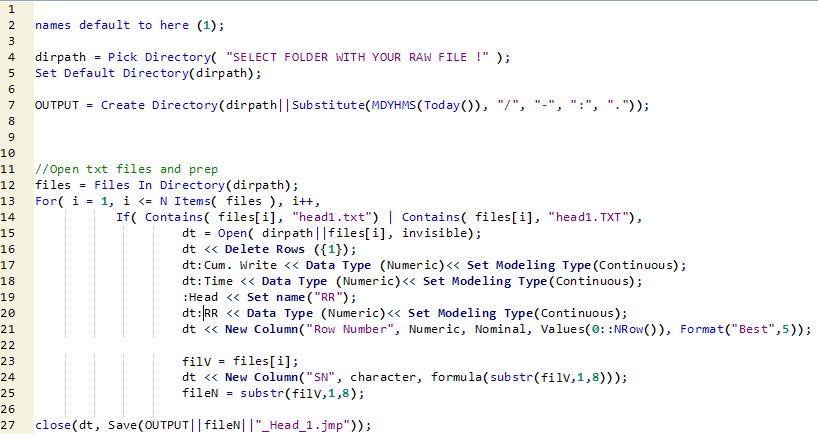
Would like to save a table to a folder created with jsl (Line #7). I have created a variable for it so that I can use it when indicating the directory I want to save my table(Line #27). However, after running the script, the variable("output") does not return the dir path but just the value "1". Thus, I could not save to my intended directory.
Am I missing someting here? Would appreciate any help.
Accepted Solutions
- Mark as New
- Bookmark
- Subscribe
- Mute
- Subscribe to RSS Feed
- Get Direct Link
- Report Inappropriate Content
Re: Saving files to created folder
Thanks much, Jim! Have added a slash to your suggestion and it worked. Appreciate the help.
OUTPUT = (dirpath||substitute(MDYHMs(Today()), "/", "-", ":", ".")||"/");


- Mark as New
- Bookmark
- Subscribe
- Mute
- Subscribe to RSS Feed
- Get Direct Link
- Report Inappropriate Content
Re: Saving files to created folder
Your variable "output" returns the success or failure of the "Create Directory" function, 1 or 0. If you want it to have the directory path as it value, use the following after creating the directory:
OUTPUT = dirpath""substitute(MDYHMS(Today()), "/", "-", ":", "."));
- Mark as New
- Bookmark
- Subscribe
- Mute
- Subscribe to RSS Feed
- Get Direct Link
- Report Inappropriate Content
Re: Saving files to created folder
Thanks much, Jim! Have added a slash to your suggestion and it worked. Appreciate the help.
OUTPUT = (dirpath||substitute(MDYHMs(Today()), "/", "-", ":", ".")||"/");
- Mark as New
- Bookmark
- Subscribe
- Mute
- Subscribe to RSS Feed
- Get Direct Link
- Report Inappropriate Content
Re: Saving files to created folder
oops, my typo....sorry
Recommended Articles
- © 2026 JMP Statistical Discovery LLC. All Rights Reserved.
- Terms of Use
- Privacy Statement
- Contact Us