cancel
Showing results for 
Show  only  | Search instead for 
Did you mean: 

Discussions

Solve problems, and share tips and tricks with other JMP users.
%3CLINGO-SUB%20id%3D%22lingo-sub-253577%22%20slang%3D%22en-US%22%20mode%3D%22NONE%22%3ESave%20Presentation%20%26gt%3B%20H%20List%20Box%20Placement%EF%BC%9A%E5%A6%82%E4%BD%95%E5%9C%A8%E6%AF%8F%E5%BC%B5%E5%B9%BB%E7%87%88%E7%89%87%E7%9A%84%E9%A0%82%E9%83%A8%E7%95%99%E5%87%BA%E4%B8%80%E4%BA%9B%E7%A9%BA%E9%96%93%EF%BC%88%E5%8F%83%E8%A6%8B%E6%B8%AC%E8%A9%A6%E8%85%B3%E6%9C%AC%EF%BC%89%EF%BC%9F%3C%2FLINGO-SUB%3E%3CLINGO-BODY%20id%3D%22lingo-body-253577%22%20slang%3D%22en-US%22%20mode%3D%22NONE%22%3E%3CP%3E%E5%97%A8%20JMP%20%E7%A4%BE%E5%8D%80%EF%BC%8C%3C%2FP%3E%3CP%3E%26nbsp%3B%3C%2FP%3E%3CP%3E%E6%88%91%E6%9C%89%E4%B8%80%E5%80%8B%E7%9C%8B%E4%BC%BC%E7%B0%A1%E5%96%AE%E4%BD%86%E7%84%A1%E6%B3%95%E8%A7%A3%E6%B1%BA%E7%9A%84%E5%95%8F%E9%A1%8C%EF%BC%9A%E6%88%91%E6%A7%8B%E5%BB%BA%E4%BA%86%E4%B8%80%E5%80%8B%E7%B0%A1%E5%96%AE%E7%9A%84%E8%85%B3%E6%9C%AC%E4%BE%86%E5%B0%87%E4%BE%86%E8%87%AA%E4%B8%8D%E5%90%8C%E6%9C%9F%E5%88%8A%E7%9A%84%E5%9C%96%E8%A1%A8%E6%94%B6%E9%9B%86%E5%88%B0%20PowerPoint%20%E6%BC%94%E7%A4%BA%E6%96%87%E7%A8%BF%E4%B8%AD%E7%9A%84%E5%96%AE%E5%BC%B5%E5%B9%BB%E7%87%88%E7%89%87%E4%B8%AD%E3%80%82%20%E5%88%B0%E7%9B%AE%E5%89%8D%E7%82%BA%E6%AD%A2%EF%BC%8C%E9%99%A4%E4%BA%86%E7%B9%AA%E5%9C%96%E9%83%BD%E5%8D%A1%E5%9C%A8%E6%AF%8F%E5%BC%B5%E5%B9%BB%E7%87%88%E7%89%87%E7%9A%84%E9%A0%82%E9%83%A8%E4%B9%8B%E5%A4%96%EF%BC%8C%E4%B8%80%E5%88%87%E9%83%BD%E5%BE%88%E5%A5%BD%20-%26gt%3B%20%E5%9C%A8%E6%88%91%E7%9A%84%20H%20%E5%88%97%E9%8C%B6%E6%A1%86%E6%88%96%E6%88%91%E7%9A%84%E9%99%A3%E5%AE%B9%E6%A1%86%E4%B8%AD%E5%8C%85%E5%90%AB%E4%B8%80%E5%80%8B%20Spacer%20%E4%BB%A5%E9%81%BF%E5%85%8D%E9%80%99%E5%80%8B%E5%95%8F%E9%A1%8C%E7%9A%84%E6%9C%80%E4%BD%B3%E6%96%B9%E6%B3%95%E6%98%AF%E4%BB%80%E9%BA%BC%EF%BC%9F%3C%2FP%3E%3CP%3E%26nbsp%3B%3C%2FP%3E%3CPRE%3E%3CCODE%20class%3D%22%20language-jsl%22%3ENames%20Default%20to%20Here%20(1)%3B%0A%0Adummy%20%3D%20H%20List%20Box%20()%3B%0A%0Adummy%20%26lt%3B%26lt%3B%20Save%20Presentation%20(%22%24Desktop%2FTEMP%20PNG%2FZ1.pptx%22%2C%20Outline%20Titles%20(Top%20Left))%3B%0A%0Ajrn1%20%3D%20Get%20Window(%22FIRST_JOURNAL%22)%3B%0Ajrn2%20%3D%20Get%20Window(%22SECOND_JOURNAL%22)%3B%0A%0AFor%20(i%20%3D%201%2C%20i%20%26lt%3B%3D5%2C%20i%2B%2B%2C%20%0A%20Plot1%20%3D%20jrn1%20%5BPictureBox(i)%5D%3B%0A%20Plot2%20%3D%20jrn2%20%5BPictureBox(i)%5D%3B%0A%0A%20MylpBox%20%3D%20Lineup%20Box%20(N%20Col%20(2))%3B%0A%20MylpBox%20%26lt%3B%26lt%3B%20Append%20(Plot1)%3B%0A%20MylpBox%20%26lt%3B%26lt%3B%20Append%20(Plot2)%3B%0A%0A%20myhlb%20%3D%20H%20List%20Box%20()%3B%0A%20myhlb%20%26lt%3B%26lt%3B%20Append%20(Spacer%20Box%20(0%2C1))%3B%20%2F%2F%20this%20does%20not%20work%0A%20myhlb%20%26lt%3B%26lt%3B%20Append%20(MylpBox%20%26lt%3B%26lt%3B%20get%20picture)%3B%0A%20myhlb%20%26lt%3B%26lt%3B%20Save%20Presentation%20(%22%24Desktop%2FTEMP%20PNG%2FZ1.pptx%22%2C%20append%2C%20Outline%20Titles%20(Top%20Left))%3B%0A%20%0A)%3B%20%3C%2FCODE%3E%3C%2FPRE%3E%3CP%3E%E6%84%9F%E8%AC%9D%E6%82%A8%E7%9A%84%E5%B9%AB%E5%8A%A9%E3%80%82%3C%2FP%3E%3CP%3ETS%3C%2FP%3E%3CP%3E%26nbsp%3B%3C%2FP%3E%3CP%3E%26nbsp%3B%3C%2FP%3E%3C%2FLINGO-BODY%3E%3CLINGO-SUB%20id%3D%22lingo-sub-253581%22%20slang%3D%22en-US%22%20mode%3D%22NONE%22%3E%E5%9B%9E%E5%A4%8D%EF%BC%9A%E4%BF%9D%E5%AD%98%E6%BC%94%E7%A4%BA%E6%96%87%E7%A8%BF%20%26gt%3B%20H%20%E5%88%97%E9%8C%B6%E6%A1%86%E6%94%BE%E7%BD%AE%EF%BC%9A%E5%A6%82%E4%BD%95%E5%9C%A8%E6%AF%8F%E5%BC%B5%E5%B9%BB%E7%87%88%E7%89%87%E7%9A%84%E9%A0%82%E9%83%A8%E7%95%99%E5%87%BA%E4%B8%80%E4%BA%9B%E7%A9%BA%E9%96%93%EF%BC%88%E5%8F%83%E8%A6%8B%E6%B8%AC%E8%A9%A6%E8%85%B3%E6%9C%AC%EF%BC%89%EF%BC%9F%3C%2FLINGO-SUB%3E%3CLINGO-BODY%20id%3D%22lingo-body-253581%22%20slang%3D%22en-US%22%20mode%3D%22NONE%22%3E%3CP%3E%E9%80%99%E6%98%AF%E4%B8%80%E5%80%8B%E7%B0%A1%E5%96%AE%E7%9A%84%E4%BE%8B%E5%AD%90%EF%BC%8C%E8%AA%AA%E6%98%8E%E6%88%91%E5%A6%82%E4%BD%95%E5%81%9A%E4%BD%A0%E6%AD%A3%E5%9C%A8%E5%B0%8B%E6%89%BE%E7%9A%84%E9%96%93%E8%B7%9D%3C%2FP%3E%0A%3CPRE%3E%3CCODE%20class%3D%22%20language-jsl%22%3ENames%20Default%20To%20Here(%201%20)%3B%0A%0AOpen(%20%22%24SAMPLE_DATA%2Fbig%20class.jmp%22%20)%3B%0A%0A%2F%2F%20Create%20the%20output%20you%20need%0Abiv%20%3D%20bivariate(%20x(%20%3Aheight%20)%2C%20y(%20%3Aweight%20)%20)%3B%0Aplot1%20%3D%20Report(%20biv%20)%3B%0A%0A%2F%2F%20Create%20a%20display%20area%20with%20the%20spacer%20box%20in%20it%20%0Avlb%20%3D%20V%20List%20Box(%20nn%20%3D%20V%20List%20Box(%20Spacer%20Box(%20size(%201%2C%2050%20)%20)%20)%20)%3B%0A%0A%2F%2F%20add%20in%20the%20part%20of%20the%20display%20that%20you%20want%20to%20be%20lower%0Ann%20%26lt%3B%26lt%3B%20append(%20plot1%5BPicture%20Box(%201%20)%5D%20)%3B%0A%0A%2F%2F%20Add%20the%20display%20area%20to%20the%20outline%20box%20that%20has%20the%20title%20%0Aplot1%5BOutline%20Box(%201%20)%5D%20%26lt%3B%26lt%3B%20prepend(%20vlb%20%26lt%3B%26lt%3B%20get%20picture%20)%3B%0A%0A%2F%2F%20Delete%20the%20area%20of%20the%20display%20that%20you%20have%20turned%0A%2F%2F%20into%20a%20picture%20object%20and%20placed%20it%20just%20below%20the%20outline%20box%0Aplot1%5BPicture%20Box(%201%20)%5D%20%26lt%3B%26lt%3B%20delete%3B%0A%0Aplot1%20%26lt%3B%26lt%3B%20Save%20Presentation(%20%22%24TEMP%2FZ1.pptx%22%2C%20append%2C%20Outline%20Titles(%20Top%20Left%20)%20)%3B%0A%0A%0AOpen(%20%22%24TEMP%2FZ1.pptx%22%20)%3B%3C%2FCODE%3E%3C%2FPRE%3E%0A%3CP%3E%3CSPAN%20class%3D%22lia-inline-image-display-wrapper%20lia-image-align-inline%22%20image-alt%3D%22space.PNG%22%20style%3D%22width%3A%20871px%3B%22%3E%3CSPAN%20class%3D%22lia-inline-image-display-wrapper%22%20image-alt%3D%22space.PNG%22%20style%3D%22width%3A%20871px%3B%22%3E%3Cspan%20class%3D%22lia-inline-image-display-wrapper%22%20image-alt%3D%22space.PNG%22%20style%3D%22width%3A%20871px%3B%22%3E%3Cimg%20src%3D%22https%3A%2F%2Fcommunity.jmp.com%2Ft5%2Fimage%2Fserverpage%2Fimage-id%2F22450i83494567A2FF1B43%2Fimage-size%2Flarge%3Fv%3Dv2%26amp%3Bpx%3D999%22%20role%3D%22button%22%20title%3D%22space.PNG%22%20alt%3D%22space.PNG%22%20%2F%3E%3C%2Fspan%3E%3C%2FSPAN%3E%3C%2FSPAN%3E%3C%2FP%3E%3C%2FLINGO-BODY%3E
Choose Language Hide Translation Bar
Thierry_S
Super User

Save Presentation > H List Box Placement: How to leave some space at the top of each slide (see testing script)?

Hi JMP Community,


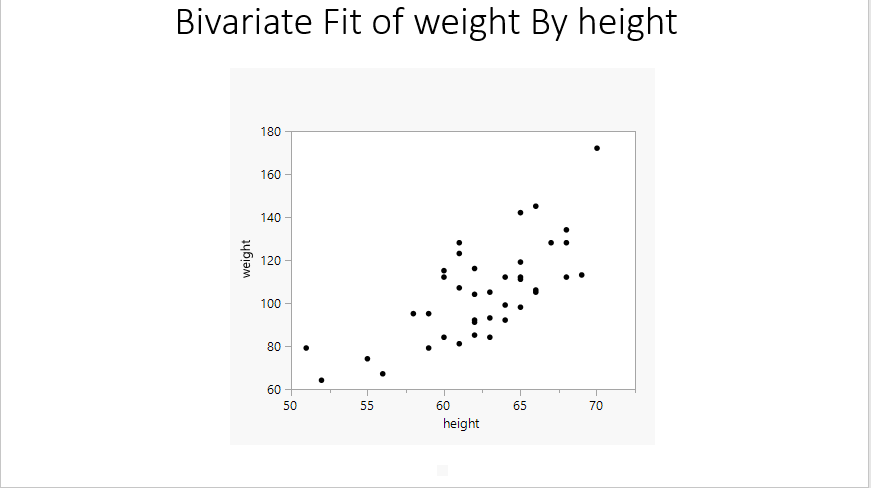
I have a apparently simple problem that I have not been able to resolve: I building a simple script to gather plots from different journals into single slides in a PowerPoint presentation. So far, things are working well except that the plots are all stuck at the top of each slide -> what is the best way to include a Spacer in my H List Box or my Lineup Box to avoid this problem?


Names Default to Here (1);

dummy = H List Box ();

dummy << Save Presentation ("$Desktop/TEMP PNG/Z1.pptx", Outline Titles (Top Left));

jrn1 = Get Window("FIRST_JOURNAL");
jrn2 = Get Window("SECOND_JOURNAL");

For (i = 1, i <=5, i++, 
	Plot1 = jrn1 [PictureBox(i)];
	Plot2 = jrn2 [PictureBox(i)];

	MylpBox = Lineup Box (N Col (2));
	MylpBox << Append (Plot1);
	MylpBox << Append (Plot2);

	myhlb = H List Box ();
	myhlb << Append (Spacer Box (0,1)); // this does not work
	myhlb << Append (MylpBox << get picture);
	myhlb << Save Presentation ("$Desktop/TEMP PNG/Z1.pptx", append, Outline Titles (Top Left));
	
);	

Thank you for your help.

TS


Thierry R. Sornasse
1 ACCEPTED SOLUTION

Accepted Solutions
txnelson
Super User

Re: Save Presentation > H List Box Placement: How to leave some space at the top of each slide (see testing script)?

Here is a simple example of how I do the spacing you are looking for

Names Default To Here( 1 );

Open( "$SAMPLE_DATA/big class.jmp" );

// Create the output you need
biv = bivariate( x( :height ), y( :weight ) );
plot1 = Report( biv );

// Create a display area with the spacer box in it 
vlb = V List Box( nn = V List Box( Spacer Box( size( 1, 50 ) ) ) );

// add in the part of the display that you want to be lower
nn << append( plot1[Picture Box( 1 )] );

// Add the display area to the outline box that has the title 
plot1[Outline Box( 1 )] << prepend( vlb << get picture );

// Delete the area of the display that you have turned
// into a picture object and placed it just below the outline box
plot1[Picture Box( 1 )] << delete;

plot1 << Save Presentation( "$TEMP/Z1.pptx", append, Outline Titles( Top Left ) );


Open( "$TEMP/Z1.pptx" );
space.PNG

Jim

View solution in original post

1 REPLY 1
txnelson
Super User

Re: Save Presentation > H List Box Placement: How to leave some space at the top of each slide (see testing script)?

Here is a simple example of how I do the spacing you are looking for

Names Default To Here( 1 );

Open( "$SAMPLE_DATA/big class.jmp" );

// Create the output you need
biv = bivariate( x( :height ), y( :weight ) );
plot1 = Report( biv );

// Create a display area with the spacer box in it 
vlb = V List Box( nn = V List Box( Spacer Box( size( 1, 50 ) ) ) );

// add in the part of the display that you want to be lower
nn << append( plot1[Picture Box( 1 )] );

// Add the display area to the outline box that has the title 
plot1[Outline Box( 1 )] << prepend( vlb << get picture );

// Delete the area of the display that you have turned
// into a picture object and placed it just below the outline box
plot1[Picture Box( 1 )] << delete;

plot1 << Save Presentation( "$TEMP/Z1.pptx", append, Outline Titles( Top Left ) );


Open( "$TEMP/Z1.pptx" );

space.PNG

Jim

Recommended Articles
