- Don’t miss your chance to experience Discovery Summit Europe at our best available rate! Early bird registration through 31 Oct.
- Graph Builder Toolbar streamlines interactive graphing. Creates shortcuts on Report and GraphBuilder Helpers toolbars. Download and install the extension.
- Subscribe to RSS Feed
- Mark Topic as New
- Mark Topic as Read
- Float this Topic for Current User
- Bookmark
- Subscribe
- Mute
- Printer Friendly Page
Discussions
Solve problems, and share tips and tricks with other JMP users.- User Community
- :
- Discussions
- :
- Regarding setting up of the JMP student application

- Mark as New
- Bookmark
- Subscribe
- Mute
- Subscribe to RSS Feed
- Get Direct Link
- Report Inappropriate Content
Regarding setting up of the JMP student application
I have downloaded the application, but everytime I click to start the app it asks to click YES to make changes in the computer and then it runs a installation wizard and when I click finish on it, the app just stops and it never opens up ?
Accepted Solutions


- Mark as New
- Bookmark
- Subscribe
- Mute
- Subscribe to RSS Feed
- Get Direct Link
- Report Inappropriate Content
Re: Regarding setting up of the JMP student application
Hi @MapReduceOcelot,
Welcome in the Community !
This file seems to be only the install launcher. If you do not have a shortcut created on your desktop, you can go to C:\Program Files\JMP, find your licence name and version folder, and from there doucle click on the JMP icon (this one is the launcher):
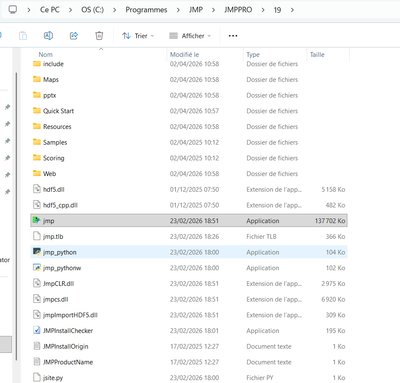
You can copy-paste this launcher in your desktop or pin it in your Windows Taskbar to find it easily and quickly.
Hope this answer will help you,
"It is not unusual for a well-designed experiment to analyze itself" (Box, Hunter and Hunter)
- Mark as New
- Bookmark
- Subscribe
- Mute
- Subscribe to RSS Feed
- Get Direct Link
- Report Inappropriate Content
Re: Regarding setting up of the JMP student application

- Mark as New
- Bookmark
- Subscribe
- Mute
- Subscribe to RSS Feed
- Get Direct Link
- Report Inappropriate Content
Re: Regarding setting up of the JMP student application
Hi @MapReduceOcelot,
Welcome in the Community !
This file seems to be only the install launcher. If you do not have a shortcut created on your desktop, you can go to C:\Program Files\JMP, find your licence name and version folder, and from there doucle click on the JMP icon (this one is the launcher):
You can copy-paste this launcher in your desktop or pin it in your Windows Taskbar to find it easily and quickly.
Hope this answer will help you,
"It is not unusual for a well-designed experiment to analyze itself" (Box, Hunter and Hunter)
- Mark as New
- Bookmark
- Subscribe
- Mute
- Subscribe to RSS Feed
- Get Direct Link
- Report Inappropriate Content
Re: Regarding setting up of the JMP student application
Thank you @Victor_G , it worked :), I am still a beginner but I want to learn this as to make my experimentation work lot more efficeint :)
Recommended Articles
- © 2026 JMP Statistical Discovery LLC. All Rights Reserved.
- Terms of Use
- Privacy Statement
- Contact Us