- JMP will suspend normal business operations for our Winter Holiday beginning on Wednesday, Dec. 24, 2025, at 5:00 p.m. ET (2:00 p.m. ET for JMP Accounts Receivable).
Regular business hours will resume at 9:00 a.m. EST on Friday, Jan. 2, 2026. - We’re retiring the File Exchange at the end of this year. The JMP Marketplace is now your destination for add-ins and extensions.
- Subscribe to RSS Feed
- Mark Topic as New
- Mark Topic as Read
- Float this Topic for Current User
- Bookmark
- Subscribe
- Mute
- Printer Friendly Page
Discussions
Solve problems, and share tips and tricks with other JMP users.- JMP User Community
- :
- Discussions
- :
- Random Uniform() keeps giving me the same number

- Mark as New
- Bookmark
- Subscribe
- Mute
- Subscribe to RSS Feed
- Get Direct Link
- Report Inappropriate Content
Random Uniform() keeps giving me the same number
My script is returning random values from Random Uniform(), until I write some results to a data table. When I write to the table Random Uniform() always returns the same value. See comments in script below. Would appreciate any help.
Many thanks,
John
names default to here(1);
clear log();
include("defineVectorClass.jsl");
dtChaos = open("chaos.jmp");
proportionToCorner = 0.5;
A = new object(Vector(column(dtChaos,"x")[1],column(dtChaos,"y")[1]));
B = new object(Vector(column(dtChaos,"x")[2],column(dtChaos,"y")[2]));
C = new object(Vector(column(dtChaos,"x")[3],column(dtChaos,"y")[3]));
triangle = {A,B,C};

dtChaos<<Graph Builder(
	Size( 534, 454 ),
	Show Control Panel( 0 ),
	Show Legend( 0 ),
	Variables( X( :X ), Y( :Y ) ),
	Elements( Points( X, Y, Legend( 3 ) ) )
);

current = new object(Vector(column(dtChaos,"x")[4],column(dtChaos,"y")[4]));
wait(2);
for(i=1,i<1000,i++,
	bill = Random Uniform( 0, 3 );//this is where I am generating random value
	show(randomuniform());
	show(bill);
	corner = triangle[Ceiling( bill )];
	show(corner);
	cornerTemp = corner<<clone;
	show(cornerTemp);
	currentTemp = current<<clone;
	show(currentTemp);
	cornerTemp:sub(currentTemp);
	show(cornerTemp);
	cornerTemp:mult(proportionToCorner);
	show(cornerTemp);
	current:add(cornerTemp);
	show(current);
	newX = current:x;
	newY = current:y;
	column(dtChaos,"X")[1+4]=newX;//the values generated above are random
	column(dtChaos,"Y")[1+4]=newY;//unless these two lines are uncommented, then I get the same value from random uniform()

	wait(2);


);Accepted Solutions


- Mark as New
- Bookmark
- Subscribe
- Mute
- Subscribe to RSS Feed
- Get Direct Link
- Report Inappropriate Content
Re: Random Uniform() keeps giving me the same number
(Thanks @EvanMcCorkle and @danschikore for puzzling this out before I got in this morning!)
It is a bug in JMP's marker drawing; the easiest way to get your JSL going is to remove the Label state and change it to a color.
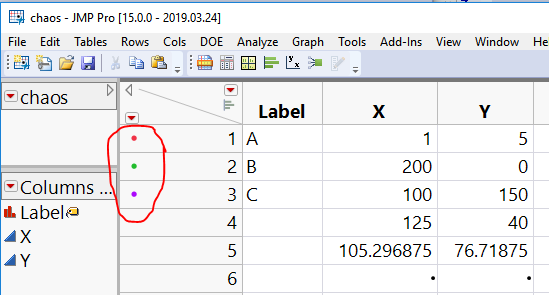
The problem is with the code that is positioning the labels around the data points; it needs a repeatable sequence of random numbers to juggle colliding labels, but it isn't keeping the reset to itself...as you noticed.
Another approach that keeps the labels needs a workaround in your JSL:
	r = Random Seed State(); // the following statements make the graph update...

	newX = current:x;
	newY = current:y;
	column(dtChaos,"X")[1+4]=newX;
	column(dtChaos,"Y")[1+4]=newY;
	wait(2);

	Random Seed State(r);
this captures and restores the random state before and after the markers are drawn. The combination of changing a value in the table and the wait triggers the graph to update.
Thanks for the test case; a proper fix is underway.
- Mark as New
- Bookmark
- Subscribe
- Mute
- Subscribe to RSS Feed
- Get Direct Link
- Report Inappropriate Content
Re: Random Uniform() keeps giving me the same number
- Mark as New
- Bookmark
- Subscribe
- Mute
- Subscribe to RSS Feed
- Get Direct Link
- Report Inappropriate Content
Re: Random Uniform() keeps giving me the same number
(Thanks @EvanMcCorkle and @danschikore for puzzling this out before I got in this morning!)
It is a bug in JMP's marker drawing; the easiest way to get your JSL going is to remove the Label state and change it to a color.
The problem is with the code that is positioning the labels around the data points; it needs a repeatable sequence of random numbers to juggle colliding labels, but it isn't keeping the reset to itself...as you noticed.
Another approach that keeps the labels needs a workaround in your JSL:
	r = Random Seed State(); // the following statements make the graph update...

	newX = current:x;
	newY = current:y;
	column(dtChaos,"X")[1+4]=newX;
	column(dtChaos,"Y")[1+4]=newY;
	wait(2);

	Random Seed State(r);
this captures and restores the random state before and after the markers are drawn. The combination of changing a value in the table and the wait triggers the graph to update.
Thanks for the test case; a proper fix is underway.


- Mark as New
- Bookmark
- Subscribe
- Mute
- Subscribe to RSS Feed
- Get Direct Link
- Report Inappropriate Content
Re: Random Uniform() keeps giving me the same number
Another work-around is to turn off the Hide Overlapping Labels preference in the Graphs preferences group. That appears to be the source of the inteference with the random stream.
- Mark as New
- Bookmark
- Subscribe
- Mute
- Subscribe to RSS Feed
- Get Direct Link
- Report Inappropriate Content
Re: Random Uniform() keeps giving me the same number
Thanks Xan
- Mark as New
- Bookmark
- Subscribe
- Mute
- Subscribe to RSS Feed
- Get Direct Link
- Report Inappropriate Content
Re: Random Uniform() keeps giving me the same number
Thanks for the quick response. Labels were not important for the simulation so I just turned them off like you suggested and everything is working great.
Recommended Articles
- © 2026 JMP Statistical Discovery LLC. All Rights Reserved.
- Terms of Use
- Privacy Statement
- Contact Us