- JMP will suspend normal business operations for our Winter Holiday beginning on Wednesday, Dec. 24, 2025, at 5:00 p.m. ET (2:00 p.m. ET for JMP Accounts Receivable).
Regular business hours will resume at 9:00 a.m. EST on Friday, Jan. 2, 2026. - We’re retiring the File Exchange at the end of this year. The JMP Marketplace is now your destination for add-ins and extensions.
- Subscribe to RSS Feed
- Mark Topic as New
- Mark Topic as Read
- Float this Topic for Current User
- Bookmark
- Subscribe
- Mute
- Printer Friendly Page
Discussions
Solve problems, and share tips and tricks with other JMP users.- JMP User Community
- :
- Discussions
- :
- Process Variable Drift or Creep Detection

- Mark as New
- Bookmark
- Subscribe
- Mute
- Subscribe to RSS Feed
- Get Direct Link
- Report Inappropriate Content
Process Variable Drift or Creep Detection
Is there any methods available in JMP to detect the drift/creep/gradient for a large set of process variables over a set period of time. The user would then set the threshold on what they would consider the gradient to be too high or too low and needs to be flagged.
Currently I am aware that the process screening tool has a Drift Summaries Option that can be enabled which shows the mean Upshift, Downshift and Absolute Shift. In this case, I am looking for the Overall Drift (whether positive or negative), however Absolute shift (from what I see) is calculated as [Abs(Upshift) + Abs(Downshift)]. This does not tell me whether overall it has drifted up or down. Technically, I'm looking for Abs(Upshift + Downshift [negative value]).
My current workaround is to write a screen that converts the process screening result into a data table and redoing the calculation. However, this means that the calculated values are disjointed from the Processing Screening platform which has a bunch of useful features such as Quick Graph/Quick Control Charts etc. Also, it doesn't work well with Local Data Filter.
Would really appreciate if anyone else has any ideas how I can approach this. Thanks!
Accepted Solutions


- Mark as New
- Bookmark
- Subscribe
- Mute
- Subscribe to RSS Feed
- Get Direct Link
- Report Inappropriate Content
Re: Process Variable Drift or Creep Detection
I am still working with JMP Support to figure out why the table sorting is applied to values read from the table but not those written to the table. For now here is a crude work around:
names default to here(1);
dt = Open("$Sample_Data/iris.jmp");

//Open Process Screening with drift summaries
ps = dt << Process Screening(
       Y( :Sepal length, :Sepal width, :Petal length, :Petal width ),
       Control Chart Type( "Indiv and MR" ),
       Drift Summaries( 1 )
);

//Add a dummy column and use set values to reset the table order
ncb = (ps << XPath( "//TableBox" )) << Append( newCol = NumberColBox("Delete Me", {}));
newCol << Set Values({});
newCol << Delete Box;

//calculate the combined drift
UpDrift = (ps << XPath( "//NumberColBox[NumberColBoxHeader[text()='Mean Up Drift']]" ))[1] << Get;
DownDrift = (ps << XPath( "//NumberColBox[NumberColBoxHeader[text()='Mean Down Drift']]" ))[1] << Get;
CombinedDrift = Abs( Matrix(UpDrift) + Matrix(DownDrift) );
ncb = (ps << XPath( "//TableBox" )) << Append( newCol = NumberColBox("Combined Drift", CombinedDrift));- Mark as New
- Bookmark
- Subscribe
- Mute
- Subscribe to RSS Feed
- Get Direct Link
- Report Inappropriate Content
Re: Process Variable Drift or Creep Detection
You could add a column to the Process Screening table:
names default to here(1);
dt = Open("$Sample_Data/iris.jmp");

//Open Process Screening with drift summaries
ps = dt << Process Screening(
	Y( :Sepal length, :Sepal width, :Petal length, :Petal width ),
	Control Chart Type( "Indiv and MR" ),
	Drift Summaries( 1 )
);

//calculate the combined drift
UpDrift = (ps << XPath( "//NumberColBox[NumberColBoxHeader[text()='Mean Up Drift']]" ))[1] << Get;
DownDrift = (ps << XPath( "//NumberColBox[NumberColBoxHeader[text()='Mean Down Drift']]" ))[1] << Get;
CombinedDrift = Abs( Matrix(UpDrift) + Matrix(DownDrift) );

//Add column to table with Combined Drift
ncb = (ps << XPath( "//TableBox" )) << Append( NumberColBox("Combined Drift", CombinedDrift) );
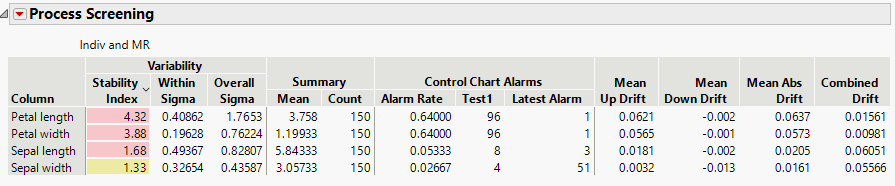
You should see a new 'Combined Drift' column on the right:
- Mark as New
- Bookmark
- Subscribe
- Mute
- Subscribe to RSS Feed
- Get Direct Link
- Report Inappropriate Content
Re: Process Variable Drift or Creep Detection
Thank you so much for getting back to me on this. I think this is almost a complete solution but it seems that the calculated values that we’re appending to the original process screening table box do not really match to the appropriate parameters/column. Wondering if there’s a way we can append the column name to the matrix that is generated in this script so that it can be matched when we append the values.
Also, wondering if it’s possible for us to make the column permanent. When we apply a local data filter and it does a recalc, the column disappears. Though a quick workaround probably just be running the data filter on the data table and rerunning this script.
- Mark as New
- Bookmark
- Subscribe
- Mute
- Subscribe to RSS Feed
- Get Direct Link
- Report Inappropriate Content
Re: Process Variable Drift or Creep Detection
I'm not sure what you mean about the calculated values not matching. Can you give an example of the discrepency?
I agree with your work-around in your second paragraph, recalculating after an update from a data filter might be the easiest path forward.
- Mark as New
- Bookmark
- Subscribe
- Mute
- Subscribe to RSS Feed
- Get Direct Link
- Report Inappropriate Content
Re: Process Variable Drift or Creep Detection
In terms of the discrepancy, we’ll take your screenshot for an example, looking at the values in the combined drift column, you’ll notice that when we added up the mean updrift and mean downdrift, the values don’t match. I think the math is done correctly between the two matrixes but when the values are appended back, there may be a misalignment with the order of the column parameters in the original process screening table.
Hoping this clarifies it.
- Mark as New
- Bookmark
- Subscribe
- Mute
- Subscribe to RSS Feed
- Get Direct Link
- Report Inappropriate Content
Re: Process Variable Drift or Creep Detection
You're right and I apologize for not catching the incorrect order earlier. I've used this method several times and haven't run into that issue yet (I just went back and re-checked a few scripts of my own). For some reason pulling data out of the table seems to use the sorted order of the table, but when writing data the rows go back in a different order. I will work to resolve that.
- Mark as New
- Bookmark
- Subscribe
- Mute
- Subscribe to RSS Feed
- Get Direct Link
- Report Inappropriate Content
Re: Process Variable Drift or Creep Detection
I am still working with JMP Support to figure out why the table sorting is applied to values read from the table but not those written to the table. For now here is a crude work around:
names default to here(1);
dt = Open("$Sample_Data/iris.jmp");

//Open Process Screening with drift summaries
ps = dt << Process Screening(
       Y( :Sepal length, :Sepal width, :Petal length, :Petal width ),
       Control Chart Type( "Indiv and MR" ),
       Drift Summaries( 1 )
);

//Add a dummy column and use set values to reset the table order
ncb = (ps << XPath( "//TableBox" )) << Append( newCol = NumberColBox("Delete Me", {}));
newCol << Set Values({});
newCol << Delete Box;

//calculate the combined drift
UpDrift = (ps << XPath( "//NumberColBox[NumberColBoxHeader[text()='Mean Up Drift']]" ))[1] << Get;
DownDrift = (ps << XPath( "//NumberColBox[NumberColBoxHeader[text()='Mean Down Drift']]" ))[1] << Get;
CombinedDrift = Abs( Matrix(UpDrift) + Matrix(DownDrift) );
ncb = (ps << XPath( "//TableBox" )) << Append( newCol = NumberColBox("Combined Drift", CombinedDrift));
- Mark as New
- Bookmark
- Subscribe
- Mute
- Subscribe to RSS Feed
- Get Direct Link
- Report Inappropriate Content
Re: Process Variable Drift or Creep Detection
Hi,
When going through this post, I was wondering if a solution has been found to address the order of the appended column (Combined Drift)?
Thank you.
- Mark as New
- Bookmark
- Subscribe
- Mute
- Subscribe to RSS Feed
- Get Direct Link
- Report Inappropriate Content
Re: Process Variable Drift or Creep Detection
I just confirmed with JMP Support that they have not solved the root issue yet, but as far as I know the work around in the accepted solution does solve the problem.


- Mark as New
- Bookmark
- Subscribe
- Mute
- Subscribe to RSS Feed
- Get Direct Link
- Report Inappropriate Content
Re: Process Variable Drift or Creep Detection
For the issue regarding the sort order of the appended column, i can confirm that this issue will be addressed in the next major release of JMP, which will be available in Fall of 2022. The accepted solution is a good workaround for now.
Recommended Articles
- © 2025 JMP Statistical Discovery LLC. All Rights Reserved.
- Terms of Use
- Privacy Statement
- Contact Us