Turn on suggestions
Auto-suggest helps you quickly narrow down your search results by suggesting possible matches as you type.
- Don’t miss your chance to experience Discovery Summit Europe at our best available rate! Early bird registration through 31 Oct.
- Graph Builder Toolbar streamlines interactive graphing. Creates shortcuts on Report and GraphBuilder Helpers toolbars. Download and install the extension.
Options
- Subscribe to RSS Feed
- Mark Topic as New
- Mark Topic as Read
- Float this Topic for Current User
- Bookmark
- Subscribe
- Mute
- Printer Friendly Page
Discussions
Solve problems, and share tips and tricks with other JMP users.- User Community
- :
- Discussions
- :
- Open function with relative file location

Level IV
- Mark as New
- Bookmark
- Subscribe
- Mute
- Subscribe to RSS Feed
- Get Direct Link
- Report Inappropriate Content
Open function with relative file location
Sep 2, 2023 03:49 AM
(2459 views)
I need to use the open function with a relative file location. The following code finds the location, and stores the path to the file in the variable RelativeLocation
relativePath = Get Default Directory();
UPtwo = Left( relativePath, Contains( relativePath, "/Folder/", -2 ) );
RelativeLocation = UPtwo || "Excel_file.xlsx";
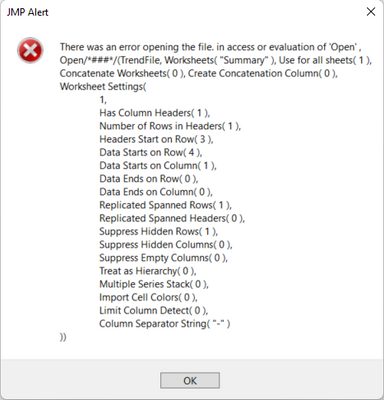
However, when using the Open function with the RelativeLocation variable, the script crashes. Here is an example:
Open(RelativeLocation,
	Worksheets( "Summary" ),
	Use for all sheets( 1 ),
	Concatenate Worksheets( 0 ),
	Create Concatenation Column( 0 ),
	Worksheet Settings(
		1,
		Has Column Headers( 1 ),
		Number of Rows in Headers( 1 ),
		Headers Start on Row( 3 ),
		Data Starts on Row( 4 ),
		Data Starts on Column( 1 ),
		Data Ends on Row( 0 ),
		Data Ends on Column( 0 ),
		Replicated Spanned Rows( 1 ),
		Replicated Spanned Headers( 0 ),
		Suppress Hidden Rows( 1 ),
		Suppress Hidden Columns( 0 ),
		Suppress Empty Columns( 0 ),
		Treat as Hierarchy( 0 ),
		Multiple Series Stack( 0 ),
		Import Cell Colors( 0 ),
		Limit Column Detect( 0 ),
		Column Separator String( "-" )
	)
);
This gives the following error message:
1 ACCEPTED SOLUTION
Accepted Solutions


Super User (Alumni)
Solution
- Mark as New
- Bookmark
- Subscribe
- Mute
- Subscribe to RSS Feed
- Get Direct Link
- Report Inappropriate Content
Re: Open function with relative file location
Perhaps start off by putting in a couple of diagnostic lines prior to doing the open:
show( RelativeLocation );
show( FileExists(RelativeLocation) );
-Dave
2 REPLIES 2
Super User (Alumni)
Solution
- Mark as New
- Bookmark
- Subscribe
- Mute
- Subscribe to RSS Feed
- Get Direct Link
- Report Inappropriate Content
Re: Open function with relative file location
Perhaps start off by putting in a couple of diagnostic lines prior to doing the open:
show( RelativeLocation );
show( FileExists(RelativeLocation) );
-Dave
Level IV
- Mark as New
- Bookmark
- Subscribe
- Mute
- Subscribe to RSS Feed
- Get Direct Link
- Report Inappropriate Content
Re: Open function with relative file location
Thanks a lot, @David_Burnham !
show( FileExists(RelativeLocation) );gave a negative answer, and
show( RelativeLocation );indicated that the path was incorrect. So, after fixing the fault, everything works as intended!
Recommended Articles
- © 2026 JMP Statistical Discovery LLC. All Rights Reserved.
- Terms of Use
- Privacy Statement
- Contact Us