- JMP Statement Regarding Critical PHP Remote Code Execution Vulnerabilities (CVE-2026-109618, CVE-2026-109619)
- Don’t miss your chance to experience Discovery Summit Europe at our best available rate! Early bird registration through 31 Oct.
- Graph Builder Toolbar streamlines interactive graphing. Creates shortcuts on Report and GraphBuilder Helpers toolbars. Download and install the extension.
- Subscribe to RSS Feed
- Mark Topic as New
- Mark Topic as Read
- Float this Topic for Current User
- Bookmark
- Subscribe
- Mute
- Printer Friendly Page
Discussions
Solve problems, and share tips and tricks with other JMP users.- User Community
- :
- Discussions
- :
- Normal Distribution

- Mark as New
- Bookmark
- Subscribe
- Mute
- Subscribe to RSS Feed
- Get Direct Link
- Report Inappropriate Content
Normal Distribution
Hello!
I want to analysis the normal distribution using JMP, so I need the add-in. I am using the latest version of JMP.


- Mark as New
- Bookmark
- Subscribe
- Mute
- Subscribe to RSS Feed
- Get Direct Link
- Report Inappropriate Content
Re: Normal Distribution
Welcome to the JMP Community.
Analysis of a Normal Distribution is available in base JMP using the Distribution Platform
Analyze=>Distribution


- Mark as New
- Bookmark
- Subscribe
- Mute
- Subscribe to RSS Feed
- Get Direct Link
- Report Inappropriate Content
Re: Normal Distribution
If you need to find a feature of JMP, you can also use Search JMP (JMP17 ->). Open your table, go to Help/Search JMP

Try to guess a search term (Normal is good starting point), pick something which could fit (Fit Normal)
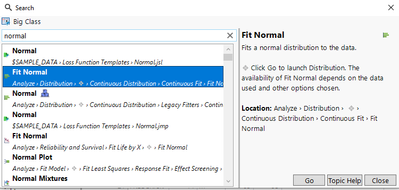
and press Go.
It will open the correct platform for you to input in columns (and on the top guide where you can do the analysis)

By pressing OK you launch the analysis and the path is pre-configured for you, so in this case you will get normal distribution fitted to your data



- Mark as New
- Bookmark
- Subscribe
- Mute
- Subscribe to RSS Feed
- Get Direct Link
- Report Inappropriate Content
Re: Normal Distribution
You do not need an add-in. Just use the menu Analyze>Distribution.

- Mark as New
- Bookmark
- Subscribe
- Mute
- Subscribe to RSS Feed
- Get Direct Link
- Report Inappropriate Content
Re: Normal Distribution
Further details on assessing Normality via Shapiro-Wilk W test can be found in this introductory video by @jules :
https://www.jmp.com/en_us/learning-library/topics/probabilities-and-distributions/assessing-normalit...
with a current version of Jmp, Anderson Darling A² can be calculated as well via the Distribution Platform:

Open( "$SAMPLE_DATA/Car Physical Data.jmp" );
Distribution(
	Continuous Distribution(
		Column( :Weight ),
		Horizontal Layout( 1 ),
		Vertical( 0 ),
		Process Capability( 0 ),
		Normal Quantile Plot( 1 ),
		Fit Normal( Goodness of Fit( 1 ) )
	),
	Continuous Distribution(
		Column( :Displacement ),
		Horizontal Layout( 1 ),
		Vertical( 0 ),
		Process Capability( 0 ),
		Normal Quantile Plot( 1 ),
		Fit Normal( Goodness of Fit( 1 ) )
	)
);
unfortunately:

so let's go to Wikipedia:
https://en.wikipedia.org/wiki/Anderson%E2%80%93Darling_test
- Mark as New
- Bookmark
- Subscribe
- Mute
- Subscribe to RSS Feed
- Get Direct Link
- Report Inappropriate Content
Re: Normal Distribution
it this "the addin" you were referring to?
Anderson-Darling Normality Test
Recommended Articles
- © 2026 JMP Statistical Discovery LLC. All Rights Reserved.
- Terms of Use
- Privacy Statement
- Contact Us