- Discovery Summit 2026: Early User Edition - September 23-24.Register. It's free.
- Graph Builder Toolbar streamlines interactive graphing. Creates shortcuts on Report and GraphBuilder Helpers toolbars. Download and install the extension.
- Subscribe to RSS Feed
- Mark Topic as New
- Mark Topic as Read
- Float this Topic for Current User
- Bookmark
- Subscribe
- Mute
- Printer Friendly Page
Discussions
Solve problems, and share tips and tricks with other JMP users.- User Community
- :
- Discussions
- :
- Re: Moving average and EWMA

- Mark as New
- Bookmark
- Subscribe
- Mute
- Subscribe to RSS Feed
- Get Direct Link
- Report Inappropriate Content
Moving average and EWMA
Hi
Given a column with numerical values I would like to calculate the MA in this way:
MAi=1/N*SUM(j=i-1 to j=i-w) Xj
where w is the window width, i-1 the starting element and i-w the last one. Les't do an example with w=2
t x
-------------
1 x1
2 x2
3 x3 …..
4 x4 MA=(X3+X2)/2
5 x5 MA=(X4+X3)/2
6 x6 …..
7 x7
By using the New formula column-->Row feature
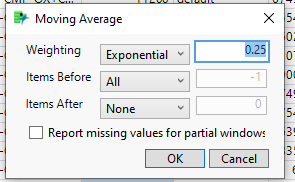
I set the Weighting to "equal". What about the Items Before and Items after to obtain what I reported before?
Same question if I want to use the Exponential weight.
Thanks Felice


- Mark as New
- Bookmark
- Subscribe
- Mute
- Subscribe to RSS Feed
- Get Direct Link
- Report Inappropriate Content
Re: Moving average and EWMA
- Mark as New
- Bookmark
- Subscribe
- Mute
- Subscribe to RSS Feed
- Get Direct Link
- Report Inappropriate Content
Re: Moving average and EWMA
Hi Jim w is not dependent on the number of column.
Thanks Felice


- Mark as New
- Bookmark
- Subscribe
- Mute
- Subscribe to RSS Feed
- Get Direct Link
- Report Inappropriate Content
Re: Moving average and EWMA
Hi,
if it is a simple moving average, you can easily compute it by using the Lag() function in Formula Editor.
Here below an example on how to calculate the moving average of previous 3 rows for Dissolution column in Tablet Production sample data table:
// Open Data Table: Tablet Production.jmp
// → Data Table( "Tablet Production" )
Open( "$SAMPLE_DATA/Tablet Production.jmp" );


// New column: Dissolution_MA3
Data Table( "Tablet Production" ) << New Column( "Dissolution_MA3",
	Numeric,
	"Continuous",
	Format( "Best", 12 ),
	Formula(
		(Lag( :Dissolution, 1 ) + Lag( :Dissolution, 2 ) + Lag( :Dissolution, 3 ))
		 / 3
	)
);


// Report snapshot: Tablet Production - Graph Builder
Data Table( "Tablet Production" ) << Graph Builder(
	Size( 799, 452 ),
	Show Control Panel( 0 ),
	Variables( Y( :Dissolution ), Y( :Dissolution_MA3, Position( 1 ) ) ),
	Elements( Line( Y( 1 ), Y( 2 ), Legend( 6 ), Row order( 1 ) ) )
);
Cheers, Massimo

- Mark as New
- Bookmark
- Subscribe
- Mute
- Subscribe to RSS Feed
- Get Direct Link
- Report Inappropriate Content
Re: Moving average and EWMA
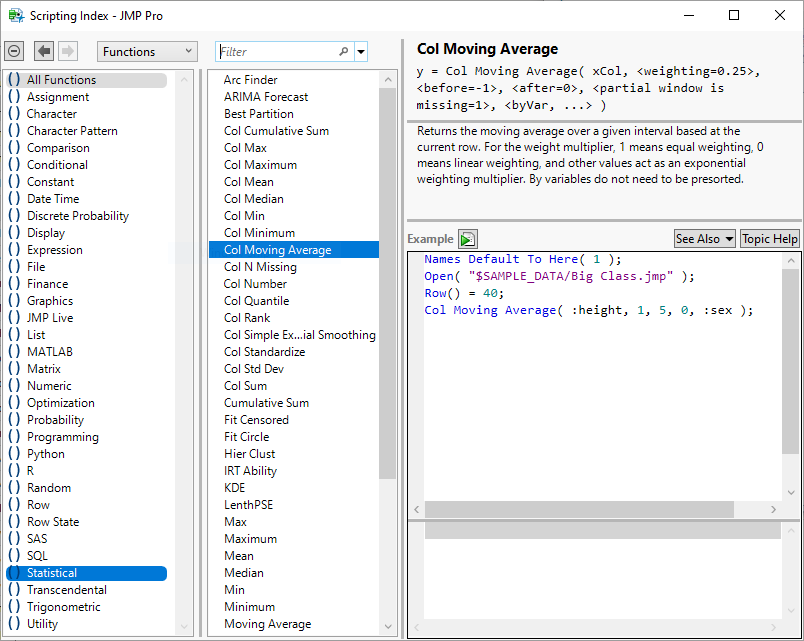
See this function in the documentation and Scripting Index:


- Mark as New
- Bookmark
- Subscribe
- Mute
- Subscribe to RSS Feed
- Get Direct Link
- Report Inappropriate Content
Re: Moving average and EWMA
It looks like you want equal weighting with 1 row before and 0 after.
- Mark as New
- Bookmark
- Subscribe
- Mute
- Subscribe to RSS Feed
- Get Direct Link
- Report Inappropriate Content
Re: Moving average and EWMA
Let me do an example
Let's suppose to have the sequence 1 2 3 4 5 6 7 8 9
Starting from 5 I would like to do do the average of previous w rows. For w=3
(2+3+4)/3
and not
(3+4+5)/3
Rgds Felice
- Mark as New
- Bookmark
- Subscribe
- Mute
- Subscribe to RSS Feed
- Get Direct Link
- Report Inappropriate Content
Re: Moving average and EWMA

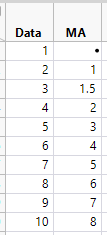
For your example:
New Table( "MA Example",
	Add Rows( 10 ),
	New Column( "Data",
		Numeric,
		"Continuous",
		Format( "Best", 12 ),
		Set Values( [1, 2, 3, 4, 5, 6, 7, 8, 9, 10] )
	),
	New Column( "MA",
		Numeric,
		"Continuous",
		Format( "Best", 12 ),
		Formula( Lag( Col Moving Average( :Data, 1, 2, 0 ) ) )
	)
)
Gives the expected result:
Recommended Articles
- © 2026 JMP Statistical Discovery LLC. All Rights Reserved.
- Terms of Use
- Privacy Statement
- Contact Us