Turn on suggestions
Auto-suggest helps you quickly narrow down your search results by suggesting possible matches as you type.
- Discovery Summit 2026: Early User Edition - September 23-24.Register. It's free.
- Graph Builder Toolbar streamlines interactive graphing. Creates shortcuts on Report and GraphBuilder Helpers toolbars. Download and install the extension.
Options
- Subscribe to RSS Feed
- Mark Topic as New
- Mark Topic as Read
- Float this Topic for Current User
- Bookmark
- Subscribe
- Mute
- Printer Friendly Page
Discussions
Solve problems, and share tips and tricks with other JMP users.- User Community
- :
- Discussions
- :
- Re: Mosaic Graph cell sizing

Level II
- Mark as New
- Bookmark
- Subscribe
- Mute
- Subscribe to RSS Feed
- Get Direct Link
- Report Inappropriate Content
Mosaic Graph cell sizing
Created:
Mar 24, 2022 11:57 AM
| Last Modified: Jun 11, 2023 4:23 AM
(1744 views)
I am building mosaic graphs and the cells are sized based on the count of each value in the graph. I am wondering if there is a way in jsl to force or fake the count to a set value? I am just trying to make the cells be the same size or show some symmetry.
Thank you,
Ray
1 ACCEPTED SOLUTION
Accepted Solutions


Super User (Alumni)
Solution
- Mark as New
- Bookmark
- Subscribe
- Mute
- Subscribe to RSS Feed
- Get Direct Link
- Report Inappropriate Content
Re: Mosaic Graph cell sizing
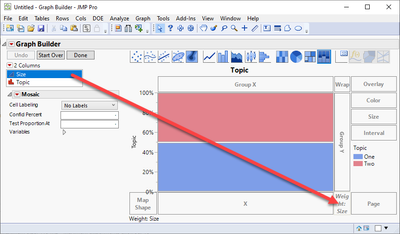
You can use frequency, it is in the bottom right corner of the graph builder. Here the sum of frequency for one and two are the same even though they do not have the same number of rows:
Names default to here(1);

dt = New Table( "Untitled",
	Add Rows( 3 ),
	Set Header Height( 46 ),
	New Column( "Size",
		Numeric,
		"Continuous",
		Format( "Best", 12 ),
		Set Values( [1, 0.5, 0.5] )
	),
	New Column( "Topic", Character, "Nominal", Set Values( {"One", "Two", "Two"} ) )
)

dt << Graph Builder(
	Size( 440, 239 ),
	Show Control Panel( 0 ),
	Variables( Y( :Topic ), Frequency( :Size ) ),
	Elements( Mosaic( Y, Legend( 5 ) ) )
);
1 REPLY 1
Super User (Alumni)
Solution
- Mark as New
- Bookmark
- Subscribe
- Mute
- Subscribe to RSS Feed
- Get Direct Link
- Report Inappropriate Content
Re: Mosaic Graph cell sizing
You can use frequency, it is in the bottom right corner of the graph builder. Here the sum of frequency for one and two are the same even though they do not have the same number of rows:
Names default to here(1);

dt = New Table( "Untitled",
	Add Rows( 3 ),
	Set Header Height( 46 ),
	New Column( "Size",
		Numeric,
		"Continuous",
		Format( "Best", 12 ),
		Set Values( [1, 0.5, 0.5] )
	),
	New Column( "Topic", Character, "Nominal", Set Values( {"One", "Two", "Two"} ) )
)

dt << Graph Builder(
	Size( 440, 239 ),
	Show Control Panel( 0 ),
	Variables( Y( :Topic ), Frequency( :Size ) ),
	Elements( Mosaic( Y, Legend( 5 ) ) )
);
Recommended Articles
- © 2026 JMP Statistical Discovery LLC. All Rights Reserved.
- Terms of Use
- Privacy Statement
- Contact Us