- Discovery Summit 2026: Early User Edition - September 23-24.Register. It's free.
- Graph Builder Toolbar streamlines interactive graphing. Creates shortcuts on Report and GraphBuilder Helpers toolbars. Download and install the extension.
- Subscribe to RSS Feed
- Mark Topic as New
- Mark Topic as Read
- Float this Topic for Current User
- Bookmark
- Subscribe
- Mute
- Printer Friendly Page
Discussions
Solve problems, and share tips and tricks with other JMP users.- User Community
- :
- Discussions
- :
- Re: Modify Pie chart to show wedges in descending order of %

- Mark as New
- Bookmark
- Subscribe
- Mute
- Subscribe to RSS Feed
- Get Direct Link
- Report Inappropriate Content
Modify Pie chart to show wedges in descending order of %
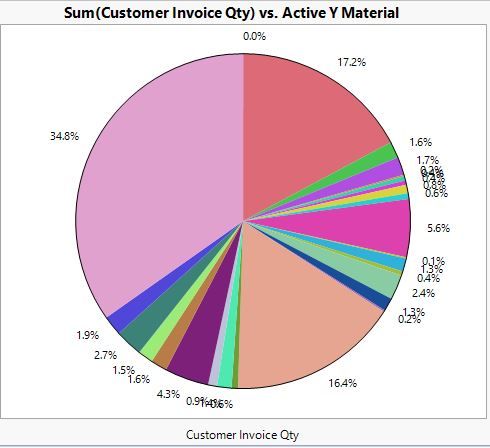
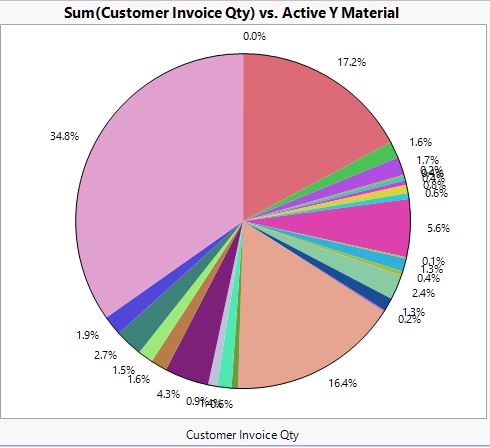
I have been able to generate a pie chart based on some sales data. Is there a way to display the wedges in descending order? Wedges are representative of sums of individual parts into grouped into a higher level category. See cahart below.
Accepted Solutions


- Mark as New
- Bookmark
- Subscribe
- Mute
- Subscribe to RSS Feed
- Get Direct Link
- Report Inappropriate Content
Re: Modify Pie chart to show wedges in descending order of %
I suggest you familiarize youself with the column property "Row Level Ordering". That may be able to be used.


- Mark as New
- Bookmark
- Subscribe
- Mute
- Subscribe to RSS Feed
- Get Direct Link
- Report Inappropriate Content
Re: Modify Pie chart to show wedges in descending order of %
Did you try right-clicking on the Customer Invoice Qty axis and select Order By command?
- Mark as New
- Bookmark
- Subscribe
- Mute
- Subscribe to RSS Feed
- Get Direct Link
- Report Inappropriate Content
Re: Modify Pie chart to show wedges in descending order of %
As a short term fix, I was able to use Value Ordering to order the largest wedges. However, this could be very tedious to sort the entire list of wedges. I guess this becomes a request on how to autorank these to save the time spent on manual sorting.
- Mark as New
- Bookmark
- Subscribe
- Mute
- Subscribe to RSS Feed
- Get Direct Link
- Report Inappropriate Content
Re: Modify Pie chart to show wedges in descending order of %
I suggest you familiarize youself with the column property "Row Level Ordering". That may be able to be used.
- Mark as New
- Bookmark
- Subscribe
- Mute
- Subscribe to RSS Feed
- Get Direct Link
- Report Inappropriate Content
Re: Modify Pie chart to show wedges in descending order of %
Did you try right-clicking on the Customer Invoice Qty axis and select Order By command?

- Mark as New
- Bookmark
- Subscribe
- Mute
- Subscribe to RSS Feed
- Get Direct Link
- Report Inappropriate Content
Re: Modify Pie chart to show wedges in descending order of %
Visualizations superior to pie chart:
Analyze > Quality & Process > Pareto Plot (automatically sorted)
Packed Bars: https://community.jmp.com/t5/JMP-Blog/Introducing-packed-bars-a-new-chart-form/ba-p/39972
#onelesspie
Recommended Articles
- © 2026 JMP Statistical Discovery LLC. All Rights Reserved.
- Terms of Use
- Privacy Statement
- Contact Us