- Don’t miss your chance to experience Discovery Summit Europe at our best available rate! Early bird registration through 31 Oct.
- Graph Builder Toolbar streamlines interactive graphing. Creates shortcuts on Report and GraphBuilder Helpers toolbars. Download and install the extension.
- Subscribe to RSS Feed
- Mark Topic as New
- Mark Topic as Read
- Float this Topic for Current User
- Bookmark
- Subscribe
- Mute
- Printer Friendly Page
Discussions
Solve problems, and share tips and tricks with other JMP users.- User Community
- :
- Discussions
- :
- Merge Rows of Text Data

- Mark as New
- Bookmark
- Subscribe
- Mute
- Subscribe to RSS Feed
- Get Direct Link
- Report Inappropriate Content
Merge Rows of Text Data
Hi,
I have an Excel file with Text Data in it. The format of the data in the Excel file looks something like this:

I want to merge the text in the Document Body Col in a single cell based on the Document Title. For example, instead of having two rows for File Name 1, I want one row for File Name 1 with the Document body concatenated together. This is not possible in Excel due to the character limit being exceed. Is there a way to perform this task in JMP Pro?
Thanks,
-N
Accepted Solutions


- Mark as New
- Bookmark
- Subscribe
- Mute
- Subscribe to RSS Feed
- Get Direct Link
- Report Inappropriate Content
Re: Merge Rows of Text Data
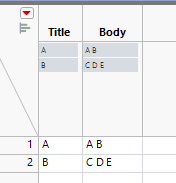
Using Query could work:
Names Default To Here(1);

dt = New Table("Untitled",
	Add Rows(5),
	Compress File When Saved(1),
	New Column("Title", Character, "Nominal", Set Values({"A", "A", "B", "B", "B"})),
	New Column("Body", Character, "Nominal", Set Values({"A", "B", "C", "D", "E"}))
);

Query(Table(dt, "dt1"), "Select title, GROUP_CONCAT(body, ' ') FROM dt1 group by title");
SQL Functions Available for JMP Queries
You might also be able to do this with some split/stack/combine columns combination.
Edit: Using Transpose:
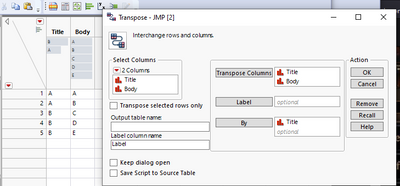
Result table:
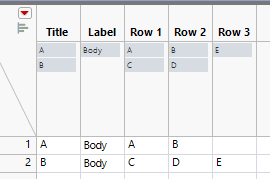
Use Combine Columns with Row 1 - Row 3 selected:
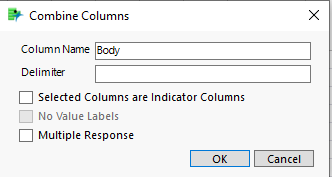
Result:
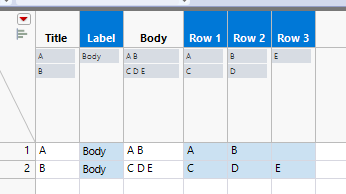
Delete unnecessary columns:
- Mark as New
- Bookmark
- Subscribe
- Mute
- Subscribe to RSS Feed
- Get Direct Link
- Report Inappropriate Content
Re: Merge Rows of Text Data
Using Query could work:
Names Default To Here(1);

dt = New Table("Untitled",
	Add Rows(5),
	Compress File When Saved(1),
	New Column("Title", Character, "Nominal", Set Values({"A", "A", "B", "B", "B"})),
	New Column("Body", Character, "Nominal", Set Values({"A", "B", "C", "D", "E"}))
);

Query(Table(dt, "dt1"), "Select title, GROUP_CONCAT(body, ' ') FROM dt1 group by title");
SQL Functions Available for JMP Queries
You might also be able to do this with some split/stack/combine columns combination.
Edit: Using Transpose:
Result table:
Use Combine Columns with Row 1 - Row 3 selected:
Result:
Delete unnecessary columns:
- Mark as New
- Bookmark
- Subscribe
- Mute
- Subscribe to RSS Feed
- Get Direct Link
- Report Inappropriate Content
Re: Merge Rows of Text Data
Hi J! Thank you so much! That worked. Appreciate your help :)
Recommended Articles
- © 2026 JMP Statistical Discovery LLC. All Rights Reserved.
- Terms of Use
- Privacy Statement
- Contact Us