cancel
Showing results for 
Show  only  | Search instead for 
Did you mean: 
  • Learn how to build custom Python data connectors and further customize JMP’s Data Connector Framework with the Python Data Connector Demo, available now in the JMP Marketplace!
  • See how to create experiments to support product design and ID useful product features. Register for June 12 webinar, 2pm US Eastern Time.

Discussions

Solve problems, and share tips and tricks with other JMP users.
Choose Language Hide Translation Bar

Making a heat map- how do I choose the numbers/interval on the legend?

Hello,

I am making a heat map, so the legend for my graph is a color gradient with numbers corresponding to each color. JMP seems to automatically choose which numbers go with each color based on the data set. For example, my current legend has the following numbers (-20, -14, -8, -2, 1, 2 ,4, 5), so obviously there is not a regular interval (the interval switches from 6 to 1 about halfway through). I know you can set the minimum, maximum, and center values, which I have already done. But is there a way to change my gradient/legend so that it could maybe go (-20, -15, -10, -5, 0, 5, 10, 15, etc)?

1 REPLY 1

Re: Making a heat map- how do I choose the numbers/interval on the legend?

Hi,

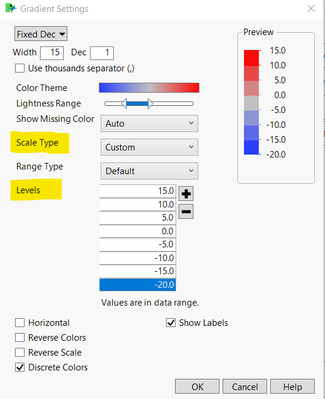
The quickest way to do it would be from the gradient settings menu (right click on the colour scale, and select "gradient"). From here, you can set manual levels for the colours. To do this, Change scale type to "custom", then enter in your desired levels, and if you want them to be separate rather than a colour spectrum, then check the "discrete colours" option.

Hit OK, and it should be sorted. 

Hope that helps,

Stuart

Stuart_Little_0-1641897275417.png


Recommended Articles