- JMP Statement Regarding Critical PHP Remote Code Execution Vulnerabilities (CVE-2026-109618, CVE-2026-109619)
- Don’t miss your chance to experience Discovery Summit Europe at our best available rate! Early bird registration through 31 Oct.
- Graph Builder Toolbar streamlines interactive graphing. Creates shortcuts on Report and GraphBuilder Helpers toolbars. Download and install the extension.
- Subscribe to RSS Feed
- Mark Topic as New
- Mark Topic as Read
- Float this Topic for Current User
- Bookmark
- Subscribe
- Mute
- Printer Friendly Page
Discussions
Solve problems, and share tips and tricks with other JMP users.- User Community
- :
- Discussions
- :
- Making Subsets Smarter - Help Needed

- Mark as New
- Bookmark
- Subscribe
- Mute
- Subscribe to RSS Feed
- Get Direct Link
- Report Inappropriate Content
Making Subsets Smarter - Help Needed
Hi Hive Mind,
I quite often make a subset of my data table.
My current method is
- Find a value that is representative of my subset
- Right click -> Select matching cells
- Tables -> Subset à selected rows, all columns
- Save file
Alternatively, I will
- Use “Save as” to create a new file
- Find a value that is representative of my subset
- Right click -> Select matching cells
- Invert selection
- Delete Rows
I do this many times on a weekly basis… and it is painful…
So here is my idea that I need help with:
I want to create a script that when I have selected my matching cells I can click a button that will make a subset of the selected rows:
Here is my best shot so far (it doesn’t work)
Dt = current data set();

My_list = dt << Get Selected();

Dt << Subset(

                Selected Rows( 0 ),

                List;

                Selected columns only( 0 )

);
Do you have other ideas, or should I do something completely different?
Cheers,
Christian
Check out my JMP YouTube channel here for tips & tricks:
https://www.youtube.com/@statslikejazz
Accepted Solutions


- Mark as New
- Bookmark
- Subscribe
- Mute
- Subscribe to RSS Feed
- Get Direct Link
- Report Inappropriate Content
Re: Making Subsets Smarter - Help Needed
I have created "add-in" (it has many other shortcuts that's why it is an add-in) which basically just sets shortcut to run simple script like
Current Data Table() << Subset(Selected Rows(1), Selected Columns Only(0));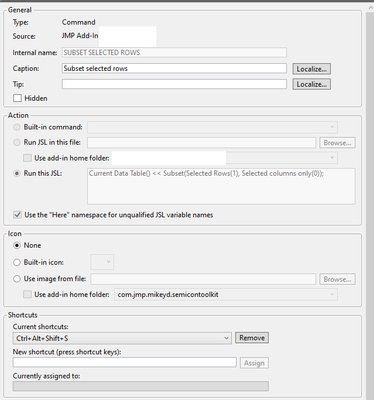
You could also do this by creating a toolbar and adding shortcut to it.

- Mark as New
- Bookmark
- Subscribe
- Mute
- Subscribe to RSS Feed
- Get Direct Link
- Report Inappropriate Content
Re: Making Subsets Smarter - Help Needed
Your specified code only needs to be modified slightly to get what you want.
Dt = current data set();Needs to be
Dt = current data table();and the Subset Platform already can find all selected rows, and use that for the selection
Dt << Subset(
	Selected Rows( 1 ),
	Selected columns( 0 )
);
Put it all together it looks like
Names Default To Here( 1 );
Dt = current data table();

Dt << Subset(
	Selected Rows( 1 ),
	Selected columns( 0 )
);
As Jarmo suggests, you could turn this into a toolbar short cut.
- Mark as New
- Bookmark
- Subscribe
- Mute
- Subscribe to RSS Feed
- Get Direct Link
- Report Inappropriate Content
Re: Making Subsets Smarter - Help Needed
I have created "add-in" (it has many other shortcuts that's why it is an add-in) which basically just sets shortcut to run simple script like
Current Data Table() << Subset(Selected Rows(1), Selected Columns Only(0));You could also do this by creating a toolbar and adding shortcut to it.
- Mark as New
- Bookmark
- Subscribe
- Mute
- Subscribe to RSS Feed
- Get Direct Link
- Report Inappropriate Content
Re: Making Subsets Smarter - Help Needed
Thanks for the answer Jarmo! I am creating an add-in with similar scripts that I find myself repeating!
dot to comma is one of them XD
Names Default To Here( 1 );

dt = Current Data Table();

nr = nrows(dt);
col_names = dt << Get Selected Columns (String);// get column names (String);
for (i = 1, i <= nitems(col_names), i++,
    one_col = column(dt, col_names[i]);
    for (k = 1, k <= nr, k++,
        one_col[k] = substitute(one_col[k], ".", ",");    // Replace decimal with comma
        //one_col[k] = substitute(one_col[k], ",", ".");    // Replace comma with decimal
    );
    one_col << Data Type(Numeric);
    one_col << Set Modeling Type ("Continuous");
);
I got this from another community script.
Check out my JMP YouTube channel here for tips & tricks:
https://www.youtube.com/@statslikejazz
- Mark as New
- Bookmark
- Subscribe
- Mute
- Subscribe to RSS Feed
- Get Direct Link
- Report Inappropriate Content
Re: Making Subsets Smarter - Help Needed
Your specified code only needs to be modified slightly to get what you want.
Dt = current data set();Needs to be
Dt = current data table();and the Subset Platform already can find all selected rows, and use that for the selection
Dt << Subset(
	Selected Rows( 1 ),
	Selected columns( 0 )
);
Put it all together it looks like
Names Default To Here( 1 );
Dt = current data table();

Dt << Subset(
	Selected Rows( 1 ),
	Selected columns( 0 )
);
As Jarmo suggests, you could turn this into a toolbar short cut.
- Mark as New
- Bookmark
- Subscribe
- Mute
- Subscribe to RSS Feed
- Get Direct Link
- Report Inappropriate Content
Re: Making Subsets Smarter - Help Needed
Thanks Jim, that was a very helpful answer.
Enjoy your weekend!
Check out my JMP YouTube channel here for tips & tricks:
https://www.youtube.com/@statslikejazz
- Mark as New
- Bookmark
- Subscribe
- Mute
- Subscribe to RSS Feed
- Get Direct Link
- Report Inappropriate Content
Re: Making Subsets Smarter - Help Needed

- Mark as New
- Bookmark
- Subscribe
- Mute
- Subscribe to RSS Feed
- Get Direct Link
- Report Inappropriate Content
Re: Making Subsets Smarter - Help Needed
Before creating an Add-In on your own, you might have a look at QuickSelect Toolbar
The option which you describe is this one:
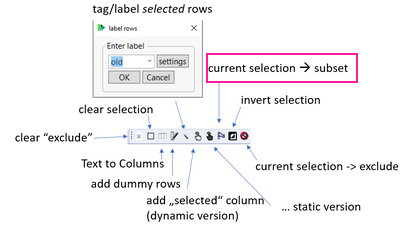
There are many more Shortcut included - like Tagging (~ Name Selection in Column on Steroids)
... and there is also a Shortcut for Invert selection :)
- Mark as New
- Bookmark
- Subscribe
- Mute
- Subscribe to RSS Feed
- Get Direct Link
- Report Inappropriate Content
Re: Making Subsets Smarter - Help Needed
Actually, I started the Toolbar with a version like this one, returning a subset with just the selected rows and columns.
The current version includes now all columns - and is a linked subset. My work in Jmp would be much less efficient without it ...
application 1) select some points in a graph -> generate the subset
application 2) select some rows -> open the linked subset -> use the subset as a remote control to enter new values:
If you prefer the other version, you could go to the AddIn folder and change the jsl code.
... or use a code similar to this one:
setting = Is Control Key(); // doesn't work with toolbars :(
dtSubset = Current Data Table() << Subset(
	Linked( Not( setting ) ),
	Suppress formula evaluation( 0 ),
	Selected Rows( 1 ),
	Selected columns only( setting )
);
Is there a trick how to get the CTRL status after triggering the script by a click on a toolbar icon?
Checking-for-modifier-keys-ctrl-alt-shift-in-script


- Mark as New
- Bookmark
- Subscribe
- Mute
- Subscribe to RSS Feed
- Get Direct Link
- Report Inappropriate Content
Re: Making Subsets Smarter - Help Needed
Have you thought about row states: Hide & Exclude effectively create a subset for analysis without spawning new (or many) data tables? This is a no scripting option that will also limit file sprawl.
This would be your alternative method/ except
no need to step 1 "save as", and
instead of step 5/delete it would be right click hide and exclude (also in columns menu).
Since you mentioned doing this frequently- a few pointers for managing hidden/excluded row states:
- If the selection can be done with column menu/ data filter for "show" and "include" then red triangle "save script to data table" and pick a descriptive name for the subset. Clear row states when done, and re-run the script when this subset is needed again.
Or- make Row State Columns for each subset...
The Row State type data column can save all row state information including hidden/excluded, but also selected and row marker/color
Example Below - sample file Big Class with two Row state columns added.
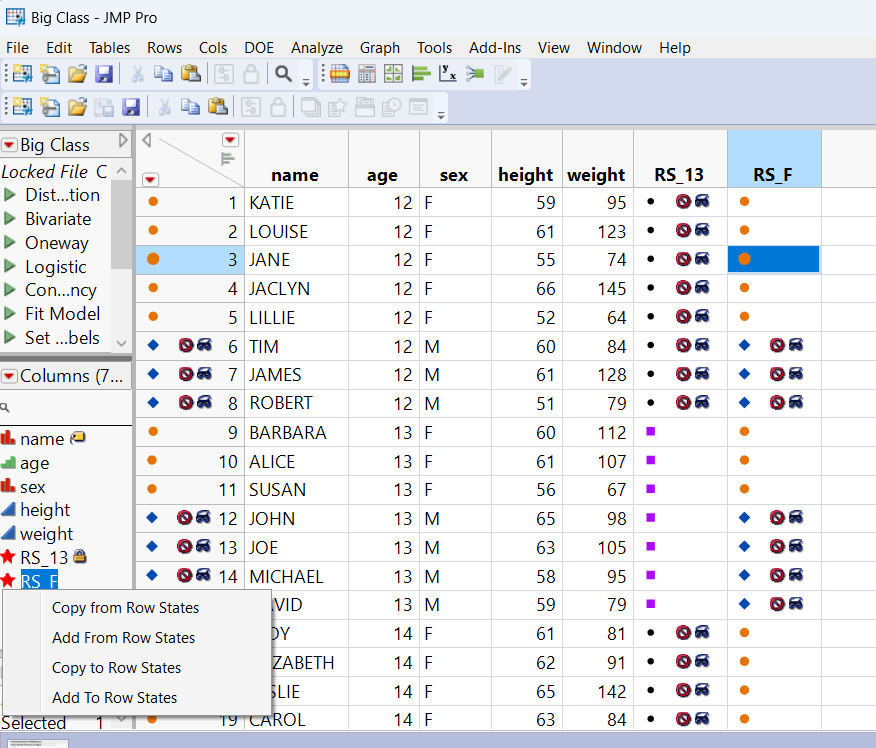
Subset #1: 13 year olds
- Select 13 year olds, right click select matching, right click invert selection
- Right Click Hide/Exclude the non 13's- the Subset of 13 year olds is now ready for analysis.
To preserve and return to this grouping
- Make a new column of Data Type Row State (named RS_13)
- Just for grins set 13 year old row markers to purple squares
- Left Click on the star of RS_13 in columns pane- copy from row states (this sends the current row states to RS_13 column)
- Protip- Column info- engage "Lock" because it is easy to inadvertently over-write
Also did this for a second subset sex=F, Notice how the row 3 selection is part of the saved row state.
- To deploy, from Row state red star, left click "Copy to Row States". (as illustrated)
Recommended Articles
- © 2026 JMP Statistical Discovery LLC. All Rights Reserved.
- Terms of Use
- Privacy Statement
- Contact Us