- Don’t miss your chance to experience Discovery Summit Europe at our best available rate! Early bird registration through 31 Oct.
- Graph Builder Toolbar streamlines interactive graphing. Creates shortcuts on Report and GraphBuilder Helpers toolbars. Download and install the extension.
- Subscribe to RSS Feed
- Mark Topic as New
- Mark Topic as Read
- Float this Topic for Current User
- Bookmark
- Subscribe
- Mute
- Printer Friendly Page
Discussions
Solve problems, and share tips and tricks with other JMP users.- User Community
- :
- Discussions
- :
- Linear modeling - log transformed/square root transformed Y-variable

- Mark as New
- Bookmark
- Subscribe
- Mute
- Subscribe to RSS Feed
- Get Direct Link
- Report Inappropriate Content
Linear modeling - log transformed/square root transformed Y-variable
Hi all JMP users,
Does anyone know how to do this in JMP? I want to do a normal linear modeling where the log is transformed or with a square root transformed Y-variable.
Thank you!
Accepted Solutions


- Mark as New
- Bookmark
- Subscribe
- Mute
- Subscribe to RSS Feed
- Get Direct Link
- Report Inappropriate Content
Re: Linear modeling - log transformed/square root transformed Y-variable
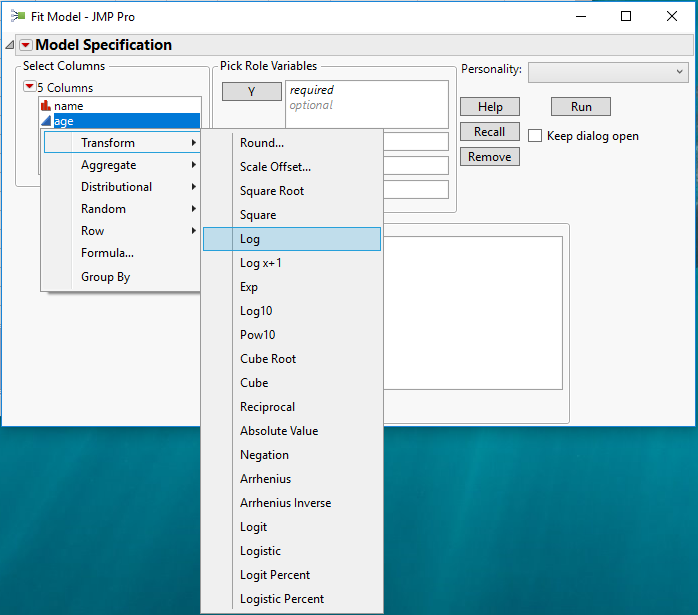
When you go to choose the Y column in the Fit Model, or any other of the JMP Platforms, you can right click on the column you want to use for the Y variable, and select the transform form you want to use
- Mark as New
- Bookmark
- Subscribe
- Mute
- Subscribe to RSS Feed
- Get Direct Link
- Report Inappropriate Content
Re: Linear modeling - log transformed/square root transformed Y-variable
When you go to choose the Y column in the Fit Model, or any other of the JMP Platforms, you can right click on the column you want to use for the Y variable, and select the transform form you want to use


- Mark as New
- Bookmark
- Subscribe
- Mute
- Subscribe to RSS Feed
- Get Direct Link
- Report Inappropriate Content
Re: Linear modeling - log transformed/square root transformed Y-variable
You can also select the response in the Y role and then click the red triangle next to Transform in the middle of the dialog box, just to the left of the Effects list.
Recommended Articles
- © 2026 JMP Statistical Discovery LLC. All Rights Reserved.
- Terms of Use
- Privacy Statement
- Contact Us