cancel
Showing results for 
Show  only  | Search instead for 
Did you mean: 
  • JMP will suspend normal business operations for our Winter Holiday beginning on Wednesday, Dec. 24, 2025, at 5:00 p.m. ET (2:00 p.m. ET for JMP Accounts Receivable).
    Regular business hours will resume at 9:00 a.m. EST on Friday, Jan. 2, 2026.
  • We’re retiring the File Exchange at the end of this year. The JMP Marketplace is now your destination for add-ins and extensions.

Discussions

Solve problems, and share tips and tricks with other JMP users.
%3CLINGO-SUB%20id%3D%22lingo-sub-28852%22%20slang%3D%22en-US%22%20mode%3D%22NONE%22%3E2%E5%88%97%E3%81%AB%E5%9F%BA%E3%81%A5%E3%81%8F%E5%87%A1%E4%BE%8B%3C%2FLINGO-SUB%3E%3CLINGO-BODY%20id%3D%22lingo-body-28852%22%20slang%3D%22en-US%22%20mode%3D%22NONE%22%3E%3CP%3E%E3%81%BF%E3%81%AA%E3%81%95%E3%82%93%E3%80%81%3C%2FP%3E%3CP%3E%26nbsp%3B%3C%2FP%3E%3CP%3E%E4%BB%A5%E4%B8%8B%E3%81%AE%E3%82%88%E3%81%86%E3%81%AA%E5%B7%A8%E5%A4%A7%E3%81%AA%E3%83%87%E3%83%BC%E3%82%BF%E3%83%86%E3%83%BC%E3%83%96%E3%83%AB%E3%81%8C%E3%81%82%E3%82%8A%E3%81%BE%E3%81%99%E3%80%82%3C%2FP%3E%3CP%3E%26nbsp%3B%3C%2FP%3E%3CP%3E%E5%A4%A7%E9%99%B8%E5%B7%9E%E5%B8%82%E4%BA%BA%E5%8F%A3%3C%2FP%3E%3CP%3E%E3%82%A2%E3%83%A1%E3%83%AA%E3%82%AB%E3%83%9A%E3%83%B3%E3%82%B7%E3%83%AB%E3%83%99%E3%83%8B%E3%82%A2%E5%B7%9E%E3%83%95%E3%82%A3%E3%83%A9%E3%83%87%E3%83%AB%E3%83%95%E3%82%A3%E3%82%A2----%3C%2FP%3E%3CP%3E%26nbsp%3B%3CSPAN%3E%E3%82%A2%E3%83%A1%E3%83%AA%E3%82%AB%E3%83%9A%E3%83%B3%E3%82%B7%E3%83%AB%E3%83%99%E3%83%8B%E3%82%A2%3C%2FSPAN%3E%E3%83%8F%E3%83%AA%E3%82%B9%E3%83%90%E3%83%BC%E3%82%B0----%3C%2FP%3E%3CP%3E%E3%82%A2%E3%83%A1%E3%83%AA%E3%82%AB%E3%82%AB%E3%83%AA%E3%83%95%E3%82%A9%E3%83%AB%E3%83%8B%E3%82%A2%E3%82%B5%E3%83%B3%E3%83%87%E3%82%A3%E3%82%A8%E3%82%B4%3C%2FP%3E%3CP%3E%3CSPAN%3E%E3%82%A2%E3%83%A1%E3%83%AA%E3%82%AB%E3%82%AB%E3%83%AA%E3%83%95%E3%82%A9%E3%83%AB%E3%83%8B%E3%82%A2%3C%2FSPAN%3E%E3%82%B5%E3%83%B3%E3%83%95%E3%83%A9%E3%83%B3%E3%82%B7%E3%82%B9%E3%82%B3%3C%2FP%3E%3CP%3E%26nbsp%3B%E3%83%A8%E3%83%BC%E3%83%AD%E3%83%83%E3%83%91%E3%83%95%E3%83%A9%E3%83%B3%E3%82%B9%E3%83%91%E3%83%AA%3C%2FP%3E%3CP%3E%26nbsp%3B%26nbsp%3B%3CSPAN%3E%E3%83%A8%E3%83%BC%E3%83%AD%E3%83%83%E3%83%91%E3%83%95%E3%83%A9%E3%83%B3%E3%82%B9%3C%2FSPAN%3E%20another_city_in_France%3C%2FP%3E%3CP%3E%26nbsp%3B%3C%2FP%3E%3CP%3E%26nbsp%3B%3C%2FP%3E%3CP%3E%E4%BA%BA%E5%8F%A3%E3%81%AE%E6%95%A3%E5%B8%83%E5%9B%B3%E3%82%92%E4%BD%9C%E6%88%90%E3%81%97%E3%81%A6%E3%81%84%E3%81%BE%E3%81%99%E3%80%82%26nbsp%3B%E5%87%A1%E4%BE%8B%E3%82%92%E5%85%A5%E3%82%8C%E3%82%8B%E3%81%9F%E3%82%81%E3%81%AB%E3%80%81%E5%B7%9E%E3%81%94%E3%81%A8%E3%81%AB%E5%9B%BA%E6%9C%89%E3%81%AE%E3%83%9E%E3%83%BC%E3%82%AB%E3%83%BC%E3%82%92%E4%BD%BF%E7%94%A8%E3%81%97%E3%81%9F%E3%81%84%E3%81%A8%E6%80%9D%E3%81%84%E3%81%BE%E3%81%99%E3%80%82%3C%2FP%3E%3CP%3E%E6%AC%A1%E3%81%AB%E3%80%81%E5%B7%9E%E3%81%94%E3%81%A8%E3%81%AB%E3%80%81%E5%90%84%E9%83%BD%E5%B8%82%E3%81%AB%E5%AF%BE%E5%BF%9C%E3%81%97%E3%81%A6%E3%81%9D%E3%81%AE%E3%83%9E%E3%83%BC%E3%82%AB%E3%83%BC%E3%81%AB%E8%89%B2%E3%82%92%E4%BB%98%E3%81%91%E3%81%9F%E3%81%84%E3%81%A8%E6%80%9D%E3%81%84%E3%81%BE%E3%81%99%E3%80%82%3C%2FP%3E%3CP%3E%26nbsp%3B%3C%2FP%3E%3CP%3E%E8%A1%8C%E3%81%AE%E5%87%A1%E4%BE%8B%E3%82%92%E8%A1%A8%E7%A4%BA%E3%81%99%E3%82%8B%E3%81%A8%E3%80%81%E7%89%B9%E5%AE%9A%E3%81%AE%E5%88%97%E3%81%A7%E8%89%B2%E3%82%92%E4%BB%98%E3%81%91%E3%82%8B%E3%81%93%E3%81%A8%E3%81%8C%E3%81%A7%E3%81%8D%E3%81%BE%E3%81%99%E3%80%82%E3%81%97%E3%81%8B%E3%81%97%E3%80%81%E7%A7%81%E3%81%8C%E4%B8%8A%E8%A8%98%E3%81%AE%E6%96%B9%E6%B3%95%E3%81%A7%E8%89%B2%E4%BB%98%E3%81%91%E3%81%97%E3%81%A6%E3%83%9E%E3%83%BC%E3%82%AF%E3%81%99%E3%82%8B%E5%BF%85%E8%A6%81%E3%81%8C%E3%81%82%E3%82%8B%E3%81%AA%E3%82%89%E3%80%81%E7%A7%81%E3%81%AF%E3%81%9D%E3%82%8C%E3%82%92%E3%81%99%E3%82%8B%E3%81%9F%E3%82%81%E3%81%AE%E6%9C%80%E3%82%82%E5%8A%B9%E7%8E%87%E7%9A%84%E3%81%AA%E6%96%B9%E6%B3%95%E3%82%92%E7%9F%A5%E3%82%8A%E3%81%9F%E3%81%84%E3%81%A7%E3%81%99%E3%80%82%3C%2FP%3E%3CP%3E%26nbsp%3B%3C%2FP%3E%3CP%3E%E4%BB%8A%E7%A7%81%E3%81%AF%E7%8A%B6%E6%85%8B%E3%81%AE%E8%A6%81%E7%B4%84%E3%82%92%E4%BD%9C%E6%88%90%E3%81%97%E3%81%A6%E3%81%8B%E3%82%89%E3%83%9E%E3%83%BC%E3%82%AB%E3%83%BC%E3%82%92%E5%89%B2%E3%82%8A%E5%BD%93%E3%81%A6%E3%81%BE%E3%81%99%E3%80%82%3C%2FP%3E%3CP%3E%E6%AC%A1%E3%81%AB%E3%80%81%E7%89%B9%E5%AE%9A%E3%81%AE%E7%8A%B6%E6%85%8B%E3%81%AB%E5%AF%BE%E5%BF%9C%E3%81%99%E3%82%8B%E3%81%99%E3%81%B9%E3%81%A6%E3%81%AE%E8%A1%8C%E3%82%92%E9%81%B8%E6%8A%9E%E3%81%97%E3%80%81%E3%81%9D%E3%81%AE%E3%82%BB%E3%83%83%E3%83%88%E3%81%AB%E6%89%8B%E5%8B%95%E3%81%A7%E8%89%B2%E3%82%92%E5%89%B2%E3%82%8A%E5%BD%93%E3%81%A6%E3%81%BE%E3%81%99%E3%80%82%E3%81%93%E3%82%8C%E3%81%AF%E3%80%81%E9%95%B7%E3%81%84%E3%83%87%E3%83%BC%E3%82%BF%E3%83%86%E3%83%BC%E3%83%96%E3%83%AB%E3%81%AB%E3%81%AF%E9%9D%9E%E5%B8%B8%E3%81%AB%E9%9D%9E%E5%8A%B9%E7%8E%87%E7%9A%84%E3%81%A7%E3%81%99%E3%80%82%3C%2FP%3E%3CP%3E%26nbsp%3B%3C%2FP%3E%3CP%3E%E3%81%82%E3%82%8A%E3%81%8C%E3%81%A8%E3%81%86%3C%2FP%3E%3CP%3E%26nbsp%3B%3C%2FP%3E%3CP%3E%26nbsp%3B%3C%2FP%3E%3CP%3E%26nbsp%3B%3C%2FP%3E%3CP%3E%26nbsp%3B%20%26nbsp%3B%20%26nbsp%3B%20%26nbsp%3B%20%26nbsp%3B%20%26nbsp%3B%20%26nbsp%3B%20%26nbsp%3B%20%26nbsp%3B%20%26nbsp%3B%20%26nbsp%3B%20%26nbsp%3B%20%26nbsp%3B%20%26nbsp%3B%20%26nbsp%3B%20%26nbsp%3B%20%26nbsp%3B%20%26nbsp%3B%20%26nbsp%3B%20%26nbsp%3B%20%26nbsp%3B%20%26nbsp%3B%20%26nbsp%3B%20%26nbsp%3B%20%26nbsp%3B%20%26nbsp%3B%20%26nbsp%3B%26nbsp%3B%3C%2FP%3E%3CP%3E%26nbsp%3B%3C%2FP%3E%3C%2FLINGO-BODY%3E%3CLINGO-SUB%20id%3D%22lingo-sub-28861%22%20slang%3D%22en-US%22%20mode%3D%22NONE%22%3E%E5%86%8D%EF%BC%9A2%E5%88%97%E3%81%AB%E5%9F%BA%E3%81%A5%E3%81%8F%E5%87%A1%E4%BE%8B%3C%2FLINGO-SUB%3E%3CLINGO-BODY%20id%3D%22lingo-body-28861%22%20slang%3D%22en-US%22%20mode%3D%22NONE%22%3E%3CP%3E%E3%81%93%E3%82%8C%E3%81%AFGraph%20Builder%E3%82%92%E4%BD%BF%E3%81%A3%E3%81%9F%E4%BE%8B%E3%81%A7%E3%81%99%E3%80%82%26nbsp%3B%20%E4%BA%BA%E5%8F%A3%E3%81%AFY%E8%BB%B8%E4%B8%8A%E3%81%AB%E3%81%82%E3%82%8A%E3%81%BE%E3%81%99%E3%80%82X%E8%BB%B8%E3%81%AB%E4%BD%95%E3%82%92%E4%BD%BF%E7%94%A8%E3%81%97%E3%81%A6%E3%81%84%E3%82%8B%E3%81%AE%E3%81%8B%E3%82%8F%E3%81%8B%E3%82%8A%E3%81%BE%E3%81%9B%E3%82%93%E3%81%A7%E3%81%97%E3%81%9F%E3%81%AE%E3%81%A7%E3%80%81%E3%82%AA%E3%82%BE%E3%83%B3%E3%83%AC%E3%83%99%E3%83%AB%E3%82%92%E9%81%B8%E6%8A%9E%E3%81%97%E3%81%BE%E3%81%97%E3%81%9F%E3%80%82%26nbsp%3B%20%E5%9B%BD%E3%81%AB%E3%82%88%E3%81%A3%E3%81%A6%E9%87%8D%E3%81%AD%E5%90%88%E3%82%8F%E3%81%9B%E3%82%89%E3%82%8C%E3%80%81%E5%B8%82%E3%81%AB%E3%82%88%E3%81%A3%E3%81%A6%E8%89%B2%E5%88%86%E3%81%91%E3%81%95%E3%82%8C%E3%81%A6%E3%81%84%E3%81%BE%E3%81%99%E3%80%82%3CSPAN%20class%3D%22lia-inline-image-display-wrapper%20lia-image-align-inline%22%20style%3D%22width%3A%20990px%3B%22%3E%3Cspan%20class%3D%22lia-inline-image-display-wrapper%22%20image-alt%3D%22Cities%20by%20states.png%22%20style%3D%22width%3A%20990px%3B%22%3E%3Cimg%20src%3D%22https%3A%2F%2Fcommunity.jmp.com%2Ft5%2Fimage%2Fserverpage%2Fimage-id%2F3955i50517B3892316806%2Fimage-size%2Flarge%3Fv%3Dv2%26amp%3Bpx%3D999%22%20role%3D%22button%22%20title%3D%22Cities%20by%20states.png%22%20alt%3D%22Cities%20by%20states.png%22%20%2F%3E%3C%2Fspan%3E%3C%2FSPAN%3E%3C%2FP%3E%0A%3CP%3E%26nbsp%3B%3C%2FP%3E%0A%3CP%3E%26nbsp%3B%3C%2FP%3E%3C%2FLINGO-BODY%3E
Choose Language Hide Translation Bar
rahulsmils
Level III

Legend based on 2 columns

Dear all,


I have a huge data table like following


Continent        State          City                  Population

USA              Pennsylvania          Philadelphia           ----

 USA              Pennsylvania        Harrisburg                ----

USA              California                San Diego

USA              California                San Fransisco

 Europe       France                      Paris

  Europe       France                                                             another_city_in_France


I am creating a scatter plot of the population.  In order to put a legend, I want to use a unique marker for each state.

Then for each state , I want to color that marker differently corresponding to each city.


I know if I do row legend, I can color by a particular  column. But if I need to color and mark in above mentioned way, I want to know the most efficient way to do it.


Right now I create a summary of state and then assign markers.

Then I select all rows corresponding to a particular state and assign colors to that set manually, which is very inefficient for the long data table.


Thanks


1 REPLY 1
txnelson
Super User

Re: Legend based on 2 columns

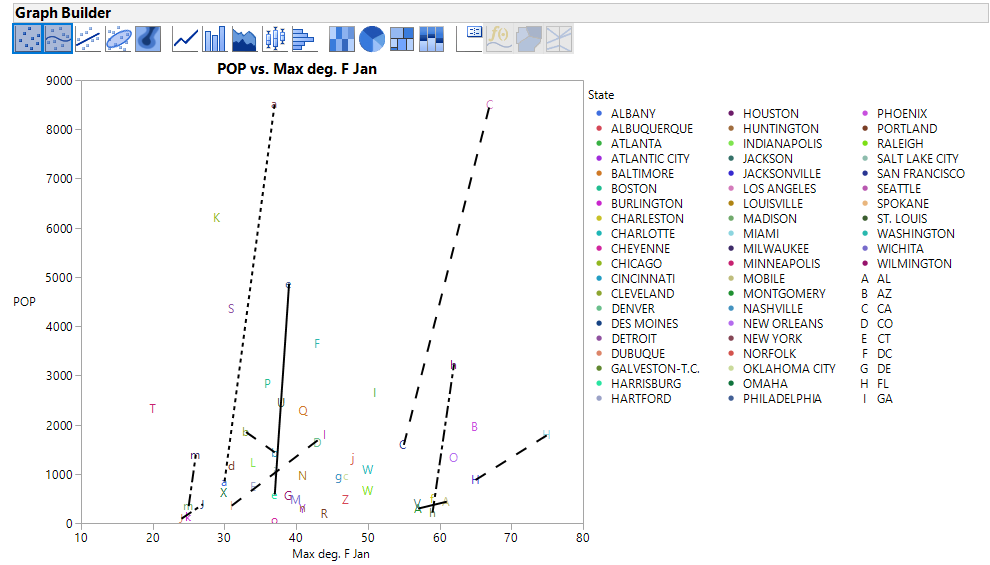
Here is an example using Graph Builder.  Population is on the Y axis, I couldn't tell what you were using for your X axis so I just chose Ozone level.  I Overlayed by State and Colored by City.Cities by states.png


Jim

Recommended Articles